I don't own a BlueTooth GPS receiver, so I cannot attest to the complexity or issues involved with maintaining a good connection between the Bluetooth GPS receiver and an end-user device, but this bit of news below seems to suggest it is harrier than trying to diffuse a nuclear bomb blindfolded. Nevertheless, I thought this bit of news merited sharing since I'm a huge fan of GPS technology and you might find it useful.
Socket Communications, Inc. (NASDAQ: SCKT), an innovative provider of mobile productivity products, today announced enhancements to its GPS Nav Kit including: Socket's patent pending Connect!Agent software, new application features, updated North American and Western European map data and Windows Mobile 5.0 support. With the updated GPS Nav Kit, Socket now provides the best experience possible to users looking to add a complete, no-hassle cordless GPS navigation solution to their mobile device.
"The average Bluetooth user experience is full of complicated device and software setups, along with compatibility and security issues," said Donnie Wong, GPS product marketing manager at Socket Communications. "Our breakthrough Connect!Agent software greatly simplifies cordless connectivity and eliminates the hassles of managing multiple Bluetooth devices for a mobile user. With the introduction of our Connect!Agent technology alongside our Bluetooth software and hardware products, Socket has created the ultimate Bluetooth user experience."
Connect!Agent simplifies the Bluetooth setup, discovery and connection process of the Bluetooth GPS receiver from within the MyNavigator application. The Connect!Agent software works in the background, managing the Bluetooth connection activities with the Socket GPS receiver, so that configuration and setup is unnecessary.Once the receiver is turned on and the MyNavigator application is running, Connect!Agent will automatically discover and setup the Bluetooth connection.Connect!Agent will then continue to manage the Bluetooth connection between the GPS receiver and the computing device, requiring no interaction from the user. Connect!Agent is patent pending, and its integration with Socket's GPS Nav Kit is the initial implementation. Connect!Agent is capable of being implemented across multiple technologies, devices and protocol stacks.
Bluetooth wireless technology introduced a new way for devices to connect with each other, offering customers new possibilities for using mobile computers with other devices without the hassle of cables. The Bluetooth GPS unit receives GPS satellite data and wirelessly sends the information to a handheld device, notebook or Tablet PC where a GPS enabled application displays location information.
Key Features and Benefits:
- Provides seamless Bluetooth setup and automatic connection with host device
- Updated MyNavigator application for true VGA Hi-res support in both portrait and landscape display modes
- Updated NAVTEQ map data for more accurate street and additional POI information
- Windows Mobile 5.0 support
- Weather option to view weather information of any selected location
- Ferry routes
Specifications:
Socket's upgraded GPS Nav Kit with Connect!Agent software is compatible with any Bluetooth enabled device running Pocket PC 2003/SE, Windows Mobile 5.0, Windows XP or Tablet XP.Connect!Agent supports Windows Mobile devices with Broadcom, Microsoft and Socket Drakar Bluetooth software for 2003/SE and Microsoft Bluetooth software for Windows Mobile 5.0 devices.
Pricing and Availability
Socket's upgraded GPS Nav Kit with Connect!Agent software and Windows Mobile 5.0 support is available immediately in the US through Socket's distribution channels and the Socket website with an MSRP of $349 US Dollars. The GPS Nav Kit for Western Europe will be available in mid-November for $369 US Dollars.
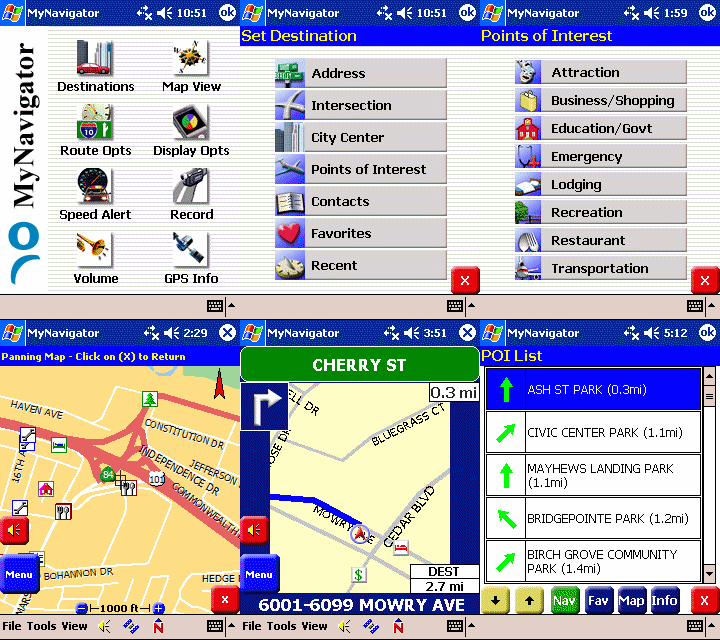
Screenshots of the MyNavigator software that comes with the GPS Nav Kit