Using the Sprint Novatel Wireless Ovation U727 makes high speed wireless EVDO Internet access a breeze to use. The U727 is unlike most EVDO cards because it connects to your computer via USB and it has an integrated microSD slot for memory storage, though you'll have to provide your own microSD card. Rich sent me over his review unit to test and put through the paces.
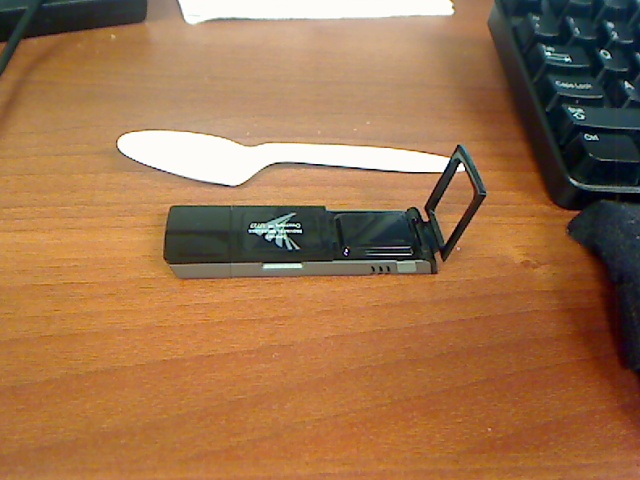
First off, the U727 is compatible with Windows Vista, XP, 2000, as well as Mac and Linux. After installing the software on the CD, I connected it to my computer's USB port and it was ready to go. It has a high-performance flip-up antenna, as seen here with a plastic spoon for scale:
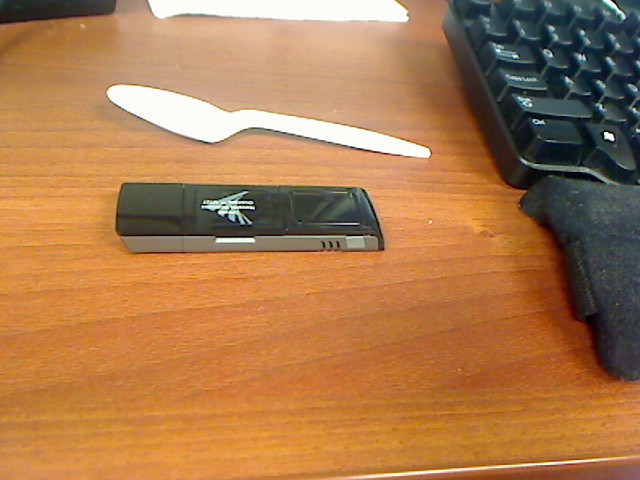
Here's a shot of it with the antenna clip closed to demonstrate how well hidden the antenna becomes:
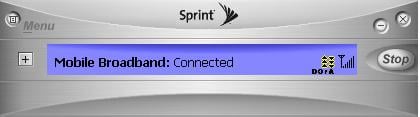
The U727 also has a monitor clip and an extended USB cable. The extended cable is an important accessory and here's why - some laptops only have rear USB ports. If you are flying on an airplane, the card, even though it only sticks out 3" could in theory bump the seat in front of you forcing you to pull the laptop more towards your body. The solution is to use the extended USB cable and then simply clip the antenna to your notebook's monitor for improved signal strength. If you are familiar with Verizon's VZAccess Manager, you will notice that Sprint Mobile Broadband is much simpler, as seen here:
The U727 operates on CDMA supporting Sprint's EV-DO Rev A network. In areas where Sprint's Rev A coverage is not available it will work with Rev 0 and 1xRTT. Sprint claims their enhanced Sprint Mobile Broadband you get 450-800kbps average download speeds (max 3.1Mbps) and 300-400 kbps average upload speeds (max 1.8Mbps). I should mention that Sprint espouses their enhanced mobile broadband service in 218 Major Metropolitan markets, and 1,002 airports coast-to-coast.
Enough theoretical speeds - time for the real world experience. Running SpeakEasy's online test to the NY server, these were my bandwidth speed results:
Sprint Novatel Wireless Ovation U727 (Rev A) speed test
802 kbps (100.3KB/s) down
680 kbps (85KB/s) up
How does that compare with Verizon's EVDO? Glad you asked. I popped in my Verizon Rev A EVDO PCMCIA card, launched VZAccess Manager, connected to Verizon and re-ran the test to come up with these results:
Verizon EVDO Rev A speed test
648 kbps (81 KB/s) down
686 kbps (85.8 KB/s) up
I ran the tests a few more times and the Sprint card came out ahead most of the time. I'm sure the results would vary depending on the coverage area. In fact, when I tested it in my house, I got a miserable 15kbps using Sprint, but Verizon was a respectable 200kbps.
Features
Update:Woops, I missed this in the docs. It does do triangulation/Trilateration
AFLT (Advanced Forward Link Trilateration)
Does this device actually use GPS satellites to calculate its locations?
It depends. If you are indoors, then the answer is no – instead,
AFLT is used. AFLT uses base station triangulation to calculate
your location. If you are outside, then it will use MS-Based
GPS and actual satellites are used to determine your location.
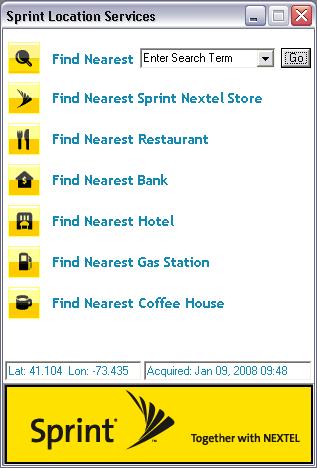
In any event, to use the GPS feature you simply go to Location And Search Services. After accepting the license, you can find the nearest Sprint Nextel store, restaurant, bank, hotel, gas station, coffee house, or a custom search. After entering in your search, it launches your browser to Microsoft Live Maps and pinpoints your location along with pushpins for items you searched for. You can change the default from Microsoft Live Maps to Google Maps, Yahoo! Maps, or Mapquest. The GPS coordinates are saved in the Sprint Mobile Broadband software with a date/time stamp.
I noticed the GPS showed up as a COM port (COM9) on my laptop, so I figured the GPS can most likely communicate with PC-based GPS software such as Microsoft Streets. Sure enough, I checked the documentation and the U727 does indeed support 3rd party GPS software and they specifically mention Microsoft Streets as an example. Thus you can use the U727 for turn-by-turn GPS navigation. The U727 with integrated GPS is an absolute bargain at $79.99 since many GPS receivers are >$100.
Overall, I was pretty impressed with the U727. Speeds were pretty good and you get a GPS receiver to boot! Definite
First off, the U727 is compatible with Windows Vista, XP, 2000, as well as Mac and Linux. After installing the software on the CD, I connected it to my computer's USB port and it was ready to go. It has a high-performance flip-up antenna, as seen here with a plastic spoon for scale:

Here's a shot of it with the antenna clip closed to demonstrate how well hidden the antenna becomes:

The U727 also has a monitor clip and an extended USB cable. The extended cable is an important accessory and here's why - some laptops only have rear USB ports. If you are flying on an airplane, the card, even though it only sticks out 3" could in theory bump the seat in front of you forcing you to pull the laptop more towards your body. The solution is to use the extended USB cable and then simply clip the antenna to your notebook's monitor for improved signal strength. If you are familiar with Verizon's VZAccess Manager, you will notice that Sprint Mobile Broadband is much simpler, as seen here:

The U727 operates on CDMA supporting Sprint's EV-DO Rev A network. In areas where Sprint's Rev A coverage is not available it will work with Rev 0 and 1xRTT. Sprint claims their enhanced Sprint Mobile Broadband you get 450-800kbps average download speeds (max 3.1Mbps) and 300-400 kbps average upload speeds (max 1.8Mbps). I should mention that Sprint espouses their enhanced mobile broadband service in 218 Major Metropolitan markets, and 1,002 airports coast-to-coast.
Enough theoretical speeds - time for the real world experience. Running SpeakEasy's online test to the NY server, these were my bandwidth speed results:
Sprint Novatel Wireless Ovation U727 (Rev A) speed test
802 kbps (100.3KB/s) down
680 kbps (85KB/s) up
How does that compare with Verizon's EVDO? Glad you asked. I popped in my Verizon Rev A EVDO PCMCIA card, launched VZAccess Manager, connected to Verizon and re-ran the test to come up with these results:
Verizon EVDO Rev A speed test
648 kbps (81 KB/s) down
686 kbps (85.8 KB/s) up
I ran the tests a few more times and the Sprint card came out ahead most of the time. I'm sure the results would vary depending on the coverage area. In fact, when I tested it in my house, I got a miserable 15kbps using Sprint, but Verizon was a respectable 200kbps.
Features
- CDMA EV-DO (Rev. A/0), 1xRTT (800/1900 MHz)
- USB interface
- High-performance flip-up loop design antenna
- GPS-Enabled
- Sprint Mobile Broadband software
- LED status indicator
- Integrated microSD slot
- Notebook monitor clip and extended USB cable for antenna
- Dimensions: 2.76" x 0.98" x 0.47"
- Weight: 1.1 oz
Update:Woops, I missed this in the docs. It does do triangulation/Trilateration
AFLT (Advanced Forward Link Trilateration)
Does this device actually use GPS satellites to calculate its locations?
It depends. If you are indoors, then the answer is no – instead,
AFLT is used. AFLT uses base station triangulation to calculate
your location. If you are outside, then it will use MS-Based
GPS and actual satellites are used to determine your location.

In any event, to use the GPS feature you simply go to Location And Search Services. After accepting the license, you can find the nearest Sprint Nextel store, restaurant, bank, hotel, gas station, coffee house, or a custom search. After entering in your search, it launches your browser to Microsoft Live Maps and pinpoints your location along with pushpins for items you searched for. You can change the default from Microsoft Live Maps to Google Maps, Yahoo! Maps, or Mapquest. The GPS coordinates are saved in the Sprint Mobile Broadband software with a date/time stamp.
I noticed the GPS showed up as a COM port (COM9) on my laptop, so I figured the GPS can most likely communicate with PC-based GPS software such as Microsoft Streets. Sure enough, I checked the documentation and the U727 does indeed support 3rd party GPS software and they specifically mention Microsoft Streets as an example. Thus you can use the U727 for turn-by-turn GPS navigation. The U727 with integrated GPS is an absolute bargain at $79.99 since many GPS receivers are >$100.
Overall, I was pretty impressed with the U727. Speeds were pretty good and you get a GPS receiver to boot! Definite


Technorati
Del.icio.us
Slashdot
Digg
twitter
I am thinking about getting this for my Mac Powerbook G4. I have kept the software updated on it. I doesn't have a USB 2.0 port, just a USB 1.1 (something or other)
Do you think that it would work with the current USB port or should I get a PCMI USB 2.0 Card? Thanks. -Curtis
I have the U727 and I am looking for a memory card for it. I would like to put an 8GB SDHC in it. The packaging says "supports up to 4 GB microSD", but every 4 GB microSD is actually SDHC; and if it supports 4 GB or SDHC, then I should be able to slap 8 GB of SDHC in it. BUT every SDHC memory packaging warns that the device should state "SDHC compatible" on its packaging (which the U727 does not). A conundrum?
Does it in FACT support SDHC memory or just SD? Are you able to use yours with more than 4 GB?
Thank in advance!
I am currently in the process of purchasing this card for my Macbook Air. The problem is the USB port on the Air is too snug to fit even this tiny little bugger, SO I'll be ripping it apart and installing it inside the air, tapping one of the extra USB feeds. I'll be posting my progress on listed1st.com starting next week!
Ripping it apart and attempting to install it internally in a Macbook air is not a good idea. I own one of these and the radio is not very strong, I often have to flip the antenna up to catch a signal. I imagine the case and shielding in a macbook air would dampen the signal a lot.
I have a friend that is trying to use the 4G Flash Memory on the U727. He has not been able to get it to work. Any suggestions as to what he needs to do? I am not too familure with Mac's so I said I would try to find help. Point me in the right direction. Any help would be appreciated.
I'm using a U727 on my macbook (leopard 10.5.5). How do I run a turn-by-turn GPS?
Any info will be appreciated.
Thank You,
jc