However, after upgrading my Windows 7 machine to Windows 8 a couple days ago, this functionality stopped working.
 This feature allows me to simply view/search for an Outlook Contact, right-click the Contact, and then choose the number I want to dial, as seen here: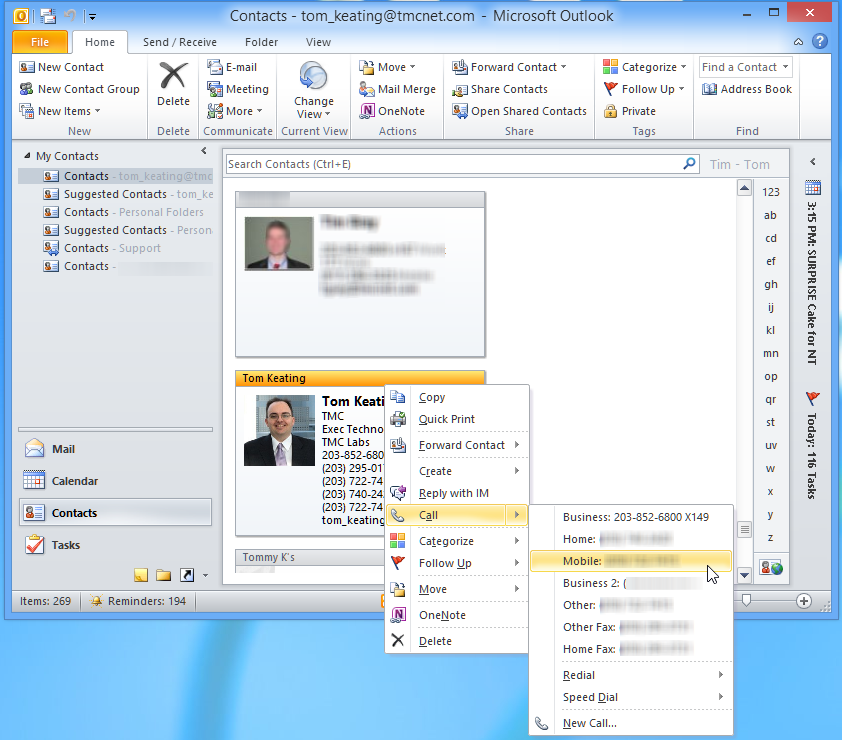
Instantly, my IP phone rings and I'm connected to the remote phone number. Fortunately, me and TAPI go way back. I personally knew (former) Microsoft's Mark Lee who was in charge of Microsoft’s TAPI development and met him way back in 1996. On a side note, it’s fascinating how I went from covering computer telephony integration (CTI) to VoIP to open source VoIP to hosted VoIP, and now the explosion of mobile and wireless. If you know what Microsoft NetMeeting is, you've been in VoIP / telecom far too long!
 Check out my 1999 review of NetMeeting, which predates Skype. It sported H.323 and also predated SIP. Oh and did I mention it had the ability to even share your screen predating the ubiquitous Remote Desktop too? Ohhh... Ahhhh. NetMeeting got no respect.
But I digress... Back to my Outlook 2010 TAPI click-to-dial problem. So what would happen is when I right-clicked a Contact and clicked a number to dial, nothing would popup. It's supposed to popup a new window showing this:
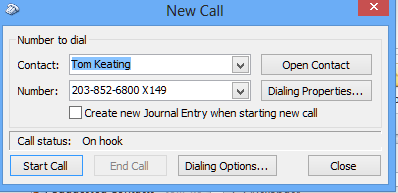
But I saw nothing. What sort of evil popup blocker is this? Where's my dialer!!!
No worries, I knew how to troubleshoot. I searched for "dialer.exe", the built-in Windows dialer that uses your TAPI TSP. Interestingly, I had one copy under C:\Windows\System32 and another under C:\Windows.old\Windows\System32. Apparently even though I did an upgrade from Windows 7 to Windows 8 instead of a fresh install (yeah, yeah, no judgement here) the upgrade process apparently keeps the old Windows 7 folder totaling a whopping 22.6GB.
Don't try the old dialer.exe, it'll give you a bunch of errors. So launch dialer.exe from C:\Windows\System32 and then you'll launch the app. Next, click Tools, Connect Using, and then click the drop-down box under Line and make sure it is set to use the proper TAPI TSP as shown here:
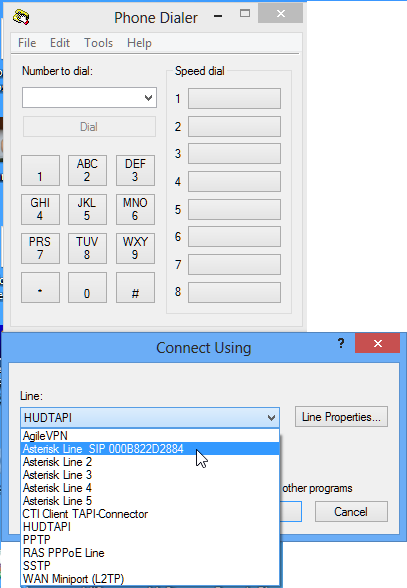
Next, try making a test call within Phone Dialer. Remember to (likely) add a '9' or whatever prefix code you use if making an outbound call through your PBX. Might be simpler to dial an internal extension to avoid any dialplan issues you may not be aware of.
If you cannot get it to dial within Phone Dialer then you will not get it to work in Outlook. If it doesn't work within Phone Dialer, then there is a problem with the TAPI TSP configuration. You may have to go into Control Panel, Phone and Modem, Advanced, as shown here:
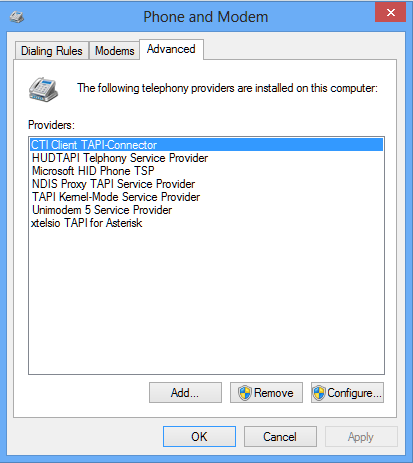
Then click Configure and verify your TSP settings.
Once Phone Dialer is working exit out and relaunch Outlook. However, I still couldn't click to dial within Outlook.
 But then I remembered that some applications such as Microsoft Communicator / Lync can override your TAPI settings. I obviously test VoIP products including Lync, so that software conflict was certainly a possibility. However, I just used click-to-dial the day I upgraded from Windows 7 to Windows 8 and it worked fine. The only difference is the new operating system. Is it possible Windows 8 has some new core TAPI capabilities? Is Microsoft looking to add some cool communications capabilities? Hmm. I will have to investigate this further.
In the meantime, I remembered how to override Microsoft taking control of TAPI. You need to add a TAPIOVERRIDE registry entry.
Here's the steps you need:
- Start Registry Editor.
- In Windows 8, click Windows key + R (Run), type regedit and then press ENTER.
- In Windows 8, click Windows key + R (Run), type regedit and then press ENTER.
- For Windows 8 32-bit locate and then click the following registry subkey:
KEY_LOCAL_MACHINE\Software\Microsoft\Office\Outlook\Call IntegrationFor Windows 8 64-bit locate and then click the following registry subkey:
HKEY_LOCAL_MACHINE\SOFTWARE\Wow6432Node\Microsoft\Office\Outlook\Call IntegrationNote: If the Call Integration key is missing, like mine was, just add this key first and then the sub-key. - On the Edit menu, point to New, and then click DWORD Value.
- Type TAPIOVERRIDE, and then press ENTER.
- Right-click TAPIOVERRIDE, and then click Modify.
- In the Value data box, type 1, and then click OK.
- Exit the Registry Editor.
- Start Registry Editor.
]]>