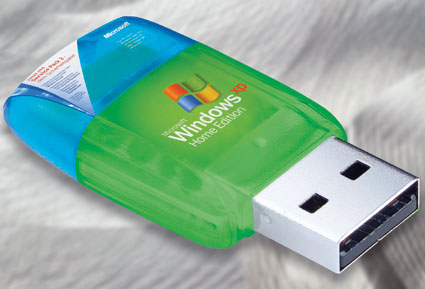
Boot Windows XP via USB key

Windows XP on USB
Ever want to boot up into Windows XP via a USB memory key? Well, now you can. According to Tom's Networking you can install a mini-version of Windows XP - just enough to get your up and running so you can restore from backup, access your files, or do whatever you have to do. I wonder what the security implications are? i.e. if someone were to boot into Windows XP using one of these devices surreptitiously on someone else's PC?

All it takes is a minor error in the Windows Registry or a virus infection, and your operating system can become unbootable. But with a properly configured USB flash drive on hand, you’ll always have a compatible replacement no further away than your pocket or keychain. In addition, the flash drive can also provide a secure browser and virus scanner, and lets you take your favorite DVD burning and Office software with you wherever you may go.

All that’s needed is a bootable USB Flash drive with at least 256 MB of storage capacity and a Windows Setup CD. Using the program Bart PE Builder (Freeware), you can install Windows XP on the flash drive, along with other software as needed (and as available space permits). <more...>

| 37 Comments | 0 TrackBacks

Listed below are links to sites that reference Boot Windows XP via USB key:

Boot Windows XP via USB key TrackBack URL : http://blog.tmcnet.com/mt/mt-tb.cgi/15875

37 Comments

I hope someone can help, I've been trying to get XP to work on my USB. I used hp to format the 256 usb key. I do the build and peinst without errors.

when booting off the USB I get this error.

Missing or corrupt
(windows root)\system32\hal.dll
please re-install a copy of the above file.

Thanks

Hi, I fixed the hal problem on the usb key but now it can't locate \minint\system32\config\system file. I copied the system and system.sav to this diretory but now it bluescreens when booting from the usb key.

I think there a problem with peinst build because the cd build works great. I'm using pebuilder313 and also tried the beta verison with the same results.

Any clues to this problem

Bob

At least you've gotten that far, all i get is a boot do a dos prompt! Thought I understood what was going on in the article, but i guess not.

I too have been trying to boot Windows XP via a USB key. I have a 1GB Lexar Jumpdrive. I used BartPE to create a nice WinXP bootable CD. I used a program called FlashBoot Wizard v1.3.0.124 http://www.prime-expert.com/flashboot/ to make the USB bootable.

It boots most of the way, however, after the Windows XP logo but before the desktop, I get the blue screen of death.

I get the same result using BartPE without plugins.

Hey Guys... I was able to boot to Microsoft windows PE using the Flashboot util. I merely created the ISO file and told flashboot it was a BartPE image. I have successfully re-imaged a thinkpad with winxp using ghost32 from my 2gb jump drive.

Sweet!

Like the most of you people, after I used peinst.cmd, i still couldn't get Bart PE to boot up. All I got was DOS.

So i saw that guys comment about flash boot. I tried the demo and it worked like a champ.

Demo version has limited functionality:

* Created bootable disk is bootable only once, boot record is erased during first boot
* You can use FlashBoot to transfer system to your USB flash disk no more than 10 times

I didn't want to buy flash boot because i didn't feel like paying 26 bucks. So i kept searching for a program that could do exactly what flash boot does, but i couldn't find any after spending HOURS of searching.

The funny thing is that i found out how to make Bart PE bootable off of your thumbdrive without flash boot. it has a function directly inside of PE Builder that will do most of the dirty work for you..

go inside your pebuilder3110a folder (thats the default folder name). open the text file, pe2usb.txt. follow the instructions and you are on your way to heaven.

the instructions has a dead link to the file, Server 2003 SP1. So here is the link to file.

http://www.microsoft.com/downloads/details.aspx?FamilyID=22cfc239-337c-4d81-8354-72593b1c1f43&DisplayLang=en


I'm so glad i figured it out. this was a weekend project that took a weekend too long.

If any of you guys know where I can get a ready-made image with win XP and Firefox and all the utilities installed on it? Please mail me if you do: cool-rr@cool-rr.com

Wow, so does that mean that Tom's article is wrong because he misunderstood which service pack the instructions were referring to?

Hello,
I´ve got usb flash booting with SP2. The problem to use pe2usb program is that the program requieres the pebuilder3110a\srsp1 folder with ramdisk.sys and setupldr.bin files in it. And it doesn´t matter if they are from SP1 or SP2. I´ve got it with SP2.

Hey guys
My computer only supports USB-FDD .Can i boot from usb that i installed win xp using bartpe.Thank alot

i have bartpe on usb and how to boot it up - in bios is all good but it just wont boot it

Now I just tried some dos usb drivers and found out after reading your article, why
DOS is being particular with reading only FAT16 flash drives.

Before I red it ,I could not work out why dos usb driver would not read my external usb hdd or my 4gig sandisk stick.

The major problem I have with my notebook is it will not load xp home anymore until I do some repair.
Its only a 64mg stick generic brand. The dos usb driver successfully red this stick.
When I looked at the driver property on another computer it said this.
Faronics Corporation
version5.7

It also did not mention if it was FAT32 or higher,but this was the very first flash stick I got. So does this mean if it only says
FAT that its always FAT16 ??
So should I reformat my 1gig flash stick to a FAT16 so that dos can recognise it
just like my 64mg one ?
Once I get xp home on this 1gig stick , can I still make it bootable even though
my bios does not support booting off a usb ???

Can anyone Help me in this,
I want to install Windows Xp in my USB Pen Drive is it possiable, If so Pls inform me how to install Xp in USB Pen Drive.

i've a flash memory can i use it to be bootable

can anybody tell how to install windows xp to usb pen drive i have 2gb of pen drive

Hi

I wanted to know whether we can install a operating system in a flash drive. it struck me only after i purchased a 2 gb kingstone flash drive.

if any one have any idea regarding this please reply to my mail id

Hi
I've managed to get a bootable BartPE on a memory stick (1GB). It works on a PC with USB Bios support. At home I have an old SE440BX-3 motherboard without bios support. Using a boot diskette with Panasonic USBASPI.sys and DI1000DD.SYS drivers I could get the motherboard to find the USB stick which has now the Drive F:\ in DOS with the prompt A:\>
There's also a Ramdrive G:\

Question: How can I start (boot)BartPE from DOS?

| Reply

trick windows into thinking the usb key is actually a HDD, create all partions/boot sectors needed, install O/S, turn off PC, shut the fuq up, disconnect all IDE drives, setbios to boot from USB Mass Storage Device, Stop your whinning, eat peanut butter, take a dump and reboot, let windows go through the configuration setup bullcrap and it should work from then on. oh ya, have a beer!, reconnect all HDD but dont let the bios refer to any ide drive to boot!
then you should have enough dilythium to power the inertial dampeners allowing you to achive a really good acne medication!

Update the link in the article. Toms Networking pulls a Four Oh Four. It tis a shame, but I am sure I can manage.

how do you fix the missing or corrupt hal.dll problem?

dear sir

how can I make usb bootable in xp operating system ?I have 2 Gb flash drive. when I make bootable drive that is going to win 98 file format is not accepting xp file format why ? any one know please Answer me

I want to install winXP in hard disk but use my 2gb pen drive to boot the computer as a key. Can any one help me?

can anybody tell how to install n make bootable windows xp from usb pen drive i have 2gb of pen drive ....


ok, IF your laptop/computer has a boot from usb option then installing a running OS (take your pick.. 95,98,xp,nt, linux, whatever).
run your install disk as normal and install to your flash drive. When you reboot make sure that your using the boot from usb option from bios. use the actual HD on the computer/laptop as storage for everything else.
:)
enjoy
if you don't ave a boot from usb option then buy a new laptop/computer that does have it because it's impossible w/o it.
the reason its so easy from a flash drive is because a flash drive is dynamic and rewritable in nature where as a cd is not. so a cd/dvd os ecomes considerably more difficult for a windows install. linux is no problem and in fact if you search there are several boot from cd/dvd linux intallations available for DL.

Hi Everyone, If you want to have XP, DOS or Linus boot from a usb key then try using flashboot.

Bob

Hey Guys,
Can anybody please tell me that how to install Windows XP Using Pen Drive. Actually My CD ROM Drive is very old and it
can't read some files on XP CD so, I thought that why not make Pen drive bootable like windows XP CD and Install Windows XP using that bootable Pen Drive.
So Please If Anybody have idea, how to do so tell me.
THANKS in ADVANCE.

Hi all .
Whaat i'm working on now is to make the usb work like the windowsXP CD , boot from it and direct install the windows ,
Wish me luck .

i have this error to....

Missing or corrupt
(windows root)\system32\hal.dll
please re-install a copy of the above file.

how can i fix it? bob?

| Reply

i want to make XP bootable USB hardisk please do write procedure

How can i install windows xp via usb pen drive. tell me all details about it.
please send my e-mail ID
thanks

I used nlite to make a copy of xp pro that installed fine on a sd card but go to boot it I get blue screen but it will go in to safe mode fine

What size USB drive would you recommend using to create a bootable XP? I have some proprietory programs that need a different password from a tech support I can barely get a hold of each time to install them. I'm thinking if I could install the programs on a USB running XP I'd be all set reguardless of what new laptop I'm using. I know with win98 you have to use a 2gig and format as fat16. Witch brings another question. What format would you use?

Here's great one:

depositfiles.com/ru/files/kcnd005tt

Best Windows XP usb flash edition 2009

I want to make bootable pandrive of windows XP for my laptop. In 1GB pandrive. Pls guide.

http://www.youtube.com/watch?v=_SwZDboRv6U

Use the above link. This is the most simple method that I have found so far and the only one that has worked.

Leave a comment

Recent Activity

Friday

Thursday

More...

Recent Comments

  • Bill: Isn't this the same chief lanier that wanted to keep read more
  • gadgets: I just read your post and I found it really read more
  • Craig: http://www.youtube.com/watch?v=_SwZDboRv6U Use the above link. This is the most simple read more
  • peetee: I would like to applaud google for creating this new read more
  • Anonymous: yahoo should get out of the whole issue. there is read more
  • Goran: I have the same issue at my work. I have read more
  • Chipmunk: It's a great app! Though it is not integrated with read more
  • christmas stocking fillers: I hope it ends as soon as possible. I do read more
  • Nikki Brown: Interesting. Is there a side-by-side comparison with Google voice anywhere? read more
  • External Hard Drive: Hi, The Skype's legal battle is in progress and now read more

Subscribe to Blog

Recent Entry Images

  • blabbelon-logo.jpg
  • ribbit-mobile-callerid-20.jpg
  • blabbelon-voip-room.jpg
  • ring2skype-logo.jpg
  • fonality-co-founders.jpg
  • captain-kirk-kick.png
  • admob-logo.jpg
  • simplesignal-call-control-toolbar .jpg

Archives

Around TMCnet Blogs

Latest Whitepapers

TMCnet Videos