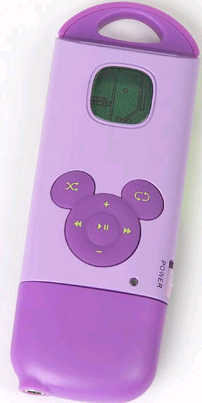
Disney Mix Stick MP3 player

September 29, 2005

Disney Mix Stick MP3 Player FrontDisney launched their own contender to the Apple iPod MP3 player with an MP3 player of their own called the Disney Mix Stick MP3 Player. Disney Mix Stick MP3 players support both MP3 and WMA and are designed to download music files, copy from CDs, as well as accommodate memory cards, called Mix Clips, that feature pre-recorded music from Walt Disney Records. Disney Mix Sticks have a storage capacity of 128MB (about 60 songs), and use USB 2.0 for connectivity. The Disney MP3 players also feature an SD/MMC card slot for as much as 1GB of storage.

"Digital music is exploding and is ready to take off with kids," Chris Heatherly, Disney Electronics vice president, said in a statement. "The Disney Mix Stick-Mix Clips combination is the perfect way for kids to get started with digital music because it's easier to use than players that can only be used with a PC, and it is just as capable."

The Mix Clip memory cards carry full-length albums from Walt Disney Records and since they are standard SD/MMC cards, they are compatible with computers, cellular phones and other devices. The MP3 players are scheduled to ship in mid-October to major retailers and are expected to sell for around $49. The Mix Clips will be offered separately costing about the same as CDs. Here's the rear of the unit featuring Tinker Bell:
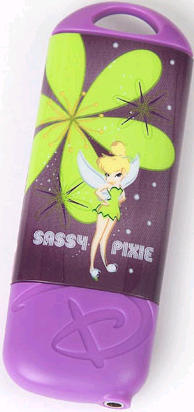
Disney Mix Stick MP3 PlayerRear
Amazon has great deals on the Disney Mix Stick worth checking out.


Post a comment
Tags: , , , ,

Search Technorati: , , , ,
Related Tags: , , , , ,

Listed below are links to sites that reference Disney Mix Stick MP3 player:

Trackback Pings

TrackBack URL:
http://blog.tmcnet.com/mt3/t.fcgi/16852

Comments to Disney Mix Stick MP3 player


  1. mark curry :

    I first saw the mix stick on disney channel as Raven demonstrated,and I think the price is more accomidating for parents with kids who want to experience the new mp3 player rave. With characters like pooh,tinkerbell and other girl characters will really grab the attention of teen females. I think it will do great


  1. bob carr :

    I live in the san francisco bay area..need to
    know what stores carry the disney mix stick mp3
    player


  1. kristina :

    I am looking for the disney mix sticks and cant find them anywhere can you please email me back with info on where i can get it in new york the bronx by stoes close to 10465 thank you


  1. anna :

    how do i download music on to a new disney mix stick chip . my daughter got one for x-mas and we can't seem to download any music on to it


  1. Shay Bradley :

    I have a mix clip and I just want to say that I love it. It is absolutly one of the best music players in the world. Who knew that alot of music could come out of such a small machine! Im only 13 years old and I've had it for 5 days and i haven't put it down! The one I got for x-mas was the sassy pixie(tinkerbell) I love her. Well I just want to say that who ever made this deserves a gazillion dollars!

    Good-bye and thank you for this mircle you have gave my Im a satifyed customer
    Shanayia Bradley( Shay)


  1. Danielle :

    I got the "Forever A Princess" Design at my local Limited too store. Sence they are a little high priced I got my Mix sick for 60$. I got Mix Clip but i don't know how to download music. My mom has to ask my friends in North Carolina.


  1. Rose :

    It took a while to figure out but to download music to the mixstick you plug in the stick to the usb port and open the drive under my computer. It should say removable disk. Open the folder that contains the music downloads as well so there are 2 screens on your desktop. Drag the songs from your music file to the removable disc page. Once your selections are complete "select all" so all music is lit up and then go to file and "send to" then choose the drive your mixstick is in.(my computer was drive F)


  1. Ben :

    The Mix clips are standard 32meg flash cards preloaded with WMA files.
    These are not SD and the content is not protected, you can easily copy them to your PC for backup and put aything else you want on the clip.


  1. jayla :

    how do u put music from the internet onto the mp3 i have tryed but i do not kno how???


  1. Taylor :

    How do you put music on a mix stick?


  1. Nikki :

    i love the mixstick MP3 player, since i love it imma get myself one.


  1. Marlina :

    i like totally think that the Mixstick MP3 player is so ccccoooooooooollllllll, i especially like the silver metal mixstick.


  1. Marlina :

    i like totally think that the Mixstick MP3 player is so ccccoooooooooollllllll, i especially like the silver metal mixstick.


  1. princessdavina :

    i think u should have a place 2 tell us how 2 download music onto the mix stick


  1. princessdavina :

    i think u should have a place 2 tell us how 2 download music onto the mix stick


  1. rakel :

    i dont know how to download music on to my mix stick and my brother wont help me do it cause my brother is a computer jenious


  1. cassie :

    there is only one i dont like about disney mix sticks i dont know how to delete songs of it.


  1. princess davina :

    cassie sorry but do u know how 2 download music onto the mix stix


  1. princessdavina :

    never mind cassie i learned how 2 download from rose if u guys dont know how 2 download music onto the mix stix come back here & rose has it on her post.


  1. princessdavina :

    rose write back how do u download music 2 mixstix.


  1. princessdavina :

    thanks rose u helped me alot i wish i could thank u more but i cant except thank u sooooooooooooooooooooooooooooooooooooooooooooooooooooooooooooooooooooo much so very much.


  1. princessdavina :

    ben how do u do that um i really need 2 know how cause none of my downloaded music will show up on my mix stick.


  1. princessdavina :

    do u know if there is anyplace 2 find out how 2 download music onto ur mix stick anybody no body inperticular just anybody


  1. toni :

    my son got one of these for his birthday, I have a mac computer and can not put music on it, anyone have any idea how to do that with a mac? the directions say that they work with mac, but that hasn't been my experience. thanks


  1. dominique :

    how much music does it hold before i buy it
    and how do you download music onto it
    and how do you delete music from the mix stick


  1. Jill Dyson :

    Hi, i saw the disney mix stick and i wondered where you can get it from in the U.K or which web site you can buy it off. I would appreciate it if could could email me back. ASAP Thank you


  1. chloie marks :

    i love it the only problem is i can't figure out how to put muic on it i have one song on it and thats it but i like it!!!!!!!!!!!!!!!


  1. kristina with a k :

    how much are the chargers? and do you need one 4 the mp3 player?


  1. niki :

    disney rocks my socks!!!


  1. beth alpert :

    i also have a mac and can't figure out how to use the mix stick.


  1. Randy Savicky :

    rock on!


  1. Ashley Todd :

    Hello i need some help on how to download music to my chrome mix stick please.


  1. colby Arrington :

    I can't figure out how to work this with a mac - it comes up as a no name icon and a settings.dat folder and will not open in any application???? Help! I have OS10.


  1. tim enos :

    I need to know how to transfer music to the sd chip


  1. brina's dad :

    Anxiously awaiting a response to the MAC questions above. I can't even get my MAC to recognize my daughter's mix stick. She loves the gadget, but we feel limited right now. Please help!


  1. Amanda price :

    hi my name is amanda and i just got my disney mix sticks(tinkerbell) and my USB cable will not go into my USB input slot on my computer.. is there another way??i need help


  1. alauna :

    I love the mixstick but I don't know how to put new music on it.It's okay a because mix clip,I mean mix stick rocks!!!!!!!!!!!!!!!


  1. DJM :

    For the benefit of other confused Mac users, let me inform you that neither of the two Mix Sticks that I purchased fit adequately into any of FOUR different Macs that I tried them in. The eMac that I own was obviously not able to accomodate the long shape of the units as it has a horizontal space that effectively blocked insertion of the USB plug. The iMacs that I tried appeared to accomodate the units and even charged, however, the disks did not appear as they should on the desktop.

    In writing to Disney's customer support staff, the response indicated that the information was "not available." (Thanks a lot!)

    My work IT person tried it in his high end Mac and it worked fine. He then had me try a USB extension cord when he heard about my experiences with the units. Voila! The cord allowed for a successful fit on all of the Mac machines!

    Apparently, the problem was that the units did not plug in fully and for that reason did not show up on the desktop.

    I then had the problem that the songs that I copied straight from CDs to the units would not play. Duh! The file types on the CDs were aiff format! Make sure that you are copying MP3 files to ensure that they will play! You can do this by downloading from your iTunes Library.

    (You don't have to open the settings.dat folder. You can ignor it. Just drag the MP3 icons into the No Name drive.)

    Make sure that you drag the No Name drive into the trash before you unplug the unit so that you don't damage the unit or lose your data.

    I complained mightily to Disney for their appalling lack of customer service.

    Good Luck!


  1. Randy Savicky :

    The lack of customer support is pathetic ...


  1. dJM :

    For the benefit of other confused Mac users, let me inform you that neither of the two Mix Sticks that I purchased fit adequately into any of FOUR different Macs that I tried them in. The eMac that I own was obviously not able to accomodate the long shape of the units as it has a horizontal space that effectively blocked insertion of the USB plug. The other three Macs appeared to accomodate the units and even charged, however, the disks did not appear as they should on the desktop.

    In writing to Disney's customer support staff, the response indicated that the information was "not available." Thanks a lot!

    My work IT person tried it in his high end Mac and it worked fine. He then had me try a USB extension cord when he heard about my experiences with the units. Voila! The cord allowed for a successful fit on all of the Mac machines!

    Apparently, the problem was that the units did not plug in fully and for that reason did not show up on the desktop.

    (You don't have to open the settings.dat folder. You can ignor it. Just drag the MP3 icons into the No Name drive.)

    I then had the problem that the songs that I copied straight from CDs to the units would not play. Duh! The file types on the CDs were aiff format! Make sure that you are copying MP3 files to ensure that they will play! You can do this by downloading from your iTunes Library.

    (Make sure that you drag the No Name drive into the trash before you unplug the unit so that you don't damage the unit or lose your data.)

    I complained mightily to Disney for their appalling lack of customer service.

    Good Luck!


  1. Anna :

    How do u delete the songs on the mix stick?


  1. Miki :

    Hey i know how 2 charge my disney mix clip, but how do i download music? And another question, can i download music straight from my cd player?


  1. Candika :

    My niece got a disney mix stick for Christmas, I've been trying to download music to it but when I've open my removable disc in the e drive it will not allow me to send it please help me figure this one out as its driving me crazy lol


  1. Yolanda Kennedy :

    My son received the Disney Mix Stick and it worked great until last night....It is charged but when you turn it on the light flashes yellow and it doesn't play music. Who can I contact for assistance.


  1. Sergio :

    I'm having the same problem, when I try to play the files i downloaded to the player, the light blinks yellow and does not play, in the instructions it says that the light should turn green once you press play. But that does not happen to me. Anyone has any suggestions.


  1. 1234 :

    I love the mix stick! But I lost the blank chip that comes with it. I think you need that chip to listen to your downloaded music because after loosing it, it wouldn't work. Is it possible to buy a new one?


  1. MIA :

    HOW DO I DOWNLOAD MUSIC INTO MY MIX STICK MP3 PLAYER?


  1. kiki :

    do u really have to have the removeable disk just to download music on your disney stick? if so what if u don't have one.


  1. Kadazia :

    Can you please send me pictures of all the designs of Disney Mix Sticks. And how do you download music on to the mix stick. And please send me what mix clips you have. Please and thank you. I want to know the designs because I'm going to buy one and want to know all the designs I have to choose from!


  1. Kayli Bozeman :

    where do i go to download music on it because i would like you know some rap and other music on it!!!!!!!!!!!!!!!!!!!!!!!!!!
    i like it kayliBee


  1. jj :

    i got mix stix for my b-day and it won't turn on i charged it for hours help!!!!!!!!!!!!!!!!!!!!!!!!!!!!!!!!!!!!!!!!!!!!!!!1 it's awesome and i want to be able to use it again


  1. tynabop :

    Hello,everyone! Can anyone please tell me how to delete songs off the mix it stick? My son is blind and autistic and gets bored easily with the same songs, I've read the direction book (saw nothing) i've searched the net and nowhere does it say how to delete the songs! Any help would be appreciated. Thank you.


  1. Bethany :

    I got my mixstick for vacation to disney world!It is easy to work and lots of fun!I love it and cant wait to leave in 1 week for Disney world!I love It!It only took 15 mins to learn how to use it!


  1. Miley :

    How do you put music in the Mixstick?HELP!!!!


  1. Madison :

    I got a Disney Mix Stick for Christmas, and during Christmas Break, I put some songs on it. Now it's almost August and I'm bored of the songs! The problem is, I can't seem to get my computer to recognize the Mix Stick. I also don't know how you take songs off of the Mix Stick. Could someone please help!?


  1. Jordan :

    I lost my disc to my mix stick but i don't want to get a mixclip so how do i download songs?????????? I really need help because i really want to listen to it now. At camp i am bored on the bus when we go on a feild trip. And when i see a lot of kids with ipods and mix sticks and other mp3 players i really really need to get some cool songs. PLEASE WRITE BACK!!!!!!!!!!!!!!!!!!


  1. Jordanna :

    HELP!!!!!!!!!!!!!!!!!!!!!!!!!!! My dad bought me a mix stick for my birthday but a week later we went on vaction and I think I left it there!!!!!! I really want to listen to a choice of songs!!! I don't want a mix clip because I wouldn't listen to all of the songs. I want to download songs so badly because at camp when I am borded I see all of these kids with ipods annd mix sticks it makes me feel different. I WANT TO KNOW SOOOO BADLY!!!!!!!! I just want to listen to MY music!!!!!!!!! PLEASE HELP!!!!!!!!!!!!!!!!!!!!!!!!!!!!!!!!!!!!!!!!!!!!!!!!!!!!!!!!!!!!!!!!!!!!!!!


  1. JAZMINE :

    I WANT A MIX STICK SOOOOOOOOOOOOOOO BADLY!!!
    I WANT A TINKERBELL OR THAT'S SO RAVEN!!!!
    IT'S ON MY CHRISTMAS LIST!!!!!!!!!!!!!!!!!!
    MOMMY CAN YOU GET ME ONE PLEASE!!


  1. Kassi :

    hey rose you didnt help me to download music on my mix stick its hannah montana mix stick


  1. Stewart :

    Hi everyone!! My daughter has the Tinkerbell Mix Stick and she loves it!! I bought a 1 giga byte SD memory card for it so she could download even more songs. My computer shows the Mix Stick as drive F, and the memory card as drive G. The extra songs did down load to the memory card, but the Mix Stick player will only play the songs downloaded to the player itself (drive F). Can anyone tell me why it won't play the songs from the memory card? We appreciate any help.


  1. Jivaro :

    IS IT POSSIBLE TO DOWNLOAD MUSIC TO MY DISNEY MIXSTICK WITHOUT USING THE CD'S THAT CAME WITH IT


  1. mariette :

    I bought the MP3 at Walmart in Montreal but they do not sell the mix clips cards. I looked everywhere. Where can I find them?.

    Thank you.


  1. ANAMYMOUS :

    WHERE DO THEY SELL THIS ONE AT ??? I NEED A STORE AROUND THE STOCKTON AREAS ... HOW MUCH DO THEY COST !!!


  1. Valerie :

    I need help one day out of the blue my daughters mix stick work on my pc it doesn't even recongnize it when I plug it into the usb plug. CAN SOMEONE PLEASE HELP ME WITH MY MIX STICK PROBLEM!!!!!


  1. Cassie :

    i love my mp3 player i have the sassy pixie well the tinker bell one it's great but i still don't now ikf you can download on to it!


  1. m :

    To delete songs from the mix stick just open the my computer folder when you plug it into the computer and click the removable disk and it should show you what is on it. Then from there you pick which songs to delete.


  1. kristin :

    How do I charge this thing? My daughter used it, loves it, but I can't re-charge it for her! Help!


  1. yesenia :

    Ithink the mix stick is the coooolleeeessttss thing I had in my life.


  1. Jay :

    The mix-stick purchased for my granddaughter didn't work out of the box due to a faulty battery.


  1. kaci :

    i got a disney mix stick for christmas and i cant find one of them techno looking thangies to save music on where can i get one. and i just gotta say i hate it because i lost my instruction manue and cant figure out how to work the Damn thang


  1. sandra :

    Besides the fact it took me 2 hours to figure out how to download the thing, it now flashes yellow and won't play songs! The docking station won't flash the lights when you put the thing into it! WWW.disneyelectronics.com has NO information on operating assistance even though the user's guide lists it for help!! Any suggestions on what to do next? I am sooo ready to ship it back to where it was purchased!!!!!


  1. Ro :

    Please someone tell me how do you charge this thing. I really need to know. If you know please contact me at peaches6315@yahoo.com. Thank you in advance for your help.


  1. tinkerbell :

    hey i have a serious problem with my tinkerbell mix stick. well first i cant seem to get any songs on it. i understand what rose said about hwo to get it on there but inside of my removable disc there are three documents -music-videos-and WMPINFO
    im not exactly sure what that is.
    the second problem is the mixstick refuses to cut off no matter hwo many times i press the button. can anyone help me with these problems!!!


  1. gracie :

    i need help downloading music onto my daugher's mix stick. can you please send me step by step instructions? thanks.


  1. Bev :

    Hi,
    I think I have fixed the problem of the Disney mix stick not being recognized by thecomputer, or Win Media Player.
    I had the same problem for about 8 months now and today I thought I would give it another chance and what I did worked.
    First, I put the mix stick into my USB port
    Then I went to c:\programs\Disney\Mix stick and there was a file called stupdaterapp, Disney Mix Stick Firmware Download Disney, I doubled clicked that and it started downloading, it was the same ver. firmware I already had but I clicked ok anyway, then when it asks you if you want to Format click yes.
    When it finished I went to windows explore and the disney mix stick would let me drag and drop new music files on it and when I took it out, after ejecting it, the mix stick worked, it plays music again, I thanked God, I was about ready to just throw it away because it would not work at all it just flashed that light it has on it, and my computer did not recognize it at all, but after this it works and my grandaughter was so happy !
    Please, if this works pass this fix on to everyone, there are alot of people out there with the same problem and maybe this will help them, there is no way I could go to every web site and post this.
    Good Luck & God Bless !
    P.S. Let me know if this helped anyone! my e-mail address is bevstutts@charter.net.


  1. deja :

    hey i got the "Disney" mp3 player the high school M. And it iz wonderful but i still cant find out the way to put the music on the mp3 player but i most surtly try


  1. Bob :

    Peaches,

    The USB cable will charge it, just plug it to a USB port and and the light will blink Red and Green, Once fully charged it will be a continuous green.


  1. Katlaya :

    i cant find my disk to put music on it where can i find a new disk?


  1. Lynette :

    I have Mac OS10 and it keeps crashing my computer. I can not download music to this thing or delete songs. Where do we get support for this WONDERFUL product? (that was sarcastic!)


  1. Heather :

    This thing is a rediculous headache!!! I have downloaded songs, bought 3 different sized SD cards and the stupid thing still wont work. I downloaded some songs the first night and it saved 11 songs on the internal memory, but I didnt have the memory stick yet. I bought a 1gb memory stick and synced more songs and now nothing plays at all. I can't believe that Disney would make such a difficult to use product, that's supposed to be geared towards children!!! I'm so frustrated!!!!!!!!


  1. Bonnie :

    I'm completely frustrated too. I consider myself pretty computer savvy and cannot load a song onto my 8 year old's MP3 player. I've even tried 4 different computers! Can anyone help?


  1. Leika :

    does anyone know what website to go onto to download songs on the mix stix? i remember on the back of the box it came in it said the website. disney .. something. idk. w/e .. help please?


  1. morgan :

    I got a mix stick for christmas and i dont know how to download my songs HELP!!!!!!!!!!!!!!!!!!!!!!!!!!!!!!!!!!!!!!


  1. denise :

    my daughter got a disney mix stick for christmas and iam not able to download music on it. Iam wondering if you have to have a memory card to do that. please help


  1. mandy :

    hi my neice has the disney mix stick and it had alot of the problems described on this site i think i may be able to help you out so contact me @ mandypandi21@aol.com just put the subject in disney mix stick and ill reply as best i can hope i can help mandy


  1. MISAEL :

    recived a disney stix
    for x-mas and I cannot load any music.
    need simple instructions please.


  1. john :

    please help!!
    I can not figure out how to load songs onto this device


  1. Stewart :

    John, to load songs onto your Mixstick, plug in your Mixstick to a USB port on your computer. I have Windows Media Player 11 on my computer, but my instructions for you should also work on Windows Media Player 10. In the media player, click on "sync" tab. Then for each song you want to load to your player just right click on that song, then left click on "Add to sync list". Do this with every song you want to load. When you're ready, go over to the list of songs in sync list column, and click on "start sync" at the bottom of the column. That's it. Hope I helped. Good luck and have fun.


  1. Trish :

    Hey, I found the mix sticks at Toys R Us, but not in their electronics section (like the gaming section) instead it was in the aisle right outside and there were a lot of keyboards and electronic drums and such there. Toys R Us also carried the mix clips to put in (they're around $15 here in MD) but were out. I actually got the mix clip at Wal-Mart in the toy department where the I-dogs and such were. Hope this helps!


(If you haven't left a comment here before, you may need to be approved by the site owner before your comment will appear. Until then, it won't appear on the entry. Thanks for waiting.)