
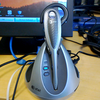
GN Netcom's GN 9350 DECT 6.0 headset (
now called the Jabra GN 9350) is one of the most versatile
headsets I have ever reviewed. When GN Netcom told me they had a new headset that did both PC audio and Phone audio, while leveraging the range and interference-free characteristics of the DECT 6.0 standard, I just had to review this headset.
(Note: DECT 6.0 operates at 1.9Ghz so it is less apt to have interference from WiFi 2.4Ghz signals) With the GN 9350 you can get your
Skype on, your iTunes on, and your phone on, all using one wireless headset. Sweet!
Comparatively speaking, the GN 9350 is similar in functionality to the
Plantronics Voyager 510 Bluetooth headset, which I reviewed
here. Both support VoIP, both can use any PC audio application, both use USB, and both are wireless. However, the similarities stop there, since the Voyager 510 uses Bluetooth and the GN 9350 uses DECT 6.0 for wireless connectivity. The advantage of the Bluetooth wireless spec is that you can use the same headset both on your PC (using the Bluetooth USB dongle) and your Bluetooth-enabled mobile phone. The GN 9350 wasn't designed for mobile phones, but rather for traditional enterprise desktop phones, which the Voyager 510 cannot connect to. Thus, these products target a slightly different target audience. Although, I should mention that Plantronics has a higher-end model of the Voyager 510 called the Voyager 510S, which supports mobile phones, desktop phones, and PC audio (VoIP) using Bluetooth.
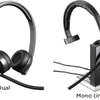
Here's a picture of the
higher-end Plantronics Voyager 510s:
One advantage of the DECT 6.0 spec over using Bluetooth is range. When I tested the Bluetooth-enabled Plantronics Voyager 510, the audio started to get choppy just 15 feet away. On the other hand the DECT-enabled GN 9350 worked flawlessly with no choppiness even 250 feet away. GN Netcom claims
300 feet of range for the Jabra GN 9350 headset.Installation
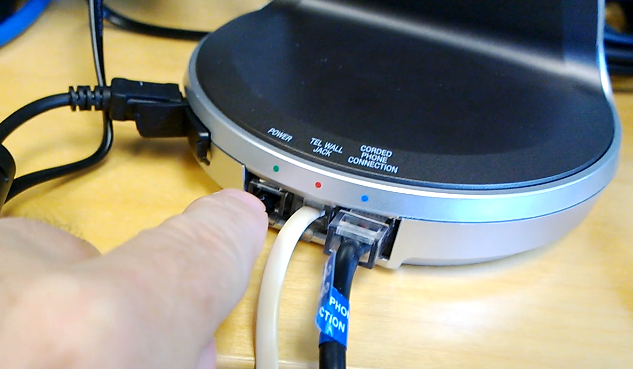
Installing the GN 9350 was a breeze. You simply connect the phone wire to one of its ports, the handset cord to the other RJ11 port. I will say that connecting the phone connectors was a bit tricky because the ports are recessed about 1/2 inch in with a lip that hangs over and a tiny opening, making it difficult to get your fingers inside to clip the phone clips. I basically had to hold the wires from the outside and gingerly aim the RJ11 clips into the female ports - I felt like I was defusing a bomb like the injured "Cappy" in the scene from Executive Decision.

It was then that I realized that the cover on top is actually removable making it easy to make the connections. Silly me. Under the cover I was surprised to discover an LCD display and a 4-way thumbpad allowing you to customize various features, including volume, bass/treble/normal, hookswitch selection, range/power selection, and finally protection level, which protects against sudden spikes in volume. There is also a switch for choosing which type of phone system you have. In any event, after hooking up the phone wires and playing with the LCD settings, I then hooked up the AC adaptor and the USB connector and was good to go.
Base Unit FeaturesOn the front of the base unit are 2 buttons for switching from PC to phone and 7 LEDs. One LED indicates when the headset is charging on its base (flashing) or when the headset is in use (solid). Another LED, red in color indicates when you have the headset muted. Another LED indicates USB connectivity, another for power, and 2 blue LEDs indicate whether you are in PC or Phone mode.
Headset Features
The headset is very flexible in it's wearing styles. You can wear it headband wearing style, neckband wearing style (wraps behind your head), as well as "over the ear" wearing style. features automatic volume adjustment that sets the volume on all calls (phone or VoIP) unless you set the auto-volume protection to level 0. The headset also features noise reduction which can remove background noise from your environment.
The headset features a noise-cancelling boom mic, a charging port, and a three-way switch on the end that performs volume up/down, as well as mute when you press it in. On the outside of the headset is a blue LED that blinks when in use and is off when not in use.
In addition, your headset can also be used with DECT cordless phones, which are GAP (Generic Access Profile) compatible. You simply have to pair the headset with the cordless phone's base station by pressing the headset's talk and mute buttons simultaneously for 5 seconds after entering the cordless telephone's GAP mode. Relatedly, the headset supports a multi-unit conferencing capability. Simply start a call, then place a 2nd headset on the base unit for 2 seconds. Then remove the headset and this headset will be conferenced into the call. You can repeat for any additional 2
headsets for a total of 4 headsets in the call.
Here's an interesting feature -
emergency dialing via VoIP. The base unit supports "speed dialing" emergency services using your VoIP application (softphone) simply by pressing the PC mode button and the Phone mode button simultaneously for 5 seconds. This is useful for when your workstation is locked and you're trying to shave off some seconds. Of course, I can type my password in less than 5 seconds as I'm sure most people can, but perhaps the emergency is that you injured your hand - which would make it a little difficult to do the three-fingered-salute (Ctrl-Alt-Del) to log on.
Testing
The voice quality was excellent and I was very impressed with the ~250ft range before the audio started to cut out. Overall, I was pleased with the sound quality, range, and the ability to switch from streaming music (PC) to an incoming call (Phone). If your phone is supported, you'll even hear a beep in the headset letting you know of an incoming call. If you have the optional handset lifter, it can even lift the handset so you can take the call without being at your desk. The 9350 also supports EHS (electronic hookswitch) to automatically answer a call, which does not require the handset lifter. Only certain phones support EHS. You can go to
www.gnnetcom.co.uk/UK/EN/EHS-setup.htm to see if your phone is listed.
Unfortunately, when you set the base unit to default to the “phone”, it appears that you can't toggle from music to phone and
then back to music using the headset button. You can only go from music to phone. So for example, say you are away from your desk, listening to streaming radio, and then an incoming call comes in. You click the headset’s button to switch to the phone connection, which uses the remote handset lifter to answer the call. You talk for a bit, you end the call and then wish to return back to the PC’s streaming audio. You can't do this remotely. You have to press the button on the base unit in order to switch back to the PC audio.
Similarly, when you set base unit to default to “PC” audio, on an incoming call, you cannot switch to the “Phone” using just the headset. You have to be physically at the base station and press the phone button.
Not a big deal, since in most cases you will be near your PC & phone (and therefore the base unit). Nevertheless, wireless headsets do add some nice office mobility, so it would be nice if you could hold the headset button for say 3 seconds and it would toggle to the opposite (PC or phone) connection. Perhaps this is a simple firmware or software upgrade of the 9350. I'll contact my sources at GN Netcom and see if its possible.
I found it a bit of a pain to put the
9350 headset back on the base unit to charge it. If you are slightly off, the charging prong hits the plastic on the headset and won't insert all the way down. I had to wiggle the headset a bit to get it to dock. However, with a little practice, I was able to get it docked on the first try about 90% of the time.
Beeping and blinking... Beeping and blinking (William Shatner - Airplane!)
When simply using the headset to listen to PC audio (music) I found that the mic picks up sounds and plays it back over the earpiece. For example, if listening to music, with the mic unmuted and you hit the mic boom with your hand, it picks up the sound and plays it over the ear piece. Or if I simply turn my head and the mic hits my cheek, it will pick this sound up. I was able to mute the mic, but then it beeps every 10 seconds which is annoying.
Beeping is a
great
reminder when using the phone feature – so you don’t accidentally forget you are muted, but when in PC mode, unless using a VoIP software all the time (requires the mic is unmuted), I prefer that the microphone be muted with no beeping.
Pros:- Better range than Bluetooth headsets (300 feet).
- Battery life is 9hrs PSTN talk time and 6hrs VoIP talk time.
- Connects to both desktop phone and PC (USB)
- Uses DECT 6.0 spec and DSP for excellent sound quality.
- Integrates with DECT 6.0 cordlesss phones.
- 3 wearing styles.
- Multi-unit conferencing capability.
Cons- Slightly heavier than the Plantronics BT headset.
- Can't toggle from PC/music mode to phone and then back to PC/music. Can only go once from PC to phone. Or when in PC default mode, and currently on a call, you can only switch once to PC and cannot return back to the phone mode.
- Bit of a pain to dock the headset into the base unit.
- Can't disable the “beep” when muted feature is on
Conclusion
Even with the beeping issue and the toggling issue, overall, I was very pleased with
GN Netcom's GN 9350. It is now my office headset of choice due to it's excellent range and very good feature-set. This multi-purpose headset is great for the office since you can be working, listing to streaming music (without distracting fellow employees) and then switch instantly to phone mode on an incoming call. Having all these features, range, and sound quality will set you back $349 MSRP. However, I checked Amazon and I see the
GN 9350 listed on Amazon for under $299.
Recent Comments