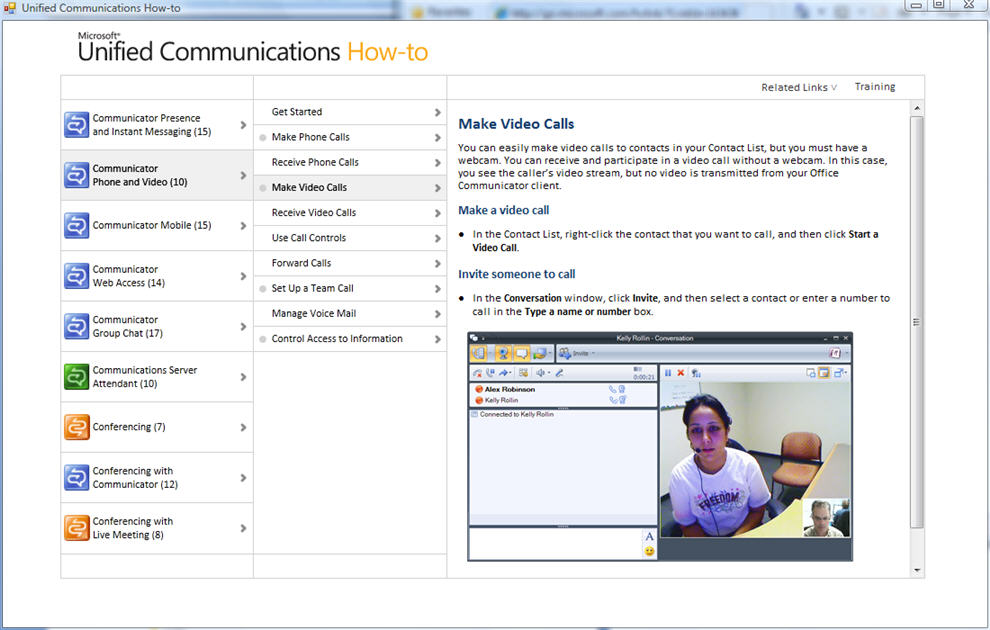
 Microsoft released a new UC How To training application leveraging Microsoft Silverlight™ 2 to help users and administrators learn how to use Office Communications Server 2007 R2. The Microsoft Unified Communications "How-To" training tool provides step-by-step instructions for common UC tasks, such as find and add contacts, create groups in contact list, initiate a voice or video call, create a chat room, search chat history, and much more. It also goes into "etiquette" in instant messaging and etiquette in managing your presence status. I really liked this aspect of this training tool, since it is often difficult for IT/MIS folks to document etiquette procedures and get users to actually listen. So having a respected third-party such as Microsoft offer up their etiquette rules certainly will get users to pay more attention, which will result in better productivity.
Using the tool is very easy. You simply pick one of the main colored categories to the left and then drill down to the section you want to read. Interestingly, you can customize the How-To application based on the UC features you've installed in your organization. For example, if you have installed all UC features except Communicator Mobile and Communicator Group Chat, you can modify the XML file so that those features and topics do not appear in the interface. The How-To training tool is delivered as both a desktop application and a Web application. The desktop client must have a Web browser with the Silverlight 2 client installed.
Additionally, Microsoft also just launched Unified Communications Adoption and Training Kit 2007 R2. The Unified Communications Adoption and Training Kit for 2007 R2 provides guidance and resources for IT Pros, Helpdesk, and Trainers to speed adoption and usage of Unified Communications technologies in the enterprise. The kit includes Planning Checklists, Awareness materials, including Poster, Door Hangers, and E-mail samples, and User Education Materials such as Quick Reference Cards, Flash Cards, and links to Web-based Training. I played around with it and it also includes a mildy funny intro video. Definitely a useful kit, especially the Quick Reference Cards that you can print and give out to users.

Lastly, there is an online tutorial with six modules of multimedia training for the OCS 2007 R2 platform, including:
Module 1: Intro to UC and Enterprise Voice
Module 2: Communicator Instant Messaging and Presence
Module 3: Enterprise Voice-Soft phone Experience
Module 4: Desk Phone Experience
Module 5: Communicator - Audio and Video
Module 6: Microsoft Office Live Meeting & Microsoft® RoundTable™
Check it out: http://www.microsoft.com/communicationsserver/enduser/tutorials/