 Microsoft Outlook 2007 sucks. Or at least it sucks in how it handles its Junk E-mail functionality. Microsoft's brilliant decision is to prevent users from Replying to any email that lands in your "special" Junk E-mail folder. Microsoft Outlook 2007, part of the Office 2007 suite, displays the following dialog box popup when I click Reply to an email in the Junk E-mail folder:
"To help protect your personal information, this message has been converted to plain text. Links and other functionality have been disabled. To restore functionality, move the message to the Inbox."
There is also a 'Do not show' check box which adds a setting to the Registry so the popup doesn't appear again. I happened to check it, so now when I click Reply to an email in my Junk E-mail folder nothing happens. The mouse cursor just sits there mocking me and my futile clicks of the Reply button. Strangely enough the Forward button works which makes absolutely no sense. Block Reply for security reasons but not Forward?
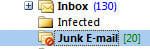 Thus, when a legitimate Outlook email lands in my Junk E-mail folder, I have to either drag it into my Inbox or I have to click 'Not Junk' on my Outlook toolbar and add the contact to my "trusted" list. The problem with this is that the email is now marked as "read". So when I click my main Inbox, this "read" email may be lost in the middle of all the other emails in my Inbox. Now I have to go find it and re-open it, then click Reply, and then if I don't need the email any more delete it.
 Let's add up and compare the clicks shall we?
1) Open email to see if spam or legit
2) It is legit, so click 'Not Spam' so it moves to Inbox automatically
3) Choose whether or not to add recipient(s) in the email to trusted list
4) Click 'Ok'
5) Click on Inbox
6) Find read email and re-open or Click Reply on toolbar
7) Delete email
Total = 7 clicks, possibly 8 if you re-open the email and then click "Reply"
It should be:
1) open email to see if spam or legit
2) Click Reply
3) Delete
Total = 3 clicks.
You would think the "trusted" list would help a little to whitelist my common contacts. Unfortunately, this "trusted" list only works with Microsoft's anti-spam filter. If you use any server-based anti-spam software such as GFI MailEssentials, this bypasses your client Outlook-based "whitelist" and places suspected spam into the Junk E-mail folder.
I even turned off Outlook's Automatic Junk E-mail filtering completely from Outlook 2007's menu option and it STILL doesn't let me click the Reply button to any email in the Junk E-mail folder.
Here's a screenshot of the Automatic Filtering turned off:
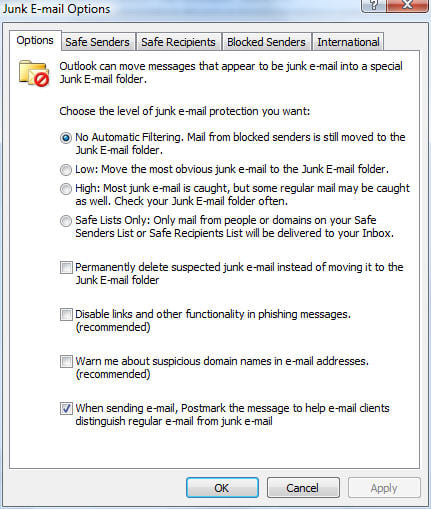
Unfortunately, the corporate-wide server-based anti-spam software still filters emails to the Junk Email folder. Well, not unfortunately, since I want suspected spam to go there. However, like I said, Outlook 2007 considers this folder "special" and in Microsoft's infinite wisdom has decided to PREVENT you from Replying to any email in this folder.
Now I get that there are some idiotic users that open attachments with viruses or do other stupid stuff, but if I want to Reply to an email, or even infect myself with a virus, then let me DAMN IT! Forcing me to move the email to my Inbox and then clicking Reply doesn't add any extra layer of security - all it does is force extra clicks and piss me off.
I suppose one option is to have the server-based anti-spam software move spam to a different folder other than Junk e-mail. However, that's a global setting that would affect everyone within our organization. Also, I like having a single unified Junk e-mail folder.
Surely there must be a way of disabling this restrictive functionality. I tried every menu option in my Outlook client to try and disable and I tried Googling it to no avail. Maybe there is a Registry hack somewhere. If so, please share since this is annoying the hell out of me.

Ok now that I got my frustrations out of the way, there is plenty to like in Outlook 2007. The Instant Search works really well and I like the clean look with the "Ribbon" menu. Still getting used to the Ribbon but it does reduce a lot of screen clutter.