Windows Live Messenger Launches

Windows Live Messenger finally launched. I've been playing around with the "invite only" beta for awhile, but now it's available to everyone to download. Some in the media claim this is Microsoft's answer to the popular Skype VoIP client, but more on that later.
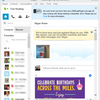
Live Messenger
New features include enhanced built-in security, shared search within the Live Messenger window, and the ability to set up a Sharing Folder with a friend that allows you to drop in photos and other stuff. Friends can see your Shared Folder items even when one of you is offline. It also features mobile messaging that allows users to send messages to friends on their mobiles, even if the contact doesn't have a messenger account.
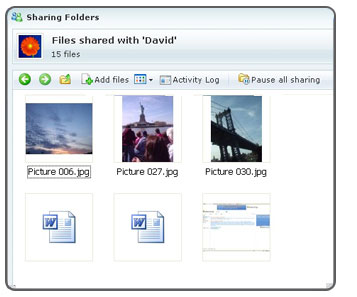
Shared Folders
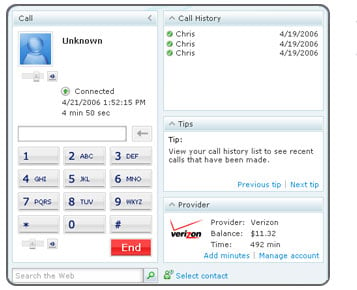
As I said, I've played with the beta. Microsoft Live Messenger uses Verizon for termination and as far as I can tell they are an "exclusive" partner. (Wasn't IDT/Net2Phone Microsoft's exclusive partner in the past on Netmeeting?) I would have liked to have seen Microsoft support any SIP-based termination service provider. I also wish Live Messenger was able connect to any SIP-based phone system so it can act as a desktop call control application. For these two reasons alone, Live Messenger fails my litmus test for the "perfect softphone & IM client" that I recently blogged.

Soon Microsoft Live Messenger will support calling the Yahoo! Messenger with Voice application. Certainly, this deal between two IM heavyweights doesn't bode well for the Skype client which doesn't interoperate with any other IM client. Part of the reason is that Skype uses a proprietary architecture instead of using the SIP standard. Are Skype's days numbered?

Windows Live Messenger is far from perfect, but nevertheless, I will go download the new Windows Live Messenger. It is my primary IM client, but Skype is still my primary VoIP client - for how long remains to be seen.

If you want it, go here to download
| 1 Comment | 0 TrackBacks

Listed below are links to sites that reference Windows Live Messenger Launches:

Windows Live Messenger Launches TrackBack URL : http://blog.tmcnet.com/mt/mt-tb.cgi/25834

1 Comment

| Reply

i just bought a new apple but bought the windows live messanger and installed it into my computer however i cannot seem to get the video working! pease helpsmile

Leave a comment

Recent Activity

Friday

  • Tom Keating posted VoIP in Google ChromeOS
  • Tom Keating tweeted, "VoIP in Google ChromeOS: Google released their ChromeOS operating system yesterday. So naturally, as a VoIP fan I w... http://bit.ly/3T68Ox"

Thursday

More...

Recent Comments

  • precoz: I am wondering, if the VOIP market is still increasing read more
  • Dustin: But that's not the point at all. The majority of read more
  • commangerYEK: Nicely done! read more
  • bstella: How did you get an email address to write to read more
  • Paul: Hi Mike, For Cisco (and normal SIP) passive VoIP recording read more
  • redshirt6: Yes, dying to know if it worked! rs6 read more
  • bruno.clermont: SkypeOut work only if I added their phone number as read more
  • bruno.clermont: I just installed it and try to do some call. read more
  • Kris: Tom, I'm curious. Did you ever get any resolution on read more
  • dsi r4: This is the age of smart phone.Nimbuzz launches it's phone read more

Subscribe to Blog

Recent Entry Images

  • google-chromos-flaphone-voip.jpg
  • startech-conxit-tool.jpg
  • thanksgiving-turkey.jpg
  • verizon-island-of-misfit-toys.jpg
  • mindtouch-cloud.jpg
  • microsoft-windows-20-history.jpg
  • taylor-randall-the-price-is-right.jpg
  • fring-google-android-skype.png
  • gotomeeting-logo.gif

Category Archives

Around TMCnet Blogs

Latest Whitepapers

TMCnet Videos