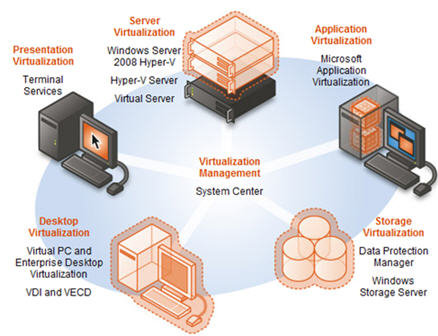
Terminal Services allows you to remotely run applications as well as perform remote administrative duties on servers. It has allowed remote audio to be streamed over IP from the remote computer to your local computer (audio redirection) but has never allowed the microphone or line-in port to be redirected. If Microsoft did, you could do VoIP. Of course, you'd have to redirect from the local PC to the remote server and not the other way around. Well read on...
According to Microsoft:
Microsoft has evolved this concept considerably in Windows Server 2008 R2, so we've decided to rename Terminal Services to Remote Desktop Services (RDS) to better reflect these exciting new features and capabilities. (full name: Windows Server 2008 RDS)
Improving User Experience through new Remote Desktop Protocol capabilities. These new capabilities, enabled with Windows Server 2008 R2 in combination with Windows7, improve significantly the experience of remote users, making it more similar to the experience enjoyed by users accessing local computing resources. These improvements include:
• Multimedia Redirection: Provides high-quality multimedia by redirecting multimedia files and streams so that audio and video content is sent in its original format from the server to the client and rendered using the client's local media playback capabilities.
• True multiple monitor support: Enables support for up to 10 monitors in almost any size, resolution or layout with RemoteApp and remote desktops; applications will behave just like they do when running locally in multi-monitor configurations.
• Audio Input & Recording: VDI (Virtual Desktop Infrastructure) supports any microphone connected to a user's local machine, enables audio recording support for RemoteApp and Remote Desktop. This is useful for VoIP scenarios and also enables speech recognition.
• Aero Glass support: VDI provides users with the ability to use the AeroGlass UI for client desktops; ensuring that remote desktop sessions look and feel like local desktop sessions.
• Direct X redirection: DirectX 9, 10 and 11 applications will render on the server and will be remoted using bitmaps (requiring Direct3D-compatible hardware). If the application supports the new DirectX 10.1 API with remoting extensions the DirectX (2D& 3D) graphics are redirected to the local client to harness the power of the GPU on the user's local device, removing the need for a GPU on the server.
• Improved audio/video synchronization: RDP improvements in Windows Server 2008 R2 are designed to provide closer synchronization of audio and video in most scenarios.
• Language Bar Redirection: Users can easily and seamlessly control the language setting (e.g. right to left) for RemoteApp programs using the local language bar.
• Task Scheduler: This adds the ability in Task Scheduler to ensure that scheduled applications never appear to users connecting with RemoteApp. This reduces user confusion.
You see the bolded part above? Microsoft Remote Desktop Services running on Windows 2008 R2 supports "any microphone connected to a user's local machine, enables audio recording support for RemoteApp and Remote Desktop. This is useful for VoIP scenarios and also enables speech recognition."
This is huge news! Running VoIP on Terminal Services - excuse me 'Remote Desktop Services' (still used to the old name) would allow for virtualized & centralized VoIP deployments. Now if only Microsoft OCS 2007 R2, Microsoft's unified communications platform supported virtualization, then that would be very interesting. As companies are trying to go "green", reduce their overall server footprint, centralize to a single data center, it seems that OCS is requiring more and more servers. Virtualization and RDS could definitely help here.
Also, the improved audio/video synch could also in theory enable video conferencing. It'll be interesting to see if developers come up with to optimize VoIP or video conferencing on Windows Server 2008 RDS. In theory, you should be able to run Skype on Windows Server 2008 RDS for a VoIP or video call. Now that would be interesting indeed.