Windows Vista USB Audio Driver Problem Fixed

May 17, 2007
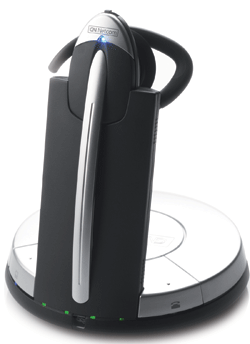
GN Jabra 9350 USB headsetWindows VistaWindows Vista Ultimate Edition is my latest desktop machine at work and some USB audio devices have given me nothing but problems. While most USB audio devices have installed just fine, since they use the standard Microsoft USB audio class, some devices, such as a Jabra Netcom 9350 wouldn't install correctly. Apparently Vista does mandatory DRM checking for USB Audio Devices. I've heard of many users complaining that their Bluetooth headsets no longer work once they upgraded to Vista due to this new DRM protection. After hours of frustration trying to get it to work, I finally decided to call Jabra (who acquired GN Netcom - See today's interesting video of Jabra/GN Netcom on the 10 blog - to see if a Vista driver was available. At first they told me the drivers for all the products were online. I explained this wasn't true - I already looked everywhere on their site and there was no 9350 drivers anywhere. Perhaps the transition from GN Netcom to Jabra due to the acquisition has them a bit confused. In any event, I then spoke to another technician who told me they would need to upgrade my 9350's firmware to be compliant with Vista's more stringent USB audio requirements. He said they do this free of charge if I just ship them the unit to:

Jabra
ATTN GN Repair Center
77 Northeastern Boulevard
Nashua, NH 03062

While this was a great offer, I knew if I sent them the unit and upgraded it to the Vista compliant firmware, the unit might not work on my Windows XP machines. I also didn't want to be without my headset - even if only for a few days. So I decided to hack my Windows Vista USB audio driver. I figured Windows Vista uses a slighly newer usbaudio.sys file, so in theory if I copied my older Windows XP usbaudio.sys file, it might solve my problem. Unfortunately, when I tried to copy my older usbaudio.sys file Windows Vista's File Protection system kicked in and wouldn't let me overwrite this system file. With Windows XP there are workarounds to override this, but I couldn't figure out how to override Vista's file protection. So then I said, "screw it, I'm going into the registry and changing all occurrences of usbaudio.sys to usbaudio-XP-TK.sys (my Windows XP version)." I figured I'd label it XP and my initials (TK) so in case I have any future issues with USB audio devices, I could see my hack job in the registry and remember that it was me that messed with it. After making these changes, I rebooted plugged in my 9350 USB headset, and crossed my fingers. It successfully installed! Woohoo! I checked all my other USB devices and they weren't affected, so my little registry hack job did the trick.

Unfortunately, a few days later a Windows Update undid all my registry changes and changed it back to usbaudio.sys, which then made the 9350 malfunction again. Curses - foiled again! So I went back into the registry, made about 14 registry replacements and exported each one of these keys as a .reg file. So the next time Microsoft decides to undo what I have done, I can just run the .reg file. So far I've had to do this 2 times. It's a bit of a nuisance, but hey, it works. If anyone out there knows how to override Microsoft's File Protection on Vista let me know so I can just overwrite the usbaudio.sys file. In theory this registry hack should work for anyone with a Bluetooth headset that won't install correctly on Windows Vista. I can't believe Microsoft doesn't allow legacy USB audio devices to work. I'm sure there are thousands if not millions of users that paid good money for their Bluetooth headsets or other USB audio devices that no longer work once they upgraded to Vista. It may be past their warranty, so some manufacturers may charge a fee to upgrade the firmware.

Update: 6/27/07
Thanks to a commenter, I discovered there is a hotfix for the USB audio problem on Vista. Namely, KB933262. Unfortunately, you'd have to contact Microsoft to get the hotfix. Fortunately, I found a couple sites that were sharing the hotfix. Just to confirm the files were legit (no virus) I downloaded from both sites and did a file comparison and they were identical. While not a perfect virus checker method, the likelihood is greatly diminished. I'll share the file as well. Click here to download the KB933262 hotfix.


Post a comment
Tags: , , , , , , , , , , , ,

Search Technorati: , , , , , , , , , , , ,
Related Tags: , , , , ,

Listed below are links to sites that reference Windows Vista USB Audio Driver Problem Fixed:

Trackback Pings

TrackBack URL:
http://blog.tmcnet.com/mt3/t.fcgi/32544

Comments to Windows Vista USB Audio Driver Problem Fixed


  1. GN Netcom 9350 :

    Tom,

    Have you tried using your Plantronics USB (910 USB or 510 USB) with Vista? We had to deal with lots of customer problems and complaints with Windows Vista with USB headsets (both wireless & non-wireless)

    www.HeadsetPlus.com


  1. Tom Keating[TypeKey Profile Page] :

    >>Have you tried using your Plantronics USB (910 USB or 510 USB) with Vista?

    I just tried it and I do get the same error when using Vista's original usbaudio.sys file.

    But once I change all the registry settings to my new usbaudio-XP-TK.sys file the Plantronics 510 USB works just fine.

    Unfortunately, Windows Vista undoes my changes after almost every Windows Update, so I had to EXPORT every single Registry Key, save it to my Desktop and run them whenever Vista changes back to the original.

    The key is after merging the registry files (.reg) to reboot - THEN install the USB device. Don't try it before rebooting or it will still use usbaudio.sys.

    This is definitely a hack job - I wish there was a way of replacing the Vista usbaudio.sys file. Would make life so much easier.


  1. GN Netcom headset :

    This has been a big problem for us when it comes to these wireless USB headsets and VISTA. We now basically tell our customers, it's "not compatible" with Windows Vista. An average user will not be able to do what you just did to make it work.

    Maybe the next Vista service pack will fix this??

    www.HeadsetPlus.com


  1. who could it be :

    First I'd suggest taking admin rights over the file by a right click and adding yourself to admins under advanced, also replacing it after booting into safe mode. If nothing else use the Vista install DVD to boot to a command prompt then do it from there.


  1. David :

    Hello Tom,

    Thank you for this fix. I followed your technique and my GN 9350 worked on Vista!

    On my computer, there was 6 registry entries affected :

    - HKLM\SYSTEM\ControlSet(001, 002, 003)\Control\Class\{4D36E96C-E325-11CE-BFC1-08002BE10318}\0009

    - HKLM\SYSTEM\ControlSet(001, 002, 003)\Services\usbaudio

    In each entry, I replaced the "USBAUDIO.SYS" to a "USBAUDIO-XP-DH.sys" (file which I copied from Windows XP) and it worked fine!

    Then, I cancelled the registry changes with my backup file (USBAUDIO-XP-DH.sys becomes USBAUDIO.sys). And i tried to replace the system files (my account is an Administrator one).

    For more clarity, the filesize of Vista's "USBAUDIO.SYS" is 70Kb and the XP one is ~58Kb.

    On my Vista, the USBAUDIO file is located in 2 locations:

    -c:\Windows\System32\Drivers
    -c:\Windows\System32\DriverStore\FileRepository\wdma_usb.inf_9ce240de

    Right click on "c:\windows\system32\usbaudio.sys". Properties, Security, Advanced. I set my admin account ("David") as the owner of the file (third panel). Then I gave the full control rights to my account.

    Then I copied the c:\windows\system32\usbaudio.sys to a "usbaudio - VistaBackup.sys". I put the XP one as the "usbaudio.sys". Everything worked.

    I also noticed that in the 3 registry entries as follow:

    - HKLM\SYSTEM\ControlSet(001, 002, 003)\Control\Class\{4D36E96C-E325-11CE-BFC1-08002BE10318}\0009

    There is a key called "InfPath" which has the "wdma_usb.inf" value. This file is in the "DriverStore\FileRepository\(...)" directory.

    So that's why I did the same action on the USBAUDIO.sys located in that directory (also with a backup).

    After rebooting, my computer recognizes well the usb HeadSet. So i guess it's a good compromise. I will see if the Windows Update keep my files quiet!


  1. Ramey :

    hello

    just posting about your update issue, as you said you need to replace the orginal file, to do this you must change the onwer ship of the file to yours:-

    right click on the file and click on properties,

    tab security-> click advanced,
    tab owner-> then click edit
    select administtors and press ok -> you will get a message telling you that you are about to change the ownership click ok and then click ok till you get back to the frist menu.

    then you have to change the permissons on the file

    click advanced
    in the permissons tab highlight the admin
    the click edit,

    double click on admin again
    select the allow full control box--- then click ok untill you get back to the front screen....

    you can now replace the file without any trouble. and this way it will not be affected with the windows update


  1. Ross :

    See knowledgebase article http://support.microsoft.com/kb/933262/en-us

    and user experience post at http://www.hmsnoodles.com/?p=9


  1. Paul Damaa :

    Thanks for the info.

    I have a pair of USB speakers on my Vista machine,
    I have had both the PC and the speakers a couple of months.
    Then when I booted up yesterday, no sound!
    Of course, there are no drivers to reinstall, so I just uninstalled the device a couple of times, but I was not getting any sound.

    Then I did some research on the Internet, and many Vista users are having problems came accross your page.

    I downloaded the hotfix from your site, that Microsoft have sneaked out, and voila, I now have sound.

    Thanks again!


  1. Lien Goethals :

    Hi All,

    I am trying to use a Skype cordless USB Phone through Windows Vista.

    Unfortunately, it seems to connect and when i go to control panel - sound it says the device is working but it's not.

    no sound comes through.

    Any suggestions?


  1. Matthew Schuessler :

    I too have experienced exactly what you describe, only with a different USB audio device. I have a wireless audio transmitter made by RCA that allows you to "broadcast" your music files throughout your home and use one or more receivers connected to amplifiers wherever you wish. This is a blessing because all my music files reside on the family PC in the basement, but our primary sound system is housed in an upstairs closet, with ceiling speakers throughout.

    In any case, I fould a blog about this and like you was able to successfully revert to the old XP version of usbaudio.sys and my transmitter worked perfectly. Then last week Microsoft pushed out a Windows Update for the Realtek Audio drivers and since then, my transmitter is kaput again. The problem is the "downgrade" hack I used successfuly doesn't conquer this latest thing, so I'm back to square one. When I try to run the Miscrosoft hotfix #933262, it errors out and says "this isn't for your machine."

    Any ideas?


  1. Luc Rader :

    just to let you know: thanks for the info, all of you!!!
    For Matthew: I have an audio transmitter by bluetooth, connected by USB. This works fine without the patch. I did replaced the USBAUDIO.sys and after this, I've got the same message while trying to install the patch (again). Uninstalling (at configuration - program's - updates) solved the problem. Everything works now, my USB-bluetooth transmitter and my GN 9330 wireless headset!

    Thanks, thanks, thanks!


  1. GN Netcom :

    See the latest information on GN Netcom 9350 and Windows Vista compatibility here:

    http://headsetplus.com/faqdesk44/faqdesk_info.html


  1. Geoff :

    Your link in Update: 6/27/07 for the hotfix of ubaudio.sys thanks


  1. Drlorenzo :

    I have a Jabra BT800 bluetooth headset,and I dont know if someone has made possible to work a bluetooth headset with Vista, if somebody knows how to do it, please share the information, Thanks.


  1. luke :

    hello all

    i have a problem i have installed
    my usb phone on vista but when i look
    in divice manager it says that there is a problem
    saying "This device cannot start. (Code 10)"
    i brought it from ebuyer and i cant find anything saying about how to get it to work with vista ultimate i also cant find the manyfacturer of the phone it is just called "CW6611"


    can anyone please help me.


  1. alex :

    I have same problem as luke. I bought new VoIP USB phone from WELLTECH (K-1030B) and in Device Manager I found error This device cannot start. (Code 10).
    I tried replace usbaudio.sys but this didn't work for me. Any ideas??


  1. Nicholas Wright :


    Hi,

    Try the .exe on this forum

    http://forums.microsoft.com/technet/showpost.aspx?pageindex=1&siteid=17&postid=1064120&sb=0&d=1&at=7&ft=11&tf=0&pageid=2

    It replaces the usbaudio.sys file...

    It has cured my code 10 on vista for the FF128 tesco phone, left me with another issue - no microphone... !

    I'm not sure if its just my set up, would welcome someone else giving this a bash on anything other than a DELL pc...


  1. Martin :

    I just want to thank you PROFUSELY for posting the USB/Vista audio patch... could NOT get the bose companion5 system to work at all on this vista laptop and the patch did the trick right off. Wow... thanks a mil.


  1. John Mayer :

    Tom... or someone

    . So then I said, "screw it, I'm going into the registry and changing all occurrences of usbaudio.sys to usbaudio-XP-TK.sys (my Windows XP version)." I figured I'd label it XP and my initials (TK) so in case I have any future issues with USB audio devices, I could see my hack job in the registry and remember that it was me that messed with it. After making these changes, I rebooted plugged in my 9350 USB headset, and crossed my fingers. It successfully installed! Woohoo!

    Ok so does anyone know where i can find those XP usbaudio.sys files?? and how do i replace them with the vista ones? anddddd how do i make the the think to make the reg.file work when vista decides to update??

    Please i need guided steps im a noob and i have the 510 usb headset froms plantronic ive been waiting to fix this like forever thank youu!!


  1. Ryan :

    To replace the usbaudio.sys you will need to take ownership and control of the final you want to get rid of. Open up command prompt as Administrator and type the following:

    takeown /f C:\Windows\System32\drivers\usbaudio.sys

    Then type

    cacls C:\Windows\System32\drivers\usbaudio.sys /G "User Name":F

    You will also have to do this in the File Repository or else it will replace your file.

    takeown /f C:\Windows\System32\DriverStore\FileRepository\usbaudio.inf_xxxxxxxx\usbaudio.sys

    cacls C:\Windows\System32\DriverStore\FileRepository\usbaudio.inf_xxxxxxxx\usbaudio.sys /G "User Name":F

    Verify that your registry is correct and you should now be able to copy and paste your XP version of the file over and replace the Vista version.


(If you haven't left a comment here before, you may need to be approved by the site owner before your comment will appear. Until then, it won't appear on the entry. Thanks for waiting.)