MovableType Facebook Connect Problems and Fixes

I've been testing the Facebook Connect plugin for MovableType 4.23 for the past few days. It's in beta, so I expected to encounter some issues. However, it was so close to working 100% that I stubbornly tried to fix the bugs myself rather than wait for Sixapart to fix them. I thought I'd share what I learned and save you hours of troubleshooting yourself.

First, as an example go check out a post of mine demonstrating my Facebook profile picture automatically being inserted into the comments:
Related Entries with Images & Recent Assets Linked to Entries

Feel free to post a comment using the Sign In link. But you have to be signed into Facebook first to see the Sign In link. (more on that bug later)

Bug #1: Firefox works, but Internet Explorer doesn't work. The Facebook blue sign in button is missing under Sign In link & IE doesn't pull in Facebook profile pictures.

Screenshot:
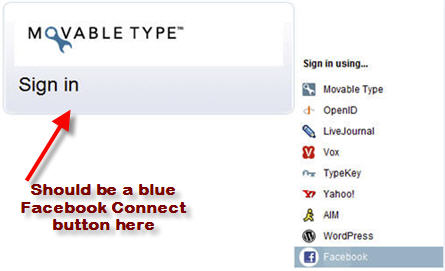
movabletype-facebook-internet-explorer-bug.jpg

Solution: Internet Explorer (IE) is very finicky when it comes to parsing XFBML tags requiring you to explicitly add the proper namespace into your <html> tag.

Per the Facebook FAQ: http://wiki.developers.facebook.com/index.php/Facebook_Connect_FAQ

Q: My browser isn't parsing any XFBML tags. Why?

A: You need to declare Facebook's XML namespace. For each of your Connect HTML pages, use the following as in your <html> tag:

<html xmlns="http://www.w3.org/1999/xhtml" xmlns:fb="http://www.facebook.com/2008/fbml">

So basically I needed the MT logon mt-comments.cgi script to have xmlns:fb="http://www.facebook.com/2008/fbml" added to the <html> tag.

Of course the mt-comments.cgi script doesn't have this code directly in the script since it's a dynamic Perl script. So I had to go searching for how mt-comments.cgi dynamically generates the <html> tag and add the Facebook namespace.

I used 'grep' from a Linux shell to search for where MT generates the <html namespace> code for the logon page. Searching simply for "<html" resulted in way too many possible files.

Fortunately, I noticed some fairly unique text within the generated mt-comments.cgi script. Namely, "    <meta http-equiv=". While other MT files have "<meta http-equiv=" in them, nearly all of them didn't have the 4 padded spaces in front.

So I ran this from the command shell:
/var/www/cgi-bin/mt>grep "    <meta http-equiv=" * -rl

and only a few files were returned. Using the 'vi' editor I edited each one and finally discovered the file I needed to change, namely this one:
[your MT directory]/tmpl/cms/include/chromeless_header.tmpl file

Simply change it from:
<html>
To:
<html xmlns:fb="http://www.facebook.com/2008/fbml">

Now Internet Explorer will work! Problem solved. No need to rebuild blog since the login is creating via a dynamic .cgi script.

Make sure to also add this namespace tag to your Entry/Individual Archives template. Otherwise, IE won't parse the Facebook tags to pull Facebook profile pictures when viewing the web page.

Bug #2: jquery Javascript errors causing Facebook Connect plugin to not work properly. (Note: /mt-static/plugins/FacebookCommenters/signface.js requires the jquery.js file!)
For some reason MT forgot to include jquery.js in the plugin.

Solution:
I had to add this:
<script type="text/javascript" src="http://blog.tmcnet.com/inc/jquery.js"></script> to:
/var/www/cgi-bin/mt/plugins/FacebookCommenters/tmpl/greets.tmpl

and rebuilt my blog. Also need to put the jquery file on your Movable Type server. You can google for jquery.js or just grab my copy.

Bug #3: The Disappearing Sign In link for Movable Type just above the Comment Form

Symptom: When not signed into Facebook, any MT blog using the Facebook Connect plugin will NOT display the Sign In link above the Comment Form. When Signed into Facebook, the Sign In link appears/works.

I'm not the only MT blogger encountering this issue. I've had several email interactions with Ken Edwards about this bug.

His MT blog also has the disappearing Sign In link. Let me show you...Choose either of these video files which are screen captures of my PC's Firefox browser in action showing this Sign In bug:.

movable-type-facebook.mov
movabletype-fb-bug.avi

Video Explanation:
1) I'm not Signed into Facebook
2) I loaded his blog page - http://blogs.bgviews.com/master/community/2009/01/i_think_fbc_works/ and the Sign In button is NOT there
3) I switch tabs to Facebook and sign into Facebook
4) I switch tabs back to his blog page, click on the URL address bar and hit enter to refresh the page
5) Now the Sign In link is magically there.

Certainly requiring a commenter to be logged onto Facebook in order to "see" the Sign In link is obviously a serious bug.

I did a little bit more digging and discovered in my Firefox Error Console that I was getting an error on line 8 of signface.js as seen below. I get this same error on my blog as well as Ken Edwards' blog:
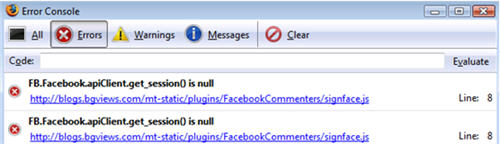
movable-type-facebook-signface-js-error.jpg

So what's in line 8 of signface?
Line 7:        // Get the current logged in user
Line 8:        var viewerId = FB.Facebook.apiClient.get_session().uid;

Obviously, it says 'get_session() is null' because I'm not signed into Facebook. I'm guessing assigning a 'null' value to a variable is not allowed in Javascript. Thus, you MUST be signed into Facebook or else you get this Javascript 'null' error, which apparently causes the Sign In link to fail to load on MovableType entry web pages. There needs to be some sort of 'null' condition testing so the Javascript doesn't 'bomb' and cause the Sign In link to fail.

Both Ken and I are in discussions with one of Sixapart's developers to see if we can resolve this bug. Stay tuned... In the meantime, let me know if any of these tips helped you out by posting a comment.
| 11 Comments | 0 TrackBacks

Listed below are links to sites that reference MovableType Facebook Connect Problems and Fixes:

MovableType Facebook Connect Problems and Fixes TrackBack URL : http://blog.tmcnet.com/mt/mt-tb.cgi/38696

11 Comments

Tom -- thanks so much for writing up these bug reports. We're going to review them and see if we can repro internally. We'll get back to you with what we find.

Awesome Chris! Glad I could be of assistance to SixApart.

Looking forward to what you find & getting FB up and running 100%.

Hi Tom,

It is a Awesome research and useful instruction. I have worried with the IE regarding the facebook login. Now it is solved.

But one help, Profile pictures are not loading. Any help ?

FB works well with the Firefox, opera, Safari browsers. but having problem with the IE

You have already said: "Make sure to also add this namespace tag to your Entry/Individual Archives template. Otherwise, IE won't parse the Facebook tags to pull Facebook profile pictures when viewing the web page."

I am having only one header file having the tag. i have modified the code with "xmlns:fb="http://www.facebook.com/2008/fbml". Is it still i need to change anything else ?

FYI: All the features are working well in other browsers except IE

Please help me.

Thanks,
Kannan.

It looks like you commented out the Facebook profile img src code just below this piece of HTML code:
<fb:profile-pic uid="743068622" facebook-logo="true" linked="false" size = "normal" ></fb:profile-pic>

This section was commented:
<!--<img src="http://external.ak.fbcdn.net/safe_image.php?logo&d=d27f0304fb8ab2dc90313931303baed9&url=http%3A%2F%2Fprofile.ak.facebook.com%2Fv223%2F1067%2F56%2Fn743068622_3196.jpg" > -->

Although you shouldn't need to uncomment this, since the Facebook Javascript is supposed to enable Facebook to replace this code below with a profile image:
<fb:profile-pic uid="743068622" facebook-logo="true" linked="false" size = "normal" ></fb:profile-pic>

But you seem to be able to pull the "actual" image hosted on Facebook's CDN network. Why not just use that? How the heck did you do that by the way? I might like to pull the link to the actual image. Might be faster than javascript image replacement.

I believe for my platform, I have to use jquery.js which enables the replacing of the fb:profile-pic section of code with the user picture. I didn't see jquery in your HTML source code. Not sure if you need it or not though. Maybe you're using something else.

Let me know how it goes.

Kannan,
You have a cool site by the way - http://kazowie.tomcoh.com/

Just checked it out.

Also, just realized I should post a comment using Facebook authentication instead of Movable Type. So this comment is using Facebook.smile

Now my Facebook userpics are not coming in to IE againsad

Following is a solution to the javascript error on signface.js. It may not be the most elegant solution, but it works...

Modify lines 7&8 to be:
// Get the current logged in user
var viewerId = null;
try
{
viewerId = FB.Facebook.apiClient.get_session().uid;
}
catch(err)
{
//Handle errors here
viewerId = null;
}
if (!viewerId) return;

Hello,
and thanks for these great instructions, but I am still having problems with, well, actually any user images appearing, be it facebook or the blog's users. I've changed out the commenter's code with the one supplied in the plugin, to no avail.

Thanks

Thanks for your work on this Facebook plugin its much appreciated. Solved my issue with Bug # 1 on your list I made the change from:

To:

Just as you stated IE logo shows up and works. The "grep" tool is great in hands like yours!

Peter,
Meant to thank you for the signface.js fix. I knew it had to be a simple fix for 'null' checking.

Others can download my version if they want:
http://blog.tmcnet.com/mt-static/plugins/FacebookCommenters/signface.js

Now the Sign In link is always there - whether signed into Facebook or not.

Has there been any developments from Six Apart towards a full working plugin of Facebook Connect with Movable Type? Is there any mention of when one might appear?

Leave a comment

Recent Activity

Today

  • Tom Keating queued Knowing

Friday

  • Tom Keating tweeted, "Microsoft Kills Response Point IP-PBX: Sources informed me a few months ago that Microsoft's SMB IP-PBX called R.. http://tinyurl.com/ksaube"
  • Tom Keating posted Microsoft Kills Response Point IP-PBX

Thursday

  • Tom Keating queued Wolverine
  • Tom Keating queued Quantum of Solace

Tuesday

More...

Recent Comments

  • bablu molla: New iPhone App Offers $1000 for Funny Video Contest New read more
  • brian: Julian, Couldn't eBay hire you then to remove the protective read more
  • Shannon: How do you set it up with your aircard? read more
  • Jim: I have two ACN Iris 3000 video phones, one for read more
  • j: does magic jack work for faxing? read more
  • James F. Grant: Yurla, I haven't had any problem with SKYPE using a read more
  • Michael S.: G-Mail is now offering FREE video phone calling. All you read more
  • Lygia Villarreal: Bob, did you ever find a videophone to market with read more
  • Lygia Villarreal: I only have information on the Globalinx Videophone by 5Linx. read more
  • Antoinette O: Contact the NJ State Attorneys office. I did and they read more

Subscribe to Blog

    View my Microsoft MVP Profile:

Blogroll

Entry Archives

Around TMCnet Blogs

  • Communications and Technology Blog - Tehrani.com:
    Classic Car Show
  • On Rad's Radar?:
    UCF Should be like Speeding
  • VoIP & Gadgets Blog:
    Microsoft Kills Response Point IP-PBX
  • Communications and Technology Blog - Tehrani.com:
    TMC Picnic 2009
  • First Coffee:
    SugarCRM Studied, Broadband 'Crucial,' EGain, OOCOSPI, NetSuite's Zander
  • On Rad's Radar?:
    A New Breed of VAR in the Cloud
  • The Readerboard:
    The Honduras Mess and Nearshore/Offshore Risks
  • VoIP & Gadgets Blog:
    iTunes Outage Problems
  • Latest Whitepapers

    TMCnet Videos