Verizon CDM8940 Cellphone

Verizon CDM8940

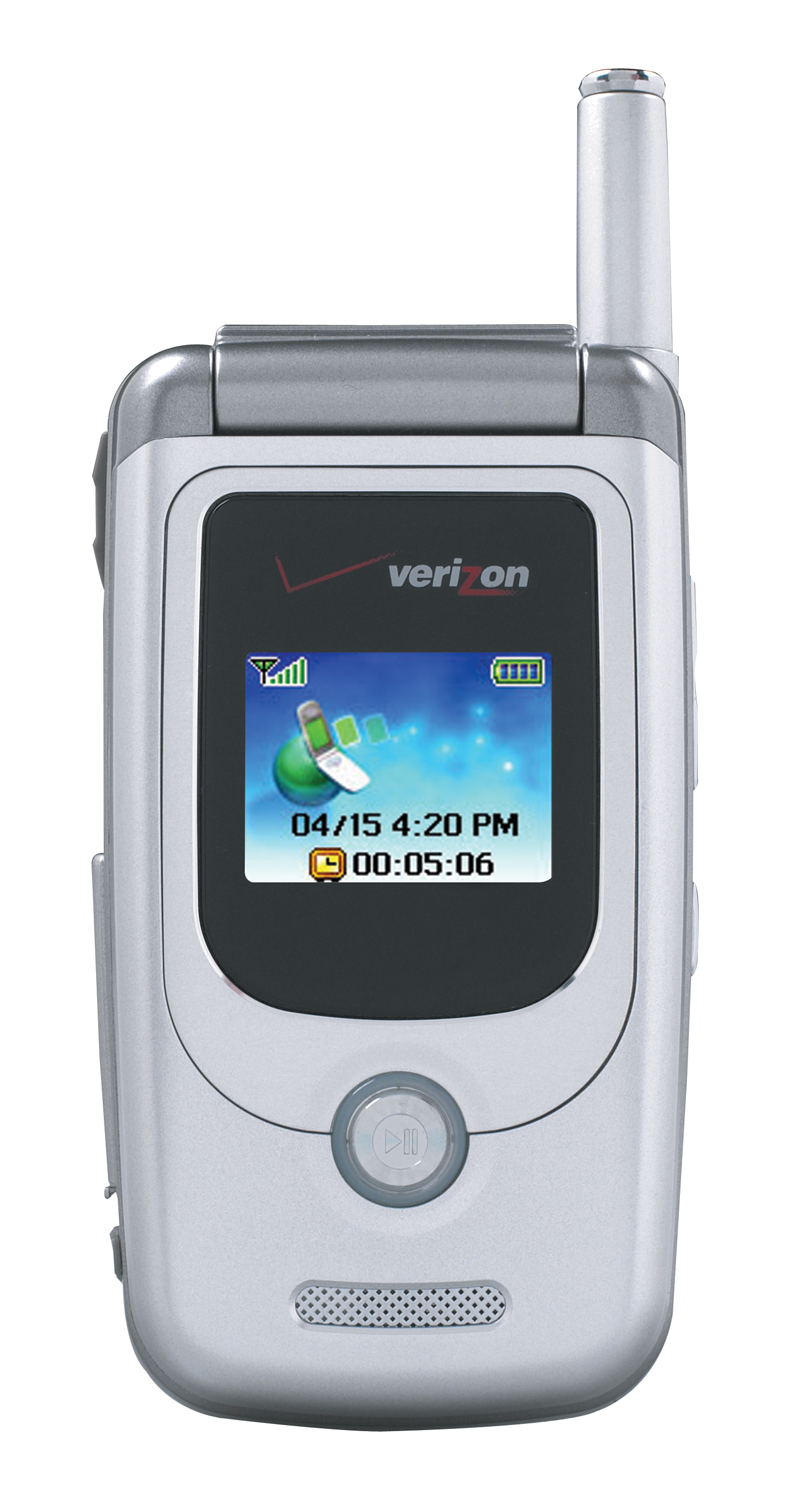
Verizon CDM8940 Closed

Verizon Wireless and UTStarcom Personal Communications Division (formerly Audiovox Communications Corp.), yesterday announced the availability of the CDM8940, that will work on Verizon's EVDO network. It features a built in 1.3 Megapixel camera (with flash) and a mini SD slot that customers can add up to 512 MB of memory - some pretty cool features!

Other Features of the handset include:
- Built-in 1.3 Megapixel Camera with Macro Function and Flash
- Mini-SD Card Slot
- Camcorder
- Two Way Speaker Phone
- Voice Activated Dialing
- Standard Rechargeable LiIon battery (220 minutes talk time/Up to 190 hours standby)
- Dual Band 800MHz CDMA/ 1900 MHz PCS Operation
- EVDO Capable
- Dual LCD Displays
- Inner Display 2.0” TFT with 262 Colors
- Outer Display –1.2 “ with 262 Colors
- MSM6500 Chipset
- CDMA 1X C
- WAP 2.0
- Two-Way Short Message Service/MMS
- GPSOne capability (E911 Phase2 Supported)
- Size: (H) 3.4” x (W) 1.8” x (D) 1.0
- Weight: 3.9 ounces
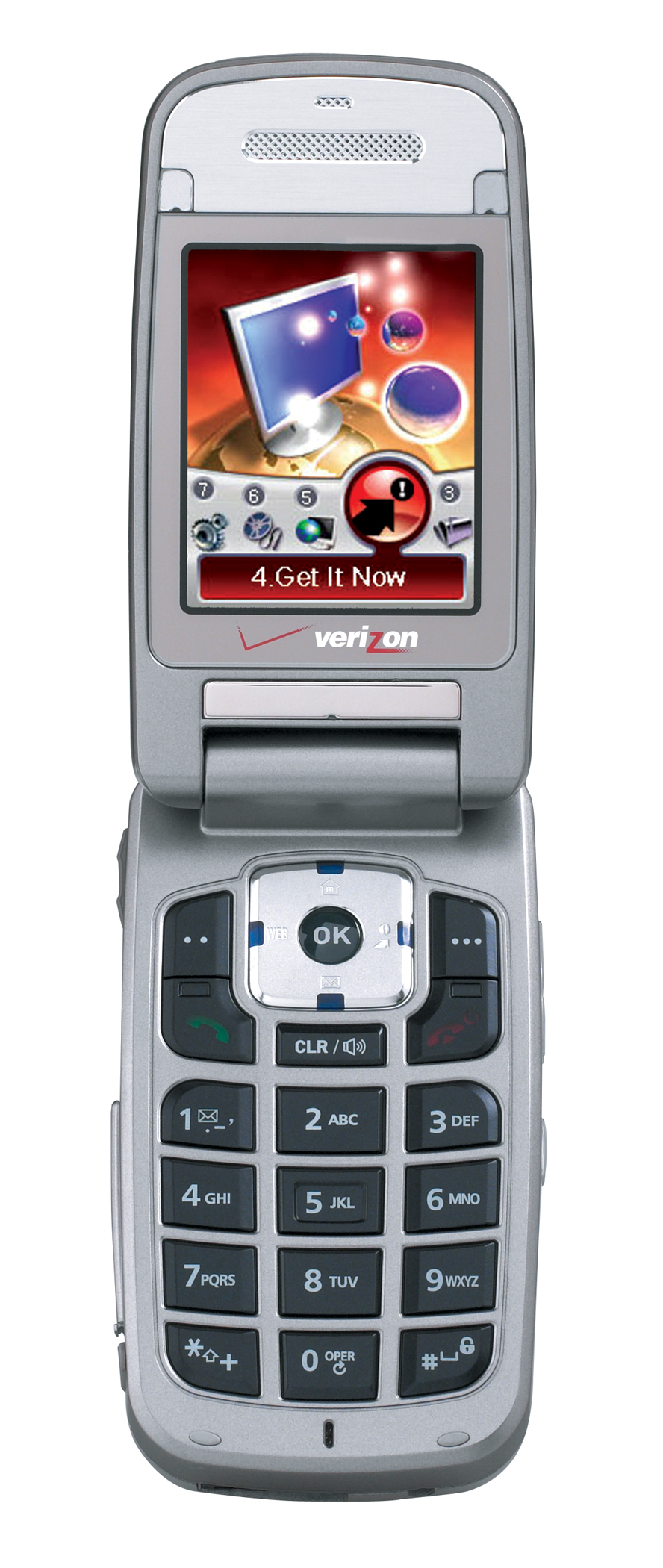
Verizon CDM8940

Verizon CDM8940 Open

Here's the full release:

Compact V CAST 3G Handset Delivers Video on Demand, 1.3 mega-pixel Camera and Built-in Mini-SD Slot for Expanded Memory Capabilities 01/26/2005

BEDMINSTER, NJ and HAUPPAUGE, NY -- Verizon Wireless, the first wireless carrier to deliver widely available 3G EV-DO (Evolution-Data Optimized) wireless broadband network, is now also the first to offer the CDM8940 handset, the only EV-DO phone to feature a built-in 1.3 mega pixel camera/camcorder and memory expansion up to 512 MB with a mini-SD slot. The CDM8940 from UTStarcom Personal Communications (formerly Audiovox Communications Corp.) a division of UTStarcom, Inc. (NASDAQ: UTSI), allows Verizon Wireless customers to access V CAST – the nation’s first 3G wireless broadband multimedia service for consumers – to view crystal clear video on demand and graphics for 3D games.

In addition to the built-in 1.3 mega pixel camera that doubles as a video camcorder and features a macro function and built-in flash, the first-in-class CDM8940 features a large 2-inch, 262K color main screen, perfect for viewing video clips on V CAST – customers can select from 300 daily updated video clips from leading content providers. With an easily accessible mini-SD slot, customers can add up to 512 MB of memory to their CDM8940 so they can store their video clips and photos and take them wherever they go.

“With V CAST and the CDM8940, Verizon Wireless' subscribers can enjoy an unmatched wireless multimedia experience in a compact and reliable wireless phone,” said Philip Christopher, president, UTStarcom Personal Communications Division.

The dual band handset (800/1900 MHz CDMA) is equipped with the MSM6500 chipset with GPSOne capability (E911 Phase2 Supported). It also offers two-way MMS/SMS, a built-in speakerphone, voice-activated dialing and vibrating alert. All these capabilities are combined in a compact, stylish design with dimensions of 3.4” (h) x 1.8” (w) and 1.0” (d) and weighing only 3.9 ounces. The CDM8940 comes with a standard rechargeable LiIon battery for up to 220 minutes of talk time or up to 190 hours of standby time.

The UTStarcom CDM8940 is available for $229.99 after a $70 rebate with a two-year customer agreement. Verizon Wireless products and services are available in more than 1,200 Verizon Wireless Communications Stores and at Circuit City stores nationwide, at and participating RadioShack locations and on the Web at www.verizonwireless.com.

About Verizon Wireless
Verizon Wireless owns and operates the nation’s most reliable wireless network serving 42.1 million voice and data customers. Headquartered in Bedminster, NJ, Verizon Wireless is a joint venture of Verizon Communications (NYSE:VZ) and Vodafone (NYSE and LSE: VOD). Find more information on the Web at www.verizonwireless.com. To receive broadcast-quality video footage of Verizon Wireless operations, log on to the Verizon Wireless Multimedia Library at www.verizonwireless.com/multimedia.

About UTStarcom Personal Communications
UTStarcom Personal Communications (formerly Audiovox Communications Corporation) is a division of UTStarcom, Inc. (NASDAQ: UTSI). The UTStarcom Personal Communications Division provides mobile wireless devices to carriers throughout North and South America.

UTStarcom is a global leader in IP-based, end-to-end networking solutions and international service and support. The company sells its wireline, wireless, optical and switching solutions to operators around the world. Founded in 1991 and headquartered in Alameda, California, the company has research and design operations in New Jersey, China, and India. UTStarcom Personal Communications Division is based in Hauppauge, New York.

UTStarcom is a Fortune 1000 Company. For more information, please visit the company website at www.utstar.com.

| 60 Comments | 0 TrackBacks

Listed below are links to sites that reference Verizon CDM8940 Cellphone:

0 TrackBacks

Verizon CDM8940 Cellphone TrackBack URL : http://blog.tmcnet.com/mt/mt-tb.cgi/1208

60 Comments

Nice of Verizon to disable you from saving pictures you take with the phone onto the SD card. How absolutely amazing are they? Its like they are trying to release useless products that could have had amazing success.

I have gone through four CDM8940 phones from Verizon over the last month. Three of them wouldn't work in the "extended network" mode and the fourth wouldn't even activate. Verizon's most recent response: Contact Audiovox and ask them to send you one that does work.

I'm not sure how much more lame Verizon customer service could get, but based on many years of service it's clear they have jumped the shark. Stay away from this phone and shop a lot before agreeing to any service contract with Verizon Wireless.

Too bad. They used to be good

I just recently bought this phone and already i'm having some trouble with it. First thing i do when i get the phone is start shopping for ringtones on "get it now." i buy the sony musicbox application that says it comes with 5 uses for $7.50. little did i know, each ringtone uses up 2 uses. I download my first ringtone and the damn phone wont let me assign it to my caller i.d.. The ringtone shows up as an mp3 and won't let me assign it anywhere. If anyone knows how to fix this please help me out. thanks.

I have had the phone for two months now, and I'm not too impressed.

Once you buy the phone you have to buy a mini SD card and an adapter for the mini SD card for your computer in order to take advantage of the mp3 playing capabilities, so your initial investment to fully utilize the phone is gonna be a bunch more then just buying the phone.

The mp3 player is not very good. Files can not be in folders, so you basically just have to have a big folder of all your mp3's, unorganized. Also, the player shows the name of the file, so it never makes use of the ID3 tags. You can not fast-forward/reverse in songs. Only skip songs. Besides that the mp3 player capabilities are pretty cool, since you don't have to go through that get-it-now crap and pay a bazillion dollars. You just upload your mp3s from your computer to a mini SD card and pop that into the phone. I use my phone like an iPod shuffle. However, I should note that every 15 minutes maybe, the player will pause for split second, or sometimes a few seconds. I guess its buffer runs out or something.

One nice feature on the phone is you can access all of the mp3 player capabilities + volume from the outside of the phone, so you don't have to open it if you don't want.

You can NOT use the mp3's as ring tones.

The camera sucks, but thats to be expected on a phone. I don't even know why phones include cameras. Who honestly takes pictures with them?

Conclusion: It a phone with a lot of great capabilities that has been severely handicapped by not including the necessary features (such as mp3s as ringtons) and poor usability (no fast-forwarding songs). Knowing what I know now, I would not buy it again.

I own the Audiovox CDM 8940 and it's a wonderful phone. My only complaint is the volume of the speaker phone.

At least it has a font that is legible from 14 inches away. I can't say that for the LG's or the Motorola or all but one Samsung. On those phones, the fonts were obviously set up with teenagers in mind and definitely not 40 somethings.

I have no idea why people say saving pictures on the phone to the Mini-SD card is disabled. There is a folder on the SD for pix (and MP3's and Flix) and they go right in from the gallery, just by selecting "move to SD card". I wonder if some people just assume the card is in there straight out of the box. Since it's a dummy card that comes with the phone, perhaps that's why people claim that feature, as well as the MP3 player is disabled.

I found no Verizon phones that came with mini-SD cards installed, so that's not the phone's fault. That would be Verizon's deal. I found a 512 Mb card on ebay for $36.95. I have no complaints. It's not an IPOD, it's a phone, but to be able to store and play over 100 songs on a cell phone at that price makes it very handy. I always have my phone with me whereas, I may not always carry my Ipod, so that's a nice convenience.

And after you load your songs from your PC and transfer the card back into the phone, it must be turned off and then back on again to properly 'read' the MP3's on the card. Otherwise, it says it can't find any music.

Verizon wants no one to be able to use an MP3 as a tone because they want to nickel and dime you to death,(not the phone's fault) BUT, there is plenty of software floating around out there (try eBAY) as well as usb connector cables that will easily convert your MP3's to acceptable format for the phone. And that software bundle even backs up your address book and sync's it to your PC.

By the way, it's got great range inside of areas where other people's phone can't even get one bar to show up and it's a nice, classy looking PHONE. Which is really what it's supposed to be to begin with. The MP3 feature is wonderful when you consider that it's just an add-on to a communication device. I am delighted with it and glad I don't have to carry another piece of equipment along to hear my music.

The camera is nice. Flash and video are good for a phone. Picture resolution as high as 960x1280. I love the fact that you don't even have to open the phone to take a picture or record a video. And the lens cover and outer switch that zooms the lens out is very cool. The same button that scrolls the MP3's, if held down for a second will utilize the flash as a flashlight. This phone has so many cool little hidden features that people just need to explore.

I'm keeping it.

What people mean by "saving pictures to the mini-SD card is disabled" is that you can't do anything with the pictures there. So you can store the pictures there, and the phone can access them, but if plug the mini-sd card into a computer, the pictures are in some unrecognizable format, so you can't view them, or email them to friends or anything. The pictures are labeled as .jpg files, but neither gimp nor firefox can display the images. If anyone knows how to view the images on a computer, please respond.

I have the same gripe. We were told by the Verizon sales rep that we could download the jpegs to our computer. That's only half true. We can download the files. However, they ARE NOT true jpeg files, and they cannot be read by standard program. If anyone has a way around, that would be great.

I have certain ring tones set for certain people in my phonebook. The ringtone is the same for everyone that calls me.

Once the date and time has passed for an event on my calendar - it's no longer saved on my calendar. I cannot go back and view a passed event. Also, I don't have the option of saving yearly repeated events like birthdays and anniversaries.

Help! Help! Help! I have this phone and I can't figure out how to use the mp3 player. I read all the posts so someone please help me. I bought the mini sd card and downloaded some songs and nothing! Phone says no music files found. I did everything right, so I thought. I downloaded the songs onto the sd card , mp3 format, and still nothing. I put the songs in the mp3 folder in the card, nothing. I turned the phone off then back on with the card, nothing. Please help before I throw this phone through the window!!!

After you have installed the card with MP3's, turn phone off and back on. Then hold down the MP3 PLAY button on the front of the phone for a couple of seconds. This should activate the MP3 PLAYER so you can see the songs. Then scroll down using the side button and pick out what you want to hear. Hit Play again. Does this not work for you?

Thanks for that tip, but I have done that and nothing. Is there a specific folder in the sd card that needs to have the mp3 songs. maybe my sd card doesn't work. I feel like I have tried everything.

I bought the mini sd card and added mp3s to it but my phone won't work. it detects that the card is installed but when i press and hold the play button, it doesn't detect any mp3 files. I also tried to send pictures onto the card from my phone as well and that doesn't work either. anyone who knows why this is happening, please let me know.

Re: Your mini-SD card, have you opened it up in My Computer and checked to make sure it's set up with Folders My_MP3, My_Flix, My_Pix, My_sounds?

I filled my card with MP3's and put it in my phone while the phone was turned off and when I turned it on and held down the button, it came up with my list of MP3's on the front screen.

It's possible your phone is a lemon and needs to be replaced. If you aren't seeing the features you should, I would take it back and get a new one.

I think that it is a lemon because I tried what you just told me and it still doesn't work. I am going to take it back today. Thanks for the info.

I am having trouble loading mp3 songs. It will load about 2 of every 10 I try to load. They are all MP3 format. Any suggestions?

I would like to thank everyone for their help, I finally got it to work. I had to go into security in the phone and configure the sd card. Then I re-entered the songs into the sd card and it worked. The mp3 player works great. Thanks for all of your help.

Wonderful... I don't recall having to do that on my phone, but that's good to know.

My MP3 player didn't work at first either, but after I put it in my phone and then back on the computer, it had automatically made folders on the card labeled MP3, FLIX etc (inside some odd crazy named folder). I moved my mp3's to that folder and it worked. Hope that helps someone out there.

Now it works fine, I'm satisfied.. I can listed to music and podcasts without having to bring along a second device, so that's pretty nifty. I wish they'd make the headphone jacks standard though. Also, it's got alot of tricky video and photo options I've had fun with. I'm a professional photographer so obviously I don't look to this to be anything more than fun. For a phone + a bunch of other junk, it's pretty impressive I'd say.

how do you load files from your computer to the mini sd card? Is synchronizing the card necesary? help please someone

Is there any software available to convert the images once you have them on the sd card to read them on your computer?

It's times like this when I hate big companies. My guess is that they do this to force customers to use their messaging/pix website where it costs $.25 a msg or $5/mo to use unlimited. If you could just get them off on the sd card where would them make their extra money. I could be wrong but that's the feeling I get. Let's see how we can get the most money out of our customers as possible.

Just wondering what size card everyone isusing in their phones. I have a kingston 256mb card and i tried everything you guys said and it still doesnt work...

I have a 256mb also. Did you read Melrod's post about going into the security of the phone and formatting it?

Ok I had this phone for a few days and it seems like I already want to throw it out of a window! I can not get the music files I download onto the mini sd card to work. Do you have to buy the music mp3 player first? Also do you have to format the sd card or something like that first before doing anything? Can someone please please help me figure out what to do step by step starting from after you opened the sd card package and activating your phone?

Ok I figured out what the problem is. I finally got my mp3s to work this weekend. What you have to do...


1 With a BRAND NEW CARD...yes i said brand new, meaning if you have a card that u tried to use before or already put mp3s on it you have to get a new one. So, with a brand new card put it straight into the phone. Go to Menu>7>4 do ur security code, and then format it. After you format it you must go to Tranfer to new phone to set the card up.

2. Turn your phone off, turn it on and then turn it off again.

3. Now you can put the Mini SD card into a reader and transfer the mp3's. A couple things though...First the folder will be named 2XXXX where the x's are different letters. Then there will be an mp3 folder. Put the mp3s in there BUT NOT IN SEPARATE FOLDERS. If you put folders into the mp3 folder you will not be able to listen to your mp3s.

4. With the PHONE OFF put the card into the phone and turn it on. Now you should be able to play the mp3s. If not, keep searching because this is what i had to do...buy a completely new card and format it immediately. I read in a bunch of forums and people called it "de-virginizing" the card

So if its possible to return the first card, do it. Just tell them its defective and request a new one...most stores will, it worked for me.

GOOD LUCK!!!

Ok I figured out what the problem is. I finally got my mp3s to work this weekend. What you have to do...


1 With a BRAND NEW CARD...yes i said brand new, meaning if you have a card that u tried to use before or already put mp3s on it you have to get a new one. So, with a brand new card put it straight into the phone. Go to Menu>7>4 do ur security code, and then format it. After you format it you must go to Tranfer to new phone to set the card up.

2. Turn your phone off, turn it on and then turn it off again.

3. Now you can put the Mini SD card into a reader and transfer the mp3's. A couple things though...First the folder will be named 2AKLJ or something of that sort. Then there will be an mp3 folder. Put the mp3s in there BUT NOT IN SEPARATE FOLDERS. If you put folders into the mp3 folder you will not be able to listen to your mp3s.

4. With the PHONE OFF put the card into the phone and turn it on. Now you should be able to play the mp3s. If not, keep searching because this is what i had to do...buy a completely new card and format it immediately. I read in a bunch of forums and people called it "de-virginizing" the card

So if its possible to return the first card, do it. Just tell them its defective and request a new one...most stores will, it worked for me.

GOOD LUCK!!!

Does anyone know why the "JPG" images can't be read by a computer nor why known good JPGs copied onto the miniSD card can't be opened by the phone?

There has to be a conversion process. Has anyone hacked the "Verizon Wireless JPG" format yet?

One word of advice, YOU DO NOT NEED TO BUY A BRAND NEW CARD. Simply format the card and restart the phone and you should have your oddly named folder on the card. I didn't have to do the transfer to another phone option, so you don't have to do that. Then just put your mp3s into the weird folder/mp3 and you'll be fine. De-virginizing? That's the dumbest thing I've ever heard.

i have bought this phone and i also got the cable to connect it to my computer. I can use ringtones, but is there anyway if i can download the music directly to my sim card and play it in the music folder?

bown, I had bought a cord for my phone but the guy i called said that you have to buy a converter, you can not use that cord

Thank God for this page! I just bought this phone and have been struggling with many of the same issues.

The manual is nearly useless when it comes to Mini SD usage! In particular it would have been nice to know about the importance of restarting the phone after inserting the card. I was starting to think my phone wasn't working right.

A seperate Mini SD card reader is probably cheaper than buying a cable to hook the phone to your PC.

Verizon's LG brand phones with similar features create JPG files that can be viewed on a computer. What's the problem with these Audiovox files? Also, my regular jpegs are not viewable on the phone when I transfer them to the card.

Is there any potential harm in inserting and removing the card from the phone with power on?

When I bought the phone, the first one the guy pulled out wouldn't activate. He struggled for an hour before trying another one. So there is definitely potential for lemons of this model.

alright...... i just got my 512mb minisd card in the mail today. when i put it in the phone and try to format it, it keeps sayin "format failed, please try again". Whats up with that? It's a brand new card. Any help would be great.


thanks-jake

hi my name is amber i just finsh buying a mini sd card for my phone does any one know if there a possible way of putting music videos on to the phone. and does any one know why the speaker phone suxs plz can some one help me thanks

No you cannot download music videos onto this phone. About the speaker phone, that's just the way it is. It sucks. Such is life.

Ok, here's a little tip:

I noticed people whining about not being able to use .mp3 files as ringtones. Well, it turns out that this phone is pretty clever in undocumented ways.

Try emailing an .mp3 file to your phone. It seems to convert it into something that your phone can use as a ringtone. The drawback to this, of course, is that it's considered a PIX/FLIX message, and you are charged accordinglly.

The same seems to work with other formats.

I did, however, have trouble with images. I'm still looking for a format converter so I can use the Mini-SD card to transport images (not just store them), but even emailed (or messaged) images seem to have some shortcomings.

I was only able to get the thing to understand images in resolutions native to the camera. Portrait or landscape, it didn't matter (though it did pad the landscapes with white space), but anything other than native resolutions would display as blank once saved to the Media Gallery.

Any other tips or hints? Or problems?

I'm using a 512 mb card I found at NewEgg.

I too have been very disapointed by this phone. I found it to be disorganize and inefficient. My charging port broke in the 4th month that had the phone on the first one I had, so after buying another charger (which didn't help of course) I finally took it into the verizon store. The issued me a new one and I had to return the old one within so many days. I wanted to save the pictures so I bought a mini SD card. I didn't have enough time to figure out how to save the pictures to the Mini SD (I kept getting an error message) so I finally gave up and sacrificed the pictures. I rarely use the camera function anyway. I wish I had gotten a more well thought out phone or just kept my old one.

So I just bought this phone and I don't have an SD card slot on my computer so is the only way to get music on the phone using the USB cable?

I can't get the caller id to work or the personalized ringers to work. Is there a trick to this? The phone gives me the options, I set them and then someone calls and all I see is the phone number. No caller id, no name, no personalized ringer. Help.

Why would formatting the card fail? I stored things to the card on my old phone and verified that they were stored. Now two different new phones can't read the card. I copied the files to my computer and tried to reformat the card and it failed. Now the card is blank. What next, other than buying a new card?

i got the phone like 6 months ago and tried to get mp3 player work so hard. today i finally got SD card reader (i got mini SD card about a month ago) and downloaded music files but it said no music files found. When i found this page, i tried everything. turned the phone off, .. also i tried to format the card but it said FORMAT FAILED PLEASE TRY AGAIN!! ugh@!!!!! This is my second CDM 8940 phone because i had to change the one i got the first time cuz the letters on the subscreen were demented. This is the second one and now the mp3 player doesnt work. i couldve gotten an ipod shuffler with the money i sacrificed on this phone to made the mp3 work! please help, do you think they'll exchange to a new phone after 6 months of usage? please reply or e-mail please!!!!!!!!

I have a Sandisk mini-Sd card and i've had no problems with the mp3's. I just wanted to know if this was a defect in the phone or what. I can't images from my computer to appear on my phone is there any way of getting them to show up? Also can you put movies or tv shows on your phone?

How about a class action law suit? I just moved pictures of my newborn son and pictures of the world trade center to my computer. I could view the pictures, and I couldn't move them back to the phone.

They are lost forever and I am soooo pissed.

The MP3 files don't work for me either.

I am heartbroken with the loss of the pictures...

Fuck Audiovox and Verizon to Hell.

Ditto on the previous entry. Mp3 files work BUT the pictures of my 3 week old son are not recognized by my computer. Not a good situation. I'm on board for the lawsuit. Support had no solution for me as of yet.

i have a cell phone Verizon CDM8940, and i don´t know what is the security code for the phone. Thanks

i have a cell phone Verizon CDM8940, and i don´t know what is the security code for the phone. Thanks

I too am unable to format my card. I just get a message saying, "formatting failed, try again." Has anyone figured this problem out?
A little more detail:
I was able to get the card working fine and I could play mp3 files. Then one day the phone just stopped recognizing those same files, and would respond with "no music files" when I tried to play them. At this point I can't even store my photos taken with the phone on the card. This feature did work previously. Now all of my pics and flix are on my computer, which of coarse can't open/read them. To make things even better, my phone no longer can open them either.

Incidentally, what happened to the concept of user-friendly technology?! (does a retorical question get a "?" or a period?) I second Dan's "Thank God for this page" sentiment. These replies have been very helpful.

But alas, I have run to a dead end with this formatting failed problem. Does anyone know what I can do to format the car?

The default security code is the last 4 digits of your cell number.

A QUESTION

I too am unable to format my card. I just get a message saying, "formatting failed, try again." Has anyone figured this problem out?

A little more detail:
I was able to get the card working fine and I could play mp3 files. Then one day the phone just stopped recognizing those same files, and would respond with "no music files" when I tried to play them. At this point I can't even store my photos taken with the phone on the card. This feature did work previously. Now all of my pics and flix are on my computer, which of coarse can't open/read them. To make things even better, my phone no longer can open them either.

Incidentally, what happened to the concept of user-friendly technology?! (does a retorical question get a "?" or a period?) I second Dan's "Thank God for this page" sentiment. These replies have been very helpful.

But alas, I have run into a dead end with this formatting failed problem. Does anyone know what I can do to format the card?

I am having problem in downloading JPEG images. Looks are great. Can it be used for watching the football game?

Best thing about this phone was is the reception. For a decent price, I get reception pretty much everywhere. The camera? Useful for things like pics of liscene plates, reminders, nothing to be printed... The mp3 player? It's pretty good for just being in a phone. I just throw some books-on-CD onto it and use it on the train.

I use the CDM8940 for taking pictures and 15 sec movies. My problem is accessing the pictures without emailing them to my computer. I can't use my $14.95 universal card reader I got at SAM'S Club (files dowload, but can't be opened)or any picture kiosk at retail stores to view the pictures. I was able to store pictures on my 512mb ScanDisk mini SD card without formating it- but I went ahead and moved the files to my phone and emailed a bunch to clear my card to format it, but nothing can read it. You can call Audiovox tech support at 1800 229-1235 with any questions about your phone (NOBODY at Verizon can help you). The tech lady hinted that there was a way to download pictures from your card, but wouldn't tell me as per Verizon's policy...I could'nt get the program BITPIN to work-- in fact under "help topics" the CDM8900 comes up with its own heading and warns us not to use it as its software is too shoddy and fragile to use their program. Has anyone been able to read pictures on their computer with a Verizon CDM8940? Thanks!

The only wat to transfer photos from the CDM8940 phone is to use a usb data transfer cable, and not the mini SD card, I just purchased a mobile phone managemennt tool software kit, and it works.

If you use a USB data transfer kit you can transfer photos from the cell phone to a computer.

I have had my Verizon CDM840 for 2 yrs and up till now I was satisfied. I decided to purchase a SD Mini card and was able to get it formatted and load files to it. As mentioned several times on this site no luck in playing music. I have cleared the files, reformated and no luck. After reading the previous entries and trying the suggestions no luck. I went to the Verizon store before finding this site and they took the phone to the back. The lady came back saying the file had no saved music on it and to save it. I think this was a line, knowing this is a fault with the phone. I can see the files in there on the PC. After reading the countless complaints about this feature it must be hit or miss with each phone. I am frustrated, I wish I have never explored this feature, I was happy with the phone.
Cathy-San Diego

Im getting the "Format Failed" error also.

I will send anyone $5 over PayPal if they solve this problem for me. No joke. This is making me mad. Haha. Feel free to email me: bobbyschultz2 (atsign) aim.com.

Example:test (atsign) aim.com = test@aim.com

thanks a ton
Bobby

Ok here goes-
There are several black images in the photo gallery. Every time I try to delete them, a msg. pops up saying Invalid Operation. I'm wondering if these black images are taking up space since any photo after these I am not able to email pix.

Thanks for any help

Why won't my flix videos that I take on my verizon phone work when I send them to email? I try to open them up and they won't open. Anyone have any suggestions?

Thank you!

I bought a mini SD card online and it just says its a "USB 2.0 SD MicroSD MiniSD MMC Card Reader" Will that work for the mp3?

I am in the process of changing my phone and have encountered Verizon's proprietary disabling of the transfer of pics and flix via the mini-sd card. Has anyone had any success in finding ways to circumvent "big bell's" disabling and get the images to transfer to their PC via SD card reader?

Same issue...has anyone found a program to open "my flix" videos from Verizon camera phones on a desktop pc?
If so, please contact me at "daktuh@yahoo.com"
Thanks,
Peter

my screen is blank and white...you can still call out and receive calls but cant see whos calling or anything for that matter....i havent done anything other than let it go dead and then i recharged it....tyrned it back on and now it wont show anything on the display screens...is there anything i can do to make my phone work again...? i need help...:(

Leave comment to Verizon CDM8940 Cellphone article

Subscribe to Blog