



Recently in Asterisk Category

Digium has an excellent post today titled The Rumors of Our Death discussing Skype for Asterisk (SFA) and the recently launched (beta) SkypeforSIP (SFS). There has been much discussion on the blogosphere, twitter, and elsewhere if SFS means the death of SFA. Some were even seen carting Skype for Asterisk away into the trashbin of other failed software endeavors, as seen here:

It's not a pretty sight when people write you off for dead when you're really not. But wait just a second. Digium's Steve Sokol explains late today that SFA is not dead. He writes:

With Skype's recent announcement of Skype For SIP there has been a great deal of pontification on the impending death of the not-yet-released Skype For Asterisk.  I'd like to take a moment to explain why Skype For SIP (SFS) does not spell the end for Skype For Asterisk (SFA), and why Skype For Asterisk is still in beta.

First, the key differences between Skype For SIP and Skype For Asterisk:

  • SFA can handle incoming Skype calls from any user on the Skype network.  SFS can receive incoming calls from Skype users only by statically mapping a Skype name to a SIP account.
  • SFA can place calls to any user on the Skype network.  SFS cannot place calls to Skype users.
  • SFA includes support for Skype presence information.  SFS has no support for presence.
  • SFA includes buddy list management.  SFS has no buddy list management features.
Steve lists more differences, but I don't want to steal his thunder. Go read his post. I knew there were key advantages in SFA over SFS and there was so much confusion out there, I was tempted to write a comparative chart, but was too busy. In any event, it's nice to see Digium clarifying the advantages of Skype for Asterisk. Any questions?

trixbox 2.8 beta is out

March 26, 2009 9:54 PM | 0 Comments
trixbox-logo.jpg In case you missed it, Andrew posted that trixbox 2.8 beta is available and is based on the latest version of Asterisk 1.6. Andrew, is even very complimentary over Asterisk 1.6 & Digum, which is nice to see coming from a Fonality employee:
We have been testing Asterisk 1.6 and DAHDI (the replacement for zaptel) since they came out last year. I am happy to say they are coming along quite nicely. Digium has worked hard on 1.6 with a lot of attention paid to reliability and scalability. I am happy to say our testing shows Asterisk 1.6 is ready for prime time!
You can grab trixbox 2.8 beta .iso image here
audioroute-windows-mobile-12020.jpg Finally a software tool called AudioRoute that can be used to route Windows Mobile audio from the earpiece speaker to the backspeaker and vice-versa. This is especially needed for VoIP applications on Windows Mobile phones.

I've tested several VoIP apps (SIP clients, Skype, etc.) on my Windows Mobile XV6700 phone and other Windows Mobiles and from what I understand the carrier forced the hardware manufacturers to block VoIP applications from using the earpiece for listening to the remote caller. You couldn't even use speakerphone. Instead, you were forced to use the backspeaker, a tiny low-quality speaker located on the back of the phone, which made phone quality horrendous when making VoIP calls. I'd have to flip the phone over when the person was talking due to low volume & quality, and then flip it back over to talk into the microphone. It was all but unusable.

Well glory glory hallelujah! I never thought the day would come when someone would come up with a solution. According to Teksoft, "After several years of tests and many questions in the development forum, we've finally did it: a tool to route the audio to the earpiece speaker is available, and we've released it as freeware." Woohoo! Now I can register my SIP client on my Windows Mobile to my Asterisk-based IP-PBX and make/receive VoIP calls.

Features:
  • Routes the audio output to earpiece or backspeaker
  • VoIP compatible
  • Easy to use User Interface
  • Command line support
  • Uses Teksoft's DynRIL library
It's compatible with Pocket PC and Smartphone Windows Mobile 5.0 / WM6.0 and above

Usage (via forums)
Install the CAB and use the titlebar icon to open the user interface.


The first icon routes the audio to the earpiece speaker.
The second blue icon, can be used to route the audio to the backspeaker.
The orange icon, routes the audio to the speakerphone, while in a phone call.
You can also use the bottom slider to move the taskbar icon, or the about button to show this page.
The top-right square hides the user interface.

Command line
This tool can be executed by command line with parameters.
You can execute /program files/teksoft/audioRoute/audioRoute.exe with the following:
-earpiece , routes the audio to the earpiece
-backspeaker , routes the audio to the backspeaker
-speakerphone , while in a phone call, activates the speakerphone
-switch , toggles between earpiece and backspeaker
Code:

 audioroute.exe -earpiece
 audioroute.exe -backspeaker
 etc.


Download
The CAB file is available in the freeware section of www.teksoftco.com, direct link here.

Google Voice Meet Asterisk

March 23, 2009 11:06 AM | 1 Comment
Nerd Vittles has another cool Asterisk recipe that combines Google Voice, voicemail transcription (via Google Voice), free calling, and of course Asterisk. Nerd does some packet sniffing and determines that Google Voice, powered by Grandcentral, is using SIP. What's most interesting is that Nerd determine that your SIP connection and your Google Voice phone bill is only protected by a 4-digit PIN. Yikes! That's not good.

Anyway, here's a teaser of Nerd's awesome recipe:

what we want to do is examine some ways to integrate the Google Voice feature set into our existing Asterisk implementations. The potential benefits are enormous. There's free calling in the U.S., free distribution of inbound calls to multiple phone numbers scattered around the country, free SMS messaging and delivery by email, free transcription of voicemail messages into text-based emails, free conferencing, and free GOOG-411, a voice-activated service that let's you find nearby businesses by saying where you are and what you're looking for. For today, we've set our sights on the Google Voice feature set which is easiest to integrate into existing Asterisk systems: free voicemail message transcription, free calling in the United States, and free GOOG-411 directory assistance. For lack of a better term, we call it... Googlified Messaging™. ;-)

Well, what are you waiting for? Go read the entire recipe and tutorial. Great stuff!
Today, Skype announced it is enabling SIP-based IP-PBX to connect to the Skype network, which will allow low-cost SkypeOut calling, receiving calls from Skype users, and receiving calls from regular PSTN phone lines. Outbound calls from IP-PBX SIP handsets to Skype phones is not part of this news announcement. Skype commented it is too difficult to dial Skype usernames from a desktop handset.

Features:
  • Receive and manage inbound calls from the 405 million Skype users worldwide on SIP-enabled PBX systems, connecting the company website to the PBX system using Skype click-to-call buttons
  • Place calls via Skype to landlines and mobile phones worldwide from any connected SIP-enabled PBX, saving your business money with Skype's low rates
  • Purchase Skype online numbers to receive calls to the corporate PBX from landlines or mobile phones
  • Manage Skype calls using your existing hardware and system applications such as call routing, conferencing, phone menus, voicemail and call recording and logging - no additional downloads or training are required

Skype For SIP is perfectly suited to businesses that already have IP-PBXs and want to connect to Skype's network which offers low-cost calling. Skype for SIP is being launched as a closed beta program, but you can register and try to be part of the beta. Interestingly, Asterisk for Skype, a SIP-based (and IAX) open-source IP-PBX was the first to offer some tight integration with Skype.

If Skype continues to open their proprietary doors (they recently announced they were giving away the SILK codec), and now they've finally enabled SIP-to-Skype integration, then we can see a momentous shift from SIP trunking to Skype trunking. Customers will not only choose the lowest cost IP trunk, but also the one with the best quality. Skype is renowned for their high-quality due to their P2P architecture, so companies will look very closely at Skype trunking instead of SIP trunking.

And of course if customers shift to purchasing Skype trunks, the SIP trunks will have to follow suit, which means a win-win for businesses looking for low-cost calling.

Via Skype blog

Update: Also check out Dan York's analysis and Rich Tehrani's post.
Asterisk has just added 'official' MFC/R2 support for chan_dahdi. Here's the commit. The modifications to chan_dahdi, and the supporting library, LibOpenR2, were both written by Moises Silva.

According to the commit:
Many users are using this code, or a variant of it, in Asterisk 1.2, 1.4 and 1.6 in Brazil, México and Argentina. An unknown number of users (but at least 1) are using it in each of the following countries: Colombia, Nepal, Thailand, Venezuela, Perú, and probably others.

To use this code, LibOpenR2 must be installed from http://www.libopenr2.org/. Information about configuration can be found in configs/chan_dahdi.conf.sample.

Via Russell Bryant
spinvoxluvsskype.jpg
Skype
users can now have their voicemails converted into text via SpinVox. Today, SpinVox announced that your Skype voicemails transcribed and sent to you via SMS for €0.20/£0.17/25 cents plus the cost of the SMS. SimulScribe, now PhoneTag, is a similar service, that Rich Tehrani uses regularly. GotVoice is yet another one.

But how about another cool TTS app that is currently 'free' and works with the popular open source Asterisk platform? Weavver's VoiceScribe is a beta web-service for Asterisk that converts your voicemail to text and delivers them to you via e-mail. What's cool about this is how easy it is to integrate with Asterisk, trixbox CE, and trixbox Pro. I tested it with trixbox Pro and it worked flawlessly in just minutes. It uses the Nuance engine. The accuracy was OK, but I'm told by Weavver's Mitchel Constantin, "Quality will get much better."

Simply edit /etc/asterisk/voicemail.conf, go to the [general] section and make sure wav49 is the default format. Also add a line with mailcmd that sends an email with your voicemail attachment to their hosted servers.

Here's a sample of the 4 lines you need in voicemail.conf:
Thumbnail image for pika-warp-appliance-1.jpg
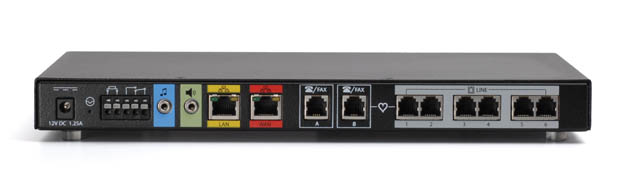
PIKA Technologies announced today the release of a BRI expansion module for the PIKA WARP Appliance. The PIKA WARP Appliance is a very flexible hardware telecom appliance that can run various flavors of Asterisk, including native Asterisk, Schmooze, trixbox CE, and others. They even support FreePBX, the popular front-end GUI for Asterisk. They support FreeSwitch as well.

PIKA's BRI module supports two ports and four channels, allowing the WARP Appliance to reach a total port density of four ports and eight channels when two BRI modules are installed. BRI is very popular in Europe and is very commonly used in the SMB space, making the WARP Appliance a suitable option.

Check out my PIKA WARP Appliance for Asterisk review for more details on this flexible piece of hardware.

cisco-logo.gif In 2006, I came across a Network World article, which espoused the fact that Sam Houston State University (SHSU) had switched from the Cisco CallManager IP-PBX to open source Asterisk. I wrote about this news since 6,000 students and faculty were moved off Cisco to the open source Asterisk IP-PBX, which was great news for the open source Asterisk community. This deployment demonstrated that Asterisk could scale and put to rest one of the main complaints against Asterisk.

jason_fuermann.jpg Well, 3 years have passed, and according to this thread written by Jason Fuermann, who is responsible for SHSU's IP phone system, SHSU has switched back to Cisco from Asterisk. Say what?

ezcallerid-cnam-service.jpg
EZ Call, Inc. today announced the launch of EZCallerID.com, a new service that provides enhanced Caller ID, also known as CNAM, for VoIP calls. The hosted CNAM service gives you not just the phone number, but the name of the person calling.

Most SIP trunking providers do not provide the caller's name with Caller ID on inbound calls. EZCallerID.com solves this issue by simply having you route your inbound calls to their server. They insert the caller's name and send the call back to your IP-PBX.

How's it work? Simply put, EZCallerID.com connects to the national databases that contain the name associated with each phone number, perform a reverse lookup, insert the CallerID info into the From SIP header and then send the call back to you.

This is similar in concept to my recent article, CNAM (CallerID with Name) on Asterisk using Reverse Phone number lookup, but in this case, no Asterisk PBX is required. It works with any SIP-based IP-PBX. It is a hosted offering, so there is a fee of course, but it's not  expensive. They only charge $0.015 per call (or $1.50 for every 100 calls). The service is available on a pay-as-you-go basis ($10 minimum initial charge), with no recurring charges or minimum monthly commitment.

Head on over to EZCallerID.com if you want to sign-up.

Hat tip to Eric Hernaez for the news tip
Reblog this post [with Zemanta]
Previous 1 2 3 4 5 6 7 8 9 10 11 12 13 14 15 16 17 18 19 Next

Subscribe to Blog

Archives