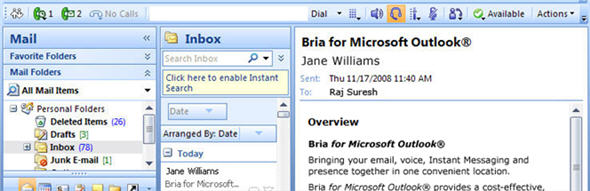
The toolbar gives users easy access to VoIP call control aling with personal information manager (PIM) info stored within Outlook Contacts. On an inbound or outbound call, it will automatically perform a lookup of your Contacts to find a match so you can see exactly who you are calling or who is calling you. With a minimally invasive GUI that fits right into Outlook, an application that many users "live in" as party of their daily work, Bria for Microsoft Outlook will certainly have some interest.
According to Counterpath, "Appearing as part of Outlook's toolbar, the Bria plug-in provides a non-intrusive VoIP interface that does not infringe on the PIM's traditional three-pane design or workspace real estate - preserving the productivity benefits of Outlook while integrating value-added VoIP services."
"CounterPath is committed to enabling unified communications in a way that employs a user's favored application tools, preferred operating systems and devices, and existing telephone infrastructures," said Donovan Jones, President and CEO for CounterPath. "As Microsoft Outlook is one of the most utilized PC applications in the business market today, integrating our softphone into Outlook was a logical move and positions us to fulfill the strong demand that we are seeing from our existing channel partners as well as the overall market for this type of solution. Our Bria for Microsoft Outlook application is designed to increase productivity while reducing overall costs, making the softphone experience even better."
You can click-to-dial from your Outlook Contacts, but also from a scheduled Calendar meeting. You simply highlight the meeting, then click the toolbar icon and it will display the attendee participants allowing you to select & click-to-dial.
Bria for Microsoft Outlook features include:
- Direct call from email, Calendar and contact list (click-to-dial)
- Multiple simultaneous calls
- Call display
- Call transfer
- Call forwarding
- Redial
- Call Hold
- Call history
- Missed call indicator and display
- Message waiting
- Voice mail access
- Speaker phone and mute
- Screen pops and call handling options such as call hold, forward and
ignore
- Click-to-Dial from any location within Outlook
- Ability to manage multiple simultaneous calls
- Message waiting indicator and one-click access to voicemail
In addition to calling features, Bria for Microsoft Outlook provides support for narrow and wideband codecs, zero touch configuration during installation, auto-updates and NAT traversal using STUN and ICE. Bria for Microsoft Outlook also offers flexible branding options, allowing solution providers to incorporate their brand into the integrated VoIP-to-Outlook user experience.
Bria for Microsoft Outlook will be available for purchase at the CounterPath website beginning December 9, 2008. To learn more, head to http://counterpath.com/bria-for-microsoft-outlook.html.