| Ratings | Score |
| Installation |  |
| Documentation | |
| Features |  |
| Usability |  |
| Value |  |
| Performance | |
| Overall | |
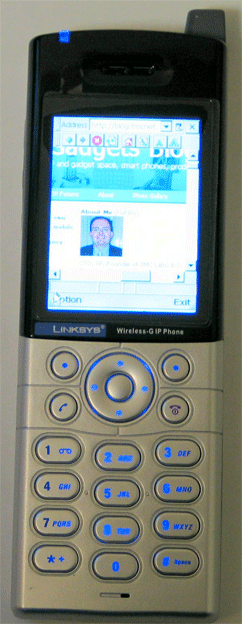
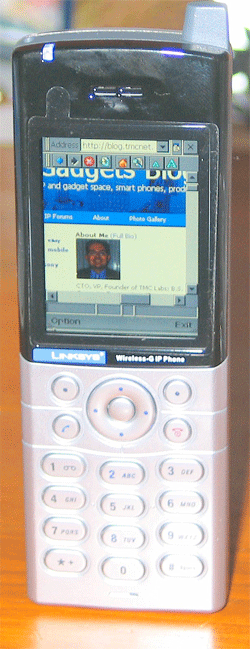
The
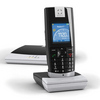
 Linksys WIP330 Wireless-G IP Phone is one of the coolest gadgets I've tested in awhile. Linksys sent me a WIP330 for a product review two weeks ago and I played around with it quite a bit, but just never found the time to write the review. Well, here goes, an exclusive look at the Linksys WIP330 Wireless-G IP Phone...
The Linksys WIP330 Wireless-G IP Phone enables VoIP service through a Wireless-G network connected to the Internet to make low-cost VoIP calls through your Internet Telephony Service Provider (ITSP). The handset features peer-to-peer dialing, speed dial, 3-way conferencing, call waiting, call transfer, and call forward, mute, hold and selectable ringtones. The Linksys WIP330 measures 46.7 x 135.2 (142.0 with Ant) x 18.8 x mm (1.84 x 5.32 (5.59)x 0.74 in) and weighs 0.119 kg (4.20 oz). It uses a 3.7V 1250mAh Lithium Battery, and includes a 5V 1.0A AC Adapter, but can also be charged using a mini-USB plug.
It's worth mentioning that Linksys makes a similar model, called the WIP300. The WIP300 and WIP330 are similar in that both models let you do VoIP from 802.11b/g WiFi networks and support SIP and the SIP v2 standards. The similarities end there. The WIP330 is the higher-end model, sporting a larger 2.2" LCD screen vs. 1.8" LCD for the WIP300. The WIP330 unit adds hotspot support and the ability to browse the Web on its 2.2-inch color display. The WIP300 on the other hand doesn't have Web capabilities, but it's also less expensive ($219.99 vs. $369.99). The WIP330 runs on the Windows CE 4.2 operating system which enables it to run the CE-version of Internet Explorer for access to just about any web page content. Although, I wasn't able to view my Linksys webcam which uses an ActiveX control from this mini-IE version. Linksys claims that you can receive live video on the WIP330 Wireless-G IP Phone when you access any web camera, including the Linksys WVC54GC Wireless-G Internet Video Camera. I actually just got my hands on a cool Linksys Wireless-G PTZ Internet Camera with Audio WVC200 that I am reviewing but wasn't able to get it to work with the WIP330. When trying to connect to my home webcam I receive an authentication dialog box and the number keypad won't let me enter in my username/password - it just ignores my key presses as the cursor flashes slowly as though mocking my attempts to access my home webcam. I'll have to contact Linksys tech support on that one.
Installation
In any event, installing and setting up the WIP330 was a breeze and in fact I didn't need to read the manual to do it - always a good thing. Linksys is known for easy, turnkey networking solutions, so considering the complexity of WiFi combined with configuring VoIP SIP settings, I was impressed with how easy the phone was to install. One caveat - Linksys pre-configured the SIP settings for me, but I checked them out and could have just as easily entered the info myself.
WiFi Settings
After first turning on the phone, I simply added my WiFi router's SSID and the WEP encryption key and the WIP330 acquired an IP address, DNS settings, etc. from the DHCP server. Next, I made my first test call by dialing the phone number that Linksys pre-configured on the device. I dialed 1-415-762-XXXX and the WIP330 rang and displayed the CallerID of the caller. It doesn't support CallerID with Name, however if you add the phone number to the Phonebook and associate a contact record, it will display the name of the contact. The handset stores the last 20 call history records and can save 250 phone book entries. When entering contacts using the 10-digits on the keypad, you have to have fast fingers when entering in the alphanumeric characters or risk it moving onto next letter. If I hesitated for a split second, it moved to the next character. The delay should be user-configurable.
The sound quality was excellent, which is attributable to the G.168 echo cancellation, jitter buffer control, and packet loss concealment. The comfort noise generation (CNG) also helps the voice quality perception. The phone supports the usual codec suspects, including G.729ab, G.711u, and G.711a. While you are on a call, you can mute the call, put the caller on cold and even answer a second call on Line-2. In fact, I initiated a 2nd call to 1-415-762-XXXX from another phone and I heard a series on tones on the ear-piece indicating a 2nd inbound call. I was able to take that call which automatically put the first caller on hold. Simply by pressing the softkey button underneath "Switch" on the LCD caused it to toggle between the two calls. Next, I pressed the softkey button underneath "Options" and was able to select "Conference" which then conferenced the three phone devices together (2 landlines & 1 WIP330 IP connection). In addition, there are two types of transfer features available. You can use the Transfer feature when you want to introduce the caller you are transferring or you can use the Blind TFR (Transfer) feature when you want to transfer the caller without introduction.
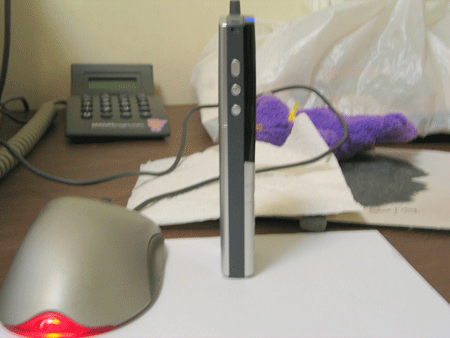
Profile of the phone:
Profiles
Up to 10 hotspot/WiFi profiles can be stored and you can designate the order of the profiles saved by the IP Phone. The next time it is powered on, it will use the first profile to automatically connect to the profile's wireless network. If that network is not available, the IP Phone will try the next profile. This will continue until it has connected to a wireless network. It can connect to "open" WiFi networks or secured WiFi networks - both WEP (64/128) and WPA-PSK encryption are supported.
Phone Customization
You can customize various settings of the IP Phone including the Ring Option, Keypad Tone, Wallpaper, Date & Time, Language, and Phone Password. You can also upgrade the firmware of the phone over an IP connection. There are five different ring types - ring, ring once, silent, vibrate, and ring & vibrate, as well as (they claim) seven customized ring tones in the documentation, but I only found 3 available. Perhaps they send me an early production model?
Web browser
The web browser is the Windows CE version. Entering in URLs using just a number pad is a bit of a pain, but with a little practice I was able to quickly navigate some sites on the 2.2" LCD screen. Although you can browse the web on the phone, really the browser's primary purpose is to allow you to logon to hotspots, hotel WiFi networks, and other WiFi networks that require some sort of Web-based authentication - often used to ask for billing info. I tested the browser and it worked pretty well, but you'll definitely want to add your commonly visited sites to the Favorites, since I already stated, typing on the number pad is tedious.
I couldn't figure out way to add a currently viewed webpage to Favorites. The toolbar didn't display an icon for adding the current page to Favorites which would make it much easier. Instead, I had to exit out of the browser, go to separate screen and manually type the URL. This is a pain considering how difficult it is to type a long URL along with special characters (: and /) using just a number keypad. Also, if it's a long URL path you may not even remember the exact URL to key in.
When surfing the WIP300, it has an auto-scroll feature so you don't have to repeatedly press the navigation button. You simply press and hold down the center selection key for two seconds until you see an orange navigation cursor. Then you can use the navigation pad to scroll up and down the webpage. To use the cursor as a page up and down button, you simply press and hold down the center selection key for an additional two seconds until the cursor turns blue with a "P" in the center and then use the navigation pad to move up and down the webpage.
Here are some of the menus on the WIP330:
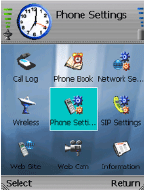
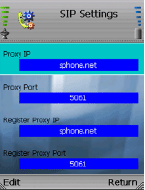
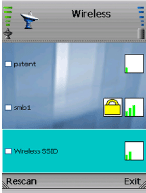
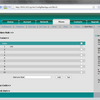
Here's the phone's web admin:
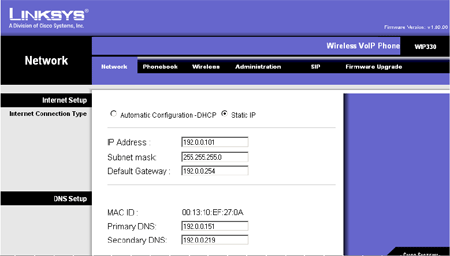
Here are the specifications:
• Support SIP v2 Standards
• Compliance with IEEE 802.11b/g Wireless Standard
• Powered by Microsoft Windows CE, with IE Web browser
• High Resolution Color LCD screen
• Support QoS (Quality of Service) to ensure best quality voice
• Enhanced Power Saving Design for Extended Standby and Talk Time
• 50 hours standby time, 3 hours talk time on average
• 3-Way Conferecing, Call Hold and Resume, and Caller ID
• Fast Hotspot Authentication
• Supports auto-provisioning using HTTP or HTTPS for configuration and upgrades
• Outdoor up to 300m via Embedded Antenna
• One mini-USB Socket, One Stereo Ear Phone Jack
• QVGA TIF 2.2 inch LCD (240*320 pixels) with 65K colors
• 32MB Flash, 64MB SDRAM
• Multiple Access point Registration Support
• TCP/UDP/IP, IPV4, DNS, SDP, ARP, ICMP, DHCP Client, Static IP
• WEP (64/128), WPA-PSK Encryption
• ToS
• SIP v2 Session Initiation Protocol (RFC3261), SDP (RFC2327)
• SIP Session Keep Alive
• G.711( A-law and μ-law), G.729 A
• In-band, Out-band (RFC2833)
• G.168 Echo Cancellation
• Jitter Buffer Control - (default 180ms, max 900ms)
• Comfort Noise Generation
• Packet Loss Concealment
• Speaker and Microphone Volume Control
• VAD - Voice Activity Detection
• 3-Way Conferencing
• Peer-to-Peer Dialing
• Call Hold and Resume
• Caller ID Presentation
• Caller ID Presentation Restriction
• Dial by Phone Number
• Call Forward
• DTMF Tone Detection
• Consultation Hold and Transfer
• Call Waiting and Retrieve
• Mute
• Speed Dial
• Last Number Redial
• Volume Control
• Ringtones: True Tones
• Phone Book (250 records)
• Call History (20 Records)
• Language (English/Spainish)
• Vibrator (Silent mode)
• Password Security
• Date & Time (NTP time synchronization)
• Internet Web Browser (Microsoft IE)
• AES or SSL Encryption
• Firmware upgrades using HTTP, or HTTPS
• Configuration change using HTTP, or HTTPS
• Embedded Web configuration interface (with password protection)
• Power-up Diagnostic
Pros
- thin and lightweight
- Web browser surfing capability
- Phone itself had web admin interface
- support for 10 WiFi profiles and built-in support for T-Mobile, Telefonica, and Hinet hotspots
- SIP v2 support
- Pressing +/- during a call will adjust handset speaker volume
- Can sync/connect to the device over USB
Cons
- No POP3 or SMTP email support (though can always use web browser to send or check email)
- You have to have fast fingers when entering in alphanumeric characters or risk it moving onto next letter
- Pressing +/- while not on a call doesn't adjust ringer volume - have to go into settings
- No speakerphone
- Mystery button on its left side that does nothing. Perhaps for future firmware release?
- Only supports 27-bit WPA key
- No Skype support
- Pricey
It now
retails for around $200 on Amazon..Conclusion
This Linksys WIP330 is great for businesses using any IP-PBX that supports the SIP standard, which is pretty much every IP-PBX these days. If you recall, I had an "exclusive" on Cisco finally adopting the SIP standard (Cisco Unified Communications) over their proprietary Skinny protocol, thus you can even use the Linksys WIP330 on a Cisco Call Manager system. Of course the Linksys WIP330 will work with the ever-popular Asterisk phone system as well. No Skype support is surprising, but I did notice some Skype config files on the phone itself, so perhaps this capability is coming. Certainly Windows CE has the ability to run a Skype client. Even with its built-in browser and its ability to logon to authenticated hotspots, due to its price ($369.99), only executives with money to burn, or gadget freaks that just have to have the latest and greatest gadgets, will find the Linksys WIP330 attractive enough to purchase.
Gadget freaks who just have to have the most feature-rich WiFi VoIP phone available today can get the Linksys WIP330 WiFi VoIP phone from Amazon.