Streaming Live TV has been a dream of mine. I'd love to have access to streaming TV from anywhere - wouldn't you? Well, last week I redeemed 170,000 Sony points to get a Sony VAIO RA920G PC running Microsoft's Media Center Edition 2005 operating system. I was curious if I could figure out a way to "stream" my home PC's multimedia content, including My Videos (.AVI, .Divx, etc), as well as stream live TV to my PC at work by accessing the TV tuner capture card. Imagine being able to remotely control your home television, change channels, and view the content at work! Now that would be cool... And so I began my investigation and research.
First, let me point out that apparently, I am not the only one desiring the ability to stream MCE 2005's content. I've read several forum posts stating the same thing. The general consensus is that Microsoft didn't put streaming capabilities into MCE 2005 as to avoid running afoul of the DMCA/RIAA/MPAA and getting tangled up in copyright issues. Why does Hollywood always have to ruin all the fun? It's not like my home broadband connection has the bandwidth to stream to hundreds of users. In fact, I had issues having enough upstream bandwidth on my home cable connection to stream to just ONE PC - I will get into that bandwidth issue in a minute.
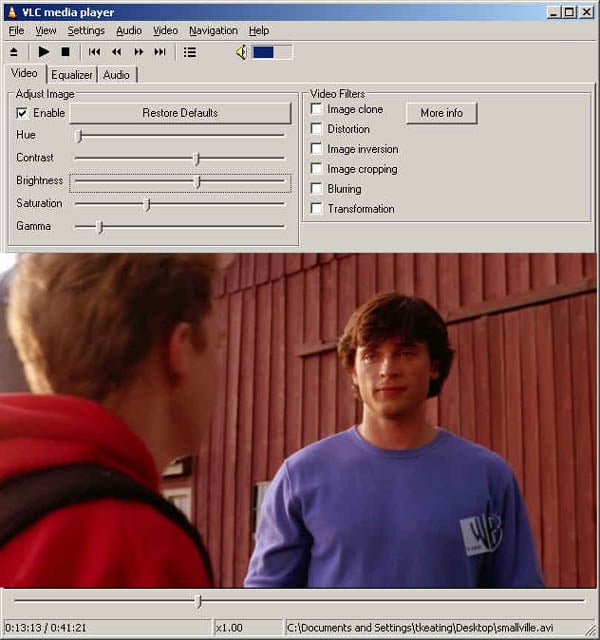
In my initial research, I could not find any software that would stream video files or access a TV tuner card and stream that. I wanted something that could also transcode on the fly so I could reduce the video quality if need be for slower Internet connections. I was about to give up and all seemed lost when I came upon VideoLAN, which has a multimedia player that also acts as a streaming server with transcoding capabilities. Best of all, this streaming software is open-source and runs on Linux, Mac, Windows, and more! Could this be it? I frantically read the home page, quickly searched for the download link and installed the software. I first tried streaming a file on the LAN rather than the Internet (WAN). From VLC media player I opened an episode of Smallville that I had recorded and encoded as an .AVI file.
|
Fig 1. VLC Media Player - Smallville TV show streaming |
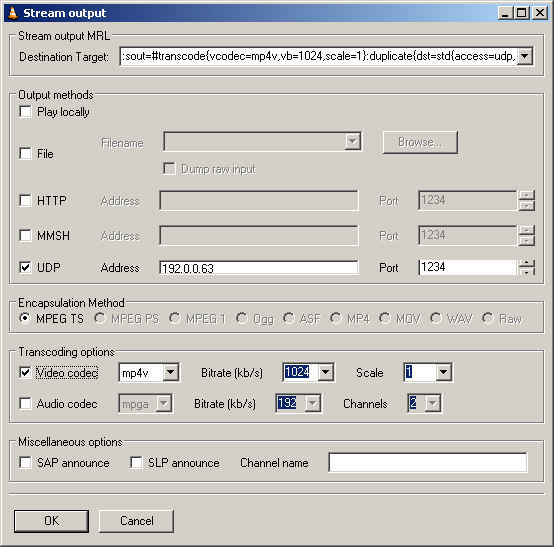
I went into the Stream Settings screen (See Fig. 2 below) and set the file to stream using UDP on port 1234 to the IP address of a 2nd PC. I could have used either multicast (for multiple PCs) or unicast to stream the video. For my first test I didn't want to get greedy by trying to stream to multiple PCs so I chose the unicast option.
Fig 2. Streaming Output Window
Next, on this 2nd PC I installed the VLC media player. Then I simply clicked on Open Network Stream, chose UDP port 1234 (the default) and clicked OK as shown in this Fig 3. streaming TV screenshot: Fig 3. Network Streaming Window
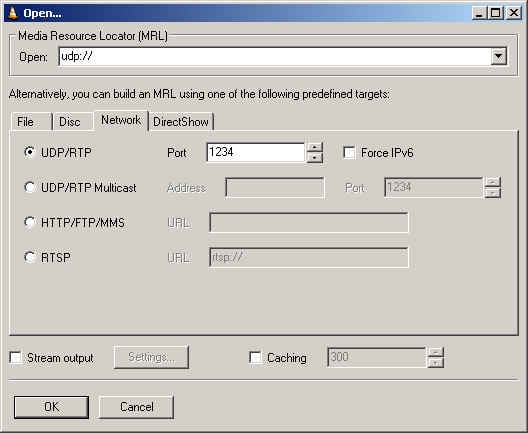
Almost immediately the popular Smallville TV show started playing on this 2nd PC. Good stuff! Next, I attempted to duplicate these results using the Internet. I had one PC setup to use one broadband connection (T1 line) and another PC setup to use a different Internet broadband connection (2nd T1 line). I then repeated the above steps and once again was able to see Smallville play. The quality was actually quite good, but it did have some artifacts and break-ups due to Internet congestion. I decided to reduce the quality of the video from 1024kbps to 512kbps and the artifacts and "hiccups" all but disappeared! Even with the transcoder reducing the video quality, the video quality was pretty good.
VLC media player has some other tricks up its sleeve. You can stream a DVD across a network connection. Yeah, that's right, you read that correctly. Stream a DVD using an IP network! Now this I had to try. Once again I repeated the above steps, except instead of opening a file, VLC has a menu option to open a DVD. I inserted my wedding DVD, because if I inserted a commercial DVD and used VLC media player's libdvdcss library to read the commerical DVD I might run afoul of the DMCA since this library has the capability of disregarding the DVD's region/zone. All regions are supported without any constraint, which is probably against the DMCA (Digital Millenium Copyright Act). And since I don't want any trouble with the DMCA, I'll just use my own DVD thank you very much. (Shhhh.. it does work with commerical DVDs but I didn't tell you that.)
In any event, I was able to stream the DVD across two broadband Internet connections with very good video and audio quality. I did once again have to reduce the kbps from 1024 to 512 or 384kbps to prevent congestion though, which slightly degraded the quality. But hey, I was watching a DVD across the Internet. Is that cool or what? Now for the really fun part. I wanted to see if I could stream my home MCE 2005 PC's video content, DVDs, etc. and of course "Live TV" across my cable broadband connection. I decided to start simple with a video since I knew that would be easiest. I used Remote Desktop to access my home PC and execute the VLC player. I opened a video file on my home PC and set it to stream the video to a public IP address of a PC at work mapped outside of our corporate firewall. This time, no video came through. Hmmm. What's going on here. I switched back to the Remote Desktop window to troubleshoot and I was disconnected. I tried reconnecting - no dice. I thought maybe the PC locked up, so I tried pinging the IP address if my other home PC. No pingage. Hmmm, that's strange. I tried pinging the home router, once again, no dice. Finally I tried to call my home's Vonage line and ask my wife to reboot all the equipment and I couldn't get through. Oh no!
* Home PC - dead
* Internet - dead.
* Phone line (Vonage) - dead
* Me, when my wife finds out I killed the Internet connection and Vonage line - dead.
Long story short, my wife rebooted the equipment and the Internet still stayed offline for at least 3 hours. When I got home and attempted my experiment again (this time Remote Desktop-ing to my Work PC) I noticed once again the Remote Desktop connection was broken once I started streaming. In fact, I noticed my cable modem traffic lights were SOLID indicating heavy traffic. As soon as I clicked the Stop button on VLC player, the activity returned to normal. "Hmmm, seems like the VLC player is a bandwidth hog," I thought to myself, "let's try reducing the kbps of the video to 128kbps". Once again though the cable modem's lights went crazy. Worse, a few moments later the Internet was knocked completely offline again! Had I just crashed Charter's broadband connection, again? Of course, it could just be my cable modem that I locked up, but resetting the cable modem didn't seem to help. This time it took 30 minutes for the cable modem to re-establish a connection. So what have we learned here? Well,if you want to attempt to crash a cable modem's network, go download VLC player and stream to an outside IP address.
In any event, I tried the lowest video setting and still I couldn't get it to work. It appears my 3MB broadband connection isn't up to par with a symmetric 1.544MB T1 line. The issue is the damn upload/upstream cap that cable providers place on each subscriber. Last I tested, I only get 256kbps upstream - which actually should have been enough to stream, so I am at a loss as to why this didn't work. Alas, I did not get to the point where I could attempt to stream live TV from my home PC to my work PC. I will mention that VLC media player has another option called "Open Capture Device" which supposedly works with MPEG encoder cards. Since I believe my "live TV" goes through the Sony's MPEG encoder card in theory I can open this capture device and stream the live TV feed --- if only I had a better upstream Internet connection. I'll have to play around with it some more, but it's tricky since it knocks my Vonage line offline which my wife uses during the day. I'm also still working on the WAF (Wife Acceptance Factor) of her liking the Vonage VoIP phone line which does go down when I test stuff (among other reasons) as well as the WAF factor of having a Media Center PC in our living room. By the way, I'm going to post a review of Microsoft's MCE 2005 along with some VoIP capabilities in the next week or so, so stay tuned for that.
Update
It's been awhile since I posted about VLC's streaming capabilities and I wanted to update this post to point out two other good streaming solutions. The first streaming solution is from Orb Networks, a free software download that installs on a Windows PC and can stream your music (mp3) files, your video files (.avi, DivX, .wmv, etc.), as well as view your Pictures remotely. If you have Windows Media Center Edition it can even stream your recorded TV programs to your laptop, PDA, or even some smart phones. You can also use their web interface to schedule a recording of a TV show. Another solution is from SlingMedia called the Slingbox. It's a standalone box that resembles a Toblerone candy bar and has video and audio inputs/outputs to connect to your TV cable or satellite set-top box as well as an Ethernet connection to stream your video content over the Internet using their Sling Media Player.


Technorati
Del.icio.us
Slashdot
Digg
Have you tried Windows Media Encoder ? You can capture from a capture card and stream it to another machine. It's from Microsoft and it's free.
http://www.microsoft.com/windows/windowsmedia/9series/encoder/default.aspx
Funny you should say that, I actually was going to try Media Encoder 9 (ME9) today.
I did try ME9 remotely from work - using Remote Desktop to my home PC, and it sees the SMRT Capture card, but when I try and capture within ME9, the ME9 app says:
"The following error occured while setting up the source 'Source 1': Cannot find a valid output stream from the source. (0xC00D1B70)"
My theory: Although I did exit the main MCE 2005 application, it's possible MCE 2005 "locks" the capture card thus it can't access it since it is already in use. I believe some Services still run that access the capture card even with the main MCE 200 GUI/app shutdown.
I'll have to tinker with it when i get home tonight.
Does your boss know that you spend so much time at work with your home hobbies?
>>Does your boss know that you spend so much time at work with your home bobbies?
Yes, he reads my blog religiously actually. I have nothing to hide with regards to my work ethic. He knows how much work I put into the company. He enjoys my gadget reviews and often takes my tips to deploy them himself.
Do you have anything better to do than post a comment to my blog insinuating I don't take my job seriously or that I'm a slacker?
Please troll someplace else unless you have something important to say.
If you are trying to stream using windows media encoder, you can't start the encoding in a terminal service session.
Kill off everything that begins with "eh" in your Windows Task Manager and that should shut down MCE.
And you are right. As long as ehRecvr is running you cannot use the capture card with other apps.
Thanks for the tip on killing "eh" processes. I will try that.
and lettering my know that the cpature card only allows 1 process/app at a time.
who do I have to thank for the tip?
feel free to email me directly. Contact info is in the About me link
Hmmm. Killed all processes with "eh" in front and I still can't access the SMRT capture card from Media Encoder.
The error from Media Encoder 9 Series is "cannot find a valid output stream source 0xc00d1b70"
any ideas?
I'm just trying to get my satellite cable from my TV to stream to my laptop. I downloaded the videolan...I have it connected bythe s-video connection, but from there, I am at a loss... Ideas?
Saw this release about streaming TV to mobile phone. thought I'd share it here in the Comments:
Dear Tom,
Missed your favorite TV program last night? If you have a mobile phone, that’s not a problem anymore. With streaming television emerging as one of the hottest trends in the mobile marketplace, anyone with a mobile phone can take their favorite shows with them wherever they go. The Mobile Media Company AS, a global leader in the provision of interactive entertainment services, has partnered with technology company Rubberduck Media Lab to provide live, streaming TV to mobile channels and wireless devices around the world.
Mobile Media will use its extensive international network of media, broadcast, and mobile operator partnerships to deliver Rubberduck’s 2.5 and 3G supported downloadable content and streaming video to wireless subscribers worldwide. Media companies will be able to manage their own content and live feeds or take advantage of Rubberduck’s wide range of services. Rubberduck has already been operating in the Scandinavian market through Norwegian channel NRK, to bring live television content to consumers.
Please see the attached press release for more information on this partnership. I would be happy to arrange for you to interview Steinar Svalesen, Executive Vice President and General Manager of Mobile Media, regarding this arrangement and the effects of streaming television on the global mobile marketplace. Please feel free to contact me at 610-642-8253 or Sarah@GregoryFCA.com if you are interested in this story or if you have any questions.
Thanks for your consideration.
******************
MOBILE MEDIA COMPANY PARTNERS WITH RUBBERDUCK MEDIA LAB TO PROVIDE STREAMING TV TO WIRELESS DEVICES
Partnership brings live television content to millions of wireless phone customers
Oslo, Norway, January 11, 2005 – The Mobile Media Company (http://www.MobileMedia.com), one of the leading, independent providers of global wireless, interactive entertainment services and marketing applications, today announced an agreement with UK-based Rubberduck Media Lab Limited (http://www.RubberduckMediaLab.com), to provide live, streaming television to mobile channels and wireless devices worldwide.
“Working with Rubberduck is another step in our continued commitment to the future of mobile interactivity and the evolution of the 4th entertainment screen—the wireless device,” says Karsten Hauge, CEO of The Mobile Media Company AS.
Building on Mobile Media’s extensive international network of media, broadcast, and mobile operator partnerships, Rubberduck will deliver its 2.5 and 3G supported downloadable content and streaming video to millions of Mobile Media wireless subscribers. Through Rubberduck’s services, media companies can manage their own content and live feeds, or take advantage of Rubberduck’s complete range of services, including live encoders and hosted solutions.
“Our mission is to enable media companies and broadcasters to launch, operate, and generate revenue by reaching people on the move at any time,” says Gavin Whyte, Managing Director of Rubberduck Media Lab. “Since our service utilizes software already pre-installed in most 2.5 and 3G phones, users can view our clients' services, whether they are live or pre-recorded, and in turn provide the largest reach possible to video mobile phone subscribers within a client’s market.”
Mobile Media and Rubberduck Media Lab are partnering to test wireless TV in North America. Both companies are in discussion with leading international broadcasters to launch mobile TV channels and services in the first quarter of 2005.
Now operating in the Scandinavian market, Rubberduck’s streaming video service brings live television content to wireless subscribers through NRK, a live mobile TV channel. Rubberduck and NRK were first in Europe to offer live television content via all networks. The carrier-independent service supports the 3G standard for mobile TV, and enables Norwegian mobile video phone owners to watch NRK programs, without having to install additional software products or players.
A Yankee Group 2004 Mobile User Survey (USA) of the Young Adult Segment found 24% of users saying they are prepared to pay to view live TV on their mobile phones, compared to 22% for music, and 12% for short video clips.
“Our partnership with Rubberduck means we’re poised to deliver TV programming to the wireless mass-market,” says Steinar Svalesen, Executive Vice President and General Manager of Mobile Media North America. “Downloadable content and streaming video services are turning the corner, and we believe 2005 will bring significant growth in the North American market. This partnership accelerates our ability to lead the way in this new mobile wireless era.”
About Mobile Media
The Mobile Media Company AS (www.MobileMedia.com) is a global provider of wireless provisioning and content solutions, interactive entertainment services and mobile marketing applications. Mobile Media works with leading industry players and a wide-range of customers including mobile carriers, broadcasters, media companies and major consumer brands. The Company was founded in 1993 to pioneer mobile messaging services and technologies and since then, has become a fast developing, multi-media organization with over 200 employees.
The Mobile Media Company AS serves customers in over 30 countries, with mobile connectivity to more than 500 million subscribers in both the mature and developing markets of Asia, Europe, and North America. The Company is headquartered in Oslo, Norway, with offices and technology development centers in the UK, Romania, China, and the USA.
Mobile content providers should contact Mobile Media at CP@mobilemedia.com. To partner with Mobile Media, please contact us at partners@mobilemedia.com. For all other enquiries, please contact info@mobilemedia.comor visit us online at www.mobilemedia.com.
About Rubberduck Media Lab
Rubberduck Media Lab is a technology company specializing in developing and integrating state-of-the-art solutions for clients who wish to enable content and services to be delivered over mobile networks. The company was started by key members of the mobile division of the Norwegian Broadcasting Corporation (NRK).
The company has delivered live television programming and on-demand multi-media content to mobile devices since early 2004. They have relationships with major broadcasting networks in Scandinavia and the USA, network operators in Europe and the USA, and leading content providers worldwide. Rubberduck Media Lab was the only streaming partner for the Telenor (Norway) 3G launch in November 2004. They have current relationships with the following companies, including NRK, Nextreaming, Sprint, Fox, Telenor, and 2.
Rubberduck Media Lab is a major player in the delivery and advancement of technology solutions to network operators and broadcasters, as well as a provider of service provision solutions to content providers and second tier networks and broadcasters.
The company’s management is experienced in mobile and television technologies, with a strong track record in mobile content brands and the streaming of high quality live TV over GPRS and 3G networks. The management team has been heavily involved in the recent floatation of a leading mobile content provider on Alternative Investment Market (U.K.).
Mobile Media Press Contacts:
US: Sarah Galea. Tel:+ 1-610-642-8253 E-mail: Saragh@GregoryFCA.com
Norway: Steinar Svalesen. Tel:+ 47-9572-8490 E-mail: Steinar.Svalesen@MobileMedia.com
Rubberduck Media Lab Press Contacts:
Lee Dudack. Tel: + 44 (0)20 7886 0891, E-mail: Lee.Dudack@RubberDuckMediaLab.com
And another website with live internet tv channels but for computers will you find on http://www.lunarbroadband.com pretty much like webtvlisting but more user friendly, some more channels and well done. Hope you will get use of that to!
How is your appproach to streaming live tv different from using NetMeeting? I have my VCR/DVD combo's video/audio output connected to my laptop via a Belkin USB video BUS2 capture device and can send a cable tv channel, DVD, or VHS stream to another NetMeeting partner, and control screen size.
Streaming from NetMeeting? That never even occurred to me. I don't think Netmeeting is designed for high-res video streaming. It was designed for application sharing and video-to-video conferencing. I don't think its codecs are designed for good quality video streaming. Isn't the video window tiny in Netmeeting? With VLC encoding and streaming and then Media Player on the remote end, you can go Full Screen for the best experience.
as regards your problems with videolan,
i dont think your cable modem is at fault. i work as a technician in an isp and what is more likely to be the problem is one of these:
1. the constant activity caused by the upload is making your isp think that your running some kind of p2p server, probbably a bittorrent one as it uses udp for upload and theyre cutting the connection (happens a lot)
2. the contention ratio (amount of users on that particular subline) of your line is too high for streaming and when you try to stream your isp is cutting the connection so you dont hog the line. (also happens a lot)
i know i would be getting cut off every 5 mins at home if i didnt manage my own line because my streaming 'experiments' would cause an auto-cutoff.
but then i do manage my own line so....
you should contact your isp and ask if either of these are the case, sometimes if you explain what your trying to do and its not causing problems for them or its not illegal they can help you out and remove any cutoff.
I have the same problem, WME gives me that same error even when i shut down any service starting with eh. Did you ever find a solution?
I have successfully streamed all my media over the internet, how? Using Sonys Own Media Center. Simply install the media app on any pc, register the PC with your Sony Media Center (Mines a VGC-VS2) and your off with all your media including TV. You can only watch TV on one client PC at a time (as well as the server) and the quality is ok if you cut down the compression, but it works. My issue is that I would love to get Windows MCE to do the same as I prefer the interface to sonys.
here is a program that i have found that i was able to stream 5 users from my broadband connection using a tv tuner card
http://www.snapstream.com/
and for a cheap price, i have also found it in a bundle with a tv tuner card for 100.00 at the local compusa.
i want to secure my live video file .I am using window media encoder 9 for broadcasting.I want to add some script in session's security of WME.Please tell me anyone how i can secure it?
I want detailed info on live streaming.
Thank you.
you should maybe try unreal media server
streams nicely at a variable bitrate from just about any tv card and has a webpaged based addon for changing channels (best of all its free)
http://www.umediaserver.net/
forgot to mention - its totally browser based so you dont need to use a specific player, and you can password protect the stream so the only people who can see it are those YOU want to see it.
Revere:
I just downloaded Unreal - can you run the media server and the live server on the same box (running IIS)? I can't get the live server to recognize the setup on the media server. Thanks!
yes, you can - works well too.
check www.bltvonline.com/new and go to 'view lve' to see something im working on atm.
What application can i stream live tv over a network from mce that would be able to change channels of my direct tv settop box which is connected to the mce. I know orb works, but its problematic. Does unreal work with that? I tried VLC, but that wasnt able to either.
how do we use vlc live tv, can u help me with it
HI i got the streaming video to work but cant seem to get the streaming tv to work:( im streaming over my LAN from my home to my Laptop on wifi:) and it seems okey but when i try to get the tv tuner to stream nothing comes out:( im using the hauppauge 150 on a windows xp pro setup
did you get the tuner to stream when on LAN?
Oh maaannn...i was JUST thinking about if this was possible this morning...i have a sony vaio desktop with a capture card for a while now..and a wireless network for a a couple of years..why i only thought of this now...i have no clue...but i came up on this blog...read it once...followed the steps and now im watching tv on my laptop wirelessly...and all in less than 5 minutes *grin... i would love to change the channel on my digital cable set top box tho..if you guys could help me out htat would be just super =) .. Huge thanx to the guy who rote this blog..and GO VLC =D
Glad I could help. VLC is great, but never was able to get it to change channels. You can use VNC (ironic lettering!)
to remotely logon to your PC and then use whatever PC software you use to change channels.
Alternatively you can use any of the following:
http://www.orb.com - highly recommended
http://www.mythtv.org/ - Like Windows MCE 2005 only free and supports streaming
Also I think Sony VAIO's have a picoplayer that supports streaming. You have to have Gigapocket installed. Just google "picoplayer".
Finally, Microsoft said they will be adding streaming support to Windows MCE or possibly just Windows Vista
Guys,
I finally feel like I am amongst friends with this blog !!
This is what I want to do:
End A - Satellite TV box, PC, broadband internet connection (assume 1024 kbit/s max upload speed and can get a dedicted IP address if necessary) and phone line (with modem to the PC)
End B - PC and broaband internet connection
I want to stream live TV (video and audio) at best possible quality from the satelite TV box to the End B PC. The video stream is only point to point sent from A End to B End and I would like it to be encrypted (lightly is fine) and/or password protected so that only me at End B PC can access it. I would also like to be able to change the channels on the satelite TV box remotely from the B End PC. Someone told me that you can get a "learning" infrared remote control that I can plug into A End PC and use this to change the channels on the satellite TV box from B End PC ? I have specified the phone line and modem so that I can dial into A End PC if the broadband there drops and re-start it.
Unfortunately I don't know much about computers. Would anyone be kind enough to give me a list of specific hardware and software that I could buy for the A and B End PCs ? My brother knows a bit about computers and so I am sure that if I had the right hardware and software I could enlist his help to set it up.
Try Vatata p2p streaming system,its client/server are all free for everyone.
http://freshmeat.net/projects/vatata
Please tell me how to step by step to setup the vatata server and how to set the file or link on website so when someone cliks on it the vatata player open automatically and plays my channels that I set in teh server.
Thanks in advance
Hey if u know good spftware for streaming live tv on internet Other than Windows Media Encoder,VLC Player,Unreal .. than plzz email me the site to download it from
Are there any solutions for us non-US citizens to watch US Cable tv?
I've tested MobiTV (www.mobitv.com) on my Treo 650 and enjoyed watching MSNBC, ESPN and other US TV channels but only on my Treo PDA phone.
Are there similar services out there offering (for a monthly fee, I guess) access to US cable TV via the Internet?
Thanks,
Christopher
CCIPTV Live Podcaster
CCIPTV Live Podcaster, typical of new P2P Live Podcaster, can realize the function of podcasting, sending the local audio and video files and signals from television card, compression card, collection card, PC camera, microphone to the Internet, which makes you to set up your own Internet TV station only on a common PC. Meanwhile, this software can play such formats as rm、rmvb、mpeg、mpg、mpeg4、avi、wmv、wma、mp3、DVD and even transit all the Internet TV programs of different formats.
soy fanatico de smavillville
You're my hero. (article-Streaming Tv)
VLC Media Watching and Controlling Remotely
To Watch
1. Open VLC
2. Press Open Network Stream
3. Press HTTP/HTTPS/FTP/MMS
4. Put In Url of Stream server
My URL is - http://68.46.69.95:1234/
To control remotely so you can stop, play, and set which movie you want to watch, go to
http://IPofstreamingserver:8080/
Note: Web Interface be enabled on the ip of the streaming server for this to work.
Mine is http://68.46.69.95:8080/
Streaming
Guide to Streaming Video in LAN
Most of the people think that video streaming is a very complicated process
Lets make it easy
This is my first effort in writing a Tutorial.
After reading this Tutorial you also will be able to stream
VCD .dat , AVI [Normal , Divx , Xvid , 3ivx] , WMV , mpg files
Hardware Requirements
~~~~~~~~~~~~~~~~~~~
Minimum 2 Computers in LAN with any IP address
Server - PIII 450Mhz , 128/256MB Ram
Client - PIII 450Mhz , 128/256MB Ram
If You dont have a LAN you can also try this on a Single Computer.
Operating System Supported
~~~~~~~~~~~~~~~~~~~~~~
Windows , Mac OS X , BeOS , Debian GNU/Linux , Mandrake Linux , Fedora Core , Familiar Linux ,
SuSE Linux , Red Hat Linux , WinCE / PocketPC
Software Requirements
~~~~~~~~~~~~~~~~~~
Video Lan Client - VLC - The Cross - Platform media player and streaming server
VLC (initially VideoLAN Client) is a highly portable multimedia player for various audio and video formats
(MPEG-1, MPEG-2, MPEG-4, DivX, mp3, ogg, ...) as well as DVDs, VCDs, and various streaming protocols.
It can also be used as a server to stream in unicast or multicast in IPv4 or IPv6 on a high-bandwidth network.
Web:- www.videolan.org
Download:- http://www.videolan.org/vlc/
Features:- http://www.videolan.org/vlc/features.html
Installation
~~~~~~~~~
Video LAN Client has to be installed on the Server and every Client Computer.
Usually it comes as a zip package you need to extract it to a folder anywhere on the server and client.
Tutorial
~~~~~~
This Tutorial is demonstrating a VLC Streaming and Stream Playback on Windows Platform
Server IP Address:- 192.168.0.1
Client IP Address:- 192.168.0.2
On Server Side
1.> Double Click on VLC.exe to Launch it.
2.> Click on "Open File" to Browse the .dat , .avi , .mpg , .wmv file
Here "Test.avi" File
3.> Now Click the "Stream output" Checkbox and click on "Settings" button.
4.> When you click on "Settings" button a new interface is displayed where nothing is clicked
- Now Click on HTTP Check Box
- Enter Server Address and any empty server port number for eg. 1234
- Under Encapsulation Method Select "MPEG TS"
- Dont click anything under Transcoding Options
- Click Ok now
After Clicking OK
Note:- The Encapsulation Method is different for different files you stream from the server side
Dat File - MPEG TS
AVI File - MPEG TS
MPG File - MPEG TS
MPEG File - MPEG TS
WMV File - ASF
5.> After Clicking OK the Server "192.168.0.1" will start streaming the select video file on Port Number 1234
It Will be displayed as follows
Now the File is Streaming from the Server.
On the Client Side
~~~~~~~~~~~~~~
1.> Double Click on VLC.exe to Launch it.
2.> Select "Open Network Stream"
3.> After Clicking there this will be displayed
4.> Now Click on "HTTP/FTP/MMS" and enter the Server IP address with the port number as "192.168.0.1:1234"
5.> After Clicking OK , The following streaming video file from the server will be displayed on the client side
6.> You can also view the Streaming Video on the Client Side in FullScreen Mode Like this
Done
----------------------------------------------------------------
Note:- For people those who dont have LAN also can try out this tutorial like this
For any Computer 2 instances of VLC can be run and your same Computer as Server and Client.
Only thing you have to do is wherever i have used Server IP as 192.168.0.1 replace that with 127.0.0.1
----------------------------------------------------------------
Hope you enjoyed my First Tutorial
Do try this and give me your feedback as it will help me improve with time.
Also Rate this Tutorial on a Scale of 5 [No Need for those Stars]
Only write it as Score:- X/5 [where X is any number from 1 to 5 and your Score]
If you have any sort of doubts related to this Tutorial feel free to ask me at the email obliqueepitome1@hotmail.com
I use Windows Media Encoder with XP and ATI capture card. It is not encrypted. I can set it all up remotely using PC anywhere. The only problem is when setting up the encoder you must select the channel from the analog cable. Therefore if you want to change channels you must stop the encoder, change the channel and restart the encoder. Works good except I have the slowest DSL package. I think uplink is 128Kbps. I must use a rediculously small resolution to view anything. I'm thinking of upgrading my DSL. Maybe this helps someone.
hi i need internet tv not lan tv
THere are sites online with that. I found one before but lost my favorites for IE. Just google around for some live internet streams. There are lots of radio streams out there too.
More than 1000 streaming TV channels http://www.lordoftv.com
I know this is obviously an old post, but I have been streaming live TV with Windows media encoder and an ATI TV Wonder for a few years now. The trick that I found is to make sure the channel you want to stream is the last channel you were viewing through your TV Tuner application (ATI MMC, MCE, WinTV, etc.). If the channels are different, no video will stream at all. Also choose multiple bit rates for the video quality, this helps with my limited upload speed. It seems like nothing works perfectly, but this is the best solution I have found.
hello Tom,i want to stream TV live on my website by capturing through TV Tuner card what should i do? could you suggest me any idea? i want to mail you personally so please provide me your email.
hi
i have sony vaio ar31s (windows vista with media center edition) i want to stream my tv channel on the web. i have AVerMedia BDA analog capture card in my laptop i want to strean my tv channel on the web i tried windows media encoder 9 but after finish all the settings when i click on the start encoding button the input screen turns blue and output screen turns white with a message no encoding i can see my tv channels only in media center.could anyone help me to sort out my problem thx in advance............plz reply me on my e-mail id pskhangura-atsign-yahoo.com
I have found out what seems to be the PERFECT solution. It is an app that replicates Media Center (both XP and Vista versions) on another computer/PDA, either within the LAN or through the Internet.
It is really cool because it mirrors Media Center 100% (it is a Media Center plug-in), with most of its functionality. Much better than Orb (which is very unstable under Vista with digital TV). So, whatever TV service you run on MCE, it will just be streamed using MCE itself, so no compatibility issues.
It is called WebGuide (http://www.asciiexpress.com/webguide/). To enable streaming there is a license fee of $18, but it is worth all of it.
Please be aware that it requires the installation of PowerDVD (trial version) and AC3 filter to work properly, but this is all explained in the FAQs.
My question, never answered, is can I feed live a/v from Logitech Quick Cam Messenger to, say, CNN or MSNBC with extraordinarily high speed internet (3.0 Mbps or so), and have station's control room clean up my signal incoming to them so that it is of sufficient resolution to "broadcast?"
Hmmm ... guess I found the right people ! Streaming TV ...
So, I don't think you've heard about UBroadcast. It's a program from UtiSoft, not the site(www.ubroadcast.com). Just Google it and you should download a free application ubsetup.exe
It's the best, i'm telling you. It beats WM Encoder. You can also change programs while you're broadcasting, but here is a problem, it doesn't know the programs you've tunned or rearanged in your TV App, you have to guess and remember the channel number ...
I have 2 tv tuners, and old one and a new one. The old one is PV-951 (bought it in 2000 and is still working), and the new one is LeadTek PVR2000 (hardware encoding). The PV951 has an nice Application that starts only a control panel from wich you can start tha TV or FM. This is the best because after I start Ubroadcast and start broadcasting, if I change the channels from the Control Panel it works superb (because the Control Panel uses the manual tuned and rearanged channels by myself). The single disadvantage is that my PV951 is old and I don't have a smooth image, and when streaming a non-smooth image will affect the quality.
At the new tuner PVR2000 I have a smooth image and when I broadcast, at the other end there's quality ... But... I cannot change my channels from a control panel (like my pv951 has) because if I try to start my TV App when Ubroadcast is running I would either receive and error from my TV App that the video stram cannot be started, or video streams goes to the TV App and Ubroadcast remains with a freezed image.
As for watching the broadcast, you may use Windows Media Player (it's the best), just check the Instructions from Ubroadcast.
Another thing ... I broadcasted TV at 320x240 (which is the best resolution / internet speed ). You have to install WM Encoder and create some custom profiles (if you install Ubroadcast you'll know what I'm talikng about). I am using a 384kB profile and it works nice. I can have 2-3 simaltanous connection without problems. A single conection uses about 55-80 KB/s from the broadcasting PC. There is a delay of 10 seconds, but it's acceptable.
My problem is that I want to control somehowe my PVR2000 tuner without starting the TV App, because I have some channels that if not tuned are black and white and I cannot change the frequency or auto fine tune with Ubroadcast. Ubroadcast only allows to change the channel number.
>>UBroadcast. It's a program from UtiSoft, not the site(www.ubroadcast.com). Just Google it
ok, I googled UBroadcast and I googled Utisoft - neither webpage has anything to do with video streaming. Care to just share the exact link?
i like smallville it's my favorite series
i like clark and chloe
she is so funny
elle est trop trop belle
on peut faire confisance a elle
bisous
The site is http://www.uticasoft.com/ and there you select Download from U-Broadcast Tv-Tuner Software, or check the product info http://www.uticasoft.com/products/ubroadcast.htm.
Good Luck...
I just got a data plan on my mobile. I pretty much do not need my computer anymore since I do so much with my mobile phone. The neatest thing is that I can even watch naughty movies:) It is pretty neat, it's called Mobile TV. All I do is point my phone to sexoncell.com and they have adult mobile movies in different formats like 3gp movies, symbian, pda or whatever. If you have any other cool sites, please let me know! This one, though, even has a free daily mobile movie.
Hey Tom ... did Ubroadcast worked for you ? Is it compatible with your Tv Tuner ?
Does streaming with UDP only working if the receiver of the stream is within the network?
Maybe you guys should forget downloading and setiing up all those stupid configurations and just watch smallville at www.boxsweeper.com Maybe this will help and you dont have to get tricked into downloading spywares and VIRUS!
Blog Owner's Note (Tom Keating):
Thanks for the tip! I tried boxsweeper, which uses the excellent DivX codec and was able to watch Star Trek episodes with excellent quality. Only issue with boxsweeper.com is that it's library is limited and it only streams recorded shows, NOT LIVE TV.
Hi guys
i was searching about vlc ,sice there is no support on their forum,finaly i found it here. First of all sorry for my english.
ok. I am streamin live cricket game .its work very well on my pc when i checked my site.But the problem is that my members telling me that the wmp stops after few seconds and they cant watch the game. i have p4 pc xp pro. i unchecked my firewall,but still no success in streaming the live game.
any help will be appreciated
thank you
Hi,
To watch TV on your PC, with a DSL connection, nothing to dowload, just go to TVonline website :
http://englishtv.site.voila.fr/index.html
Or by this short link :
http://www.tvonline.2ya.com
On TV for MTV, ESPN, Eurosport, CNN, ABC, BBC, NBC, NASA TV, Animal planet, Nationnal geographic, Cyber comic, LOL TV by categories.
On CLIP to watch and listen your best video clip.
Or RADIO to select among 200 FM radio by country and states.
I had a good experiance with opensource MediaPortal Server which may record more tv channels from dvb-t tuner at the same time and has a stream options too. Thanx for sharing your experiance