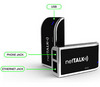
VoIP call recording software for popular VoIP applications such as Skype, Google Talk, Windows Messenger, Yahoo! Messenger, and the rest is something I get asked about all the time. I can't tell you how many times I get email requests for recommendations for the best VoiP call recording software as well as requests for call recording software and/or hardware to record strictly PSTN or traditional PBXs conversations. Even the VoIP Forums has a few threads involving requests for call recording, including this three-page thread titled "Call Recording Software" and this VoIP Forum posting, "SOHO VoIP call recording".
It's tough when I get so many of these help requests (usually via email, sometimes via phone) since it is in my nature to want to help people out. However, I am getting paid by TMC to test VoIP products, write product reviews, and provide my own VoIP industry analysis - and not to be a personal consultant for everyone that asks me for assistance.
Don't get me wrong though, I often DO respond to email queries for help. If the request is simple, I usually respond, but often times the answer is quite complex - it depends on the user's exact requirements, what type of network environment, etc. that would just take to long to solve their problem with a single email. So if I spend too much time of my workday playing "VoIP consultant" to strangers, my boss will not be happy with me. You don't want me to get fired, now do you? 
Nevertheless, since I have received so many queries about VoIP call recording, I thought I would provide some useful info - a "VoIP Recording FAQ/Primer" if you will.
I should point out that there are several companies offering VoIP call recording both for the enterprise and for personal use. First, let's look at enterprise-class VoIP call recording solutions that are used to record conversations on IP-PBXs/VoIP hard phones and then we'll look at personal call recording solutions that work with Skype, Google Talk, etc.
First, NICE Systems is one of the leaders in enterprise VoIP recording. In fact, NICE solidified their industry-leading position by purchasing Dictaphone's call recording business last year, which was one of NICE's competitors and was one of the leaders in call recording and quality management. NICE Systems VoIP recording technology is fully integrated within NICE's current product line, NiceLog and NiceUniverse, enabling any NICE user to add VoIP recording into their present environment. The solution provides intelligent recording of VoIP interactions for full-time recording, recording-on-demand and quality management. I know they are interoperable with Cisco Systems' Internet Protocol Contact Center (Cisco IPCC), but I'm sure NICE integrates with other VoIP solutions as well.
Witness Systems is another well-known company offering very good call recording and QM (quality monitoring) solutions, including their flagship VoIP recording product called eQuality ContactStore for IP . They claim to be the first to support SIP call recording.
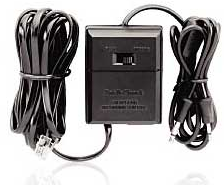
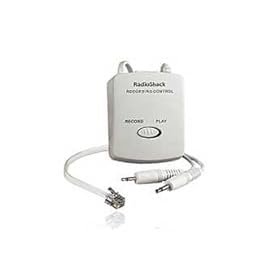
Now let's look at some "personal use" VoIP recording solutions. If you are using a hard IP phone, such as a Cisco 7900 series IP phone, then you can use a cheap telephone recorder device, such as the Recorder Control - Model 43-228 ($26.99), which you can pick up at Radio Shack. It is designed to work with a standard tape recorder and features a "remote tape control" feature that automatically starts/stops the tape. Thus, it automatically records when receiver is lifted from the phone. Of course, most people will want to record to their PC instead, so you can simply connect the microphone output to your PC's sound card and leave the tape control output plug unplugged.
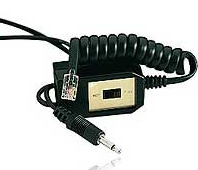
Another Radio Shack model is the Mini Recorder Model 43-1237 ($17.99), which is a bit cheaper than the 43-228 model, but it doesn't have the automatic record feature when the telephone receiver is lifted from the phone. Still, since most users don't need the remote tape control, this device should suffice for most users. You can buy the 43-1237 online on Amazon for about $15.
However, the one 43-1237 model I did try had a lot of static/noise in the background. I'm not sure if I got a defective unit or if the mic plug was not the correct size. It's possible this model was designed specifically for tape recorders mic input and not a PC's sound card. They are similar, but not exactly the same.
If you want to go really high-end (and expensive $125), the JK Audio THAT-1 is a high-end telephone recorder used by radio stations to record and play sound bytes. The grey pushbutton selects which audio will be sent into the telephone (OUT = talking on the handset, IN = sending audio in through the RCA jack). The output RCA jack contains a mix of the audio from both sides of the conversation, as well as the tones being pressed on the keypad. The volume control adjusts the volume of the signal going to your powered speaker or tape recorder. I use a THAT-1 connected to my phone's handset to record my phone conversations and it works great with excellent sound quality. But you will pay a premium for this unit.
TelRex CallRex - is a software-based VoIP call recording solution that supports integration with 3Com NBX, Cisco Call Manager, Mitel ICP, Nortel BCM, Artisoft Televantage, Avaya IP Office, Siemens HighPath, NEC NEAX, Shortel Shorewave, and Zultsys MX250.
ASC's VoIP Server Software eVOip captures VoIP packets and allows the user to store, reproduce, archive and play back the entire interaction. EVOip is a passive VoIP recording solution that monitors the RTP / RTCP packages on local area networks (LANs). They currently support tight integration with Cisco, Avaya, Siemens, innovaphone, Mitel, Nortel, and a few more, but they claim it operates with any IP vendor or signaling protocol. They even offer a free 1-license download for trial.
An option to go "cheap" is to download the FREE open-source Ethereal packet sniffer program. Ethereal can decode VoIP packets, including the RTP stream and save it as an .au file (you can convert to .WAV if you need to, but most likely your PC will play .au files. You just leave the software running on your PC in the background and then setup a filter to only capture VoIP traffic. It won't work with Skype, but should support many other VoIP applications and IP-PBXs, especially those that support the SIP standard.
Here's some info from Ethereal's web site:
____________________________________________________
Ethereal 0.99.0 has a functionality RTP Analysis that can be used to convert RTP packets to ".au" sound-file.
There are a lot of programs that can convert from .au to .wav if you really need to use the .wav format but actually you should be able to play the .au file direct, I assume. Currently this only works for G.711 (PCMU and PCMA).
If the RTP packets are not shown as RTP you first have to select one of the packets and use the "Tools/Decode As..." menu item and select that the packets shall be decoded as RTP. http://www.ethereal.com/faq.html#q5.21
Then you mark one of the RTP packets and use the "Tools/Statistics/RTP Analysis..." menu item to obtain some statistics about delay and jitter. If the codec is G.711 (PCMU/PCMA) you should be able to use the "Save voice data as..." button in the RTP Analysis window.
Yet another option, WinEyeQ VoIP network capture utility They have a trial version that comes bundled with Win Pcap 3.0 (packet capture driver) and is designed specifically for VoIP.
Just to give you an idea of what types of features to look for in a VoIP call recording software solution, I'll include WinEyeQ's Voice and Video Call Monitor/Analyzer features:
- Completely software-based test tool.
- A true H.323 and SIP call monitor with complete call analysis and media monitoring
- Detects new H.323 and SIP call attempts (both inbound and outbound) automatically
- Maintains registration information to gatekeepers and registrars giving you a complete call profile
- Detailed reporting of protocol violations and call anomalies as well as user-defined alerts and alarms
- Detailed reporting for network usage, call summaries, call traces and media QOS measurements
- Monitor entire network segments or specify IP addresses or ranges
- Measure bandwidth usage of VoIP signaling, voice, video and other network traffic
- Set watches for key call identifiers such as E.164 number, SIP ID or IP address
- Specify protocol layers to monitor (IP, TCP, UDP, RAS, H.225, H.245, SIP, RTP, RTCP, etc.)
- Detect and alert unwanted traffic on the network

vEmotion by VoiceEmotion.com is a personal use VoIP recording product that works with all of the major IM/VoIP software clients, including Skype, AIM/AIM Triton, Gtalk, Msn, Yahoo Messenger, QQ, ICQ, and Windows Live Messenger. It has some cool features, including the ability to set background music for VoIP conversations so you can share music with your friends. The nice thing about this software is that it's automatic. When you begin a VoIP call, recording automatically begins. When the call ends, the recording stops automatically and a new record is stored.
Other features include:
• Send voice emotions (lively audio clips) to who are talking with you. Anything you have inconvenience in expressing it with your mouth or text, you can communicate it by voice emotions.
• Record voice conversations into disk files, in single-track, dual-track or single-track double frequency mode. Data is encrypted, and passwords can be assigned to protect your call records against unauthorized access.
Finally, here are some other call recording solutions. Some are for enterprise use and others for personal use.
Cain and Abel is an interesting VoIP call recording application. Cain & Abel was designed as a "network administrator security tool" to pinpoint security holes. I put that it quotes, since it can also be used as a hacker's tool.
Essentially, this "security" software product can record your SIP-based VoIP applications. Cain's sniffer can now extract audio conversations based on SIP/RTP protocols and save them into WAV files. The following codecs are supported: G711 uLaw, G711 aLaw, GSM, MS-GSM, ADPMC, DVI, LPC, L16, G729, Speex, iLBC.
Gabcast is a unique hosted call recording application that actually lets you instantly create podcasts for your blog with integration with your blogging software. The neat thing about Gabcast is that it supports conference calling their service both via the PSTN and VoIP. Using your favorite SIP softphone you simply dial the SIP address: 422@sip.gabcast.com along with other particpants dialing in using PSTN or VoIP and it will record the conference call into mp3 format.
Hotrecorder is another option, which I wrote about here. It works with PC-initiated calls through Skype, AOL Instant Messenger, Net2Phone, Yahoo! Messenger and probably others. The free version of the software is supported by advertisements that are targeted according to the consumer's location, gender or age or you can buy the software ad-free for $14.95.
Oreka.org is an open source VoIP recorder developed by www.orecx.com. Orecx develops and sells add-ons, extensions and services to this open source core recorder that has been adopted by dozens of enterprise users so far including a 2500 seats deployment at http://www.jppol.dk/ in Denmark.
Call Shadow Technology - They offer a low-cost yet feature-rich call recording solution (10 phones for $3,000) and support Cisco Call Manager. In fact, they have an XML phone service which allows replaying calls directly on the phone, and is integrated with CallManager's user directory (LDAP DCDirectory) for unified authentication.
The aforementioned are just a sampling of the VoIP call recording solutions out there -- I could go on and on with a list of many other solutions, but hopefully this will give you a a headstart in finding the right VoIP call recording solution. Feel free to drop me a line with any good VoIP call recording solutions you use or if you need help with any VoIP solution. I'll do my best to try and help you out.


Technorati
Del.icio.us
Slashdot
Digg
Hi
I read your article and found it really helpful. We also want to develop our own VOIP call recording solution. We are using Zultys exchange which is connected to a switch. We want to develop an application which will be connected to switch and sniff all the VOIP packets (SIP + RTP) and save each voice conversations in a different file. Until now, we have looked into Etherreal, Java APIs for sniffing and JMF. We have been able to separate RTP packets and classify them as one stream.
Now, I want to convert RTP Payload (in G.711 format) to some wav or mp3 format. How can I do this by using some free API or tool?
We are stuck in this for a week. An urgent response will be highly appreciated.
Callrex works well with several platforms including Zultys. What makes it real nice is that you mirror the only the port that the zultys is plugged into and it supports the g729a codec - not just g711. check out www.callrex.com. Not free - but I think they offer a good trial program.
Is there any open source available to implement similar concept of Ethereal...capturing RTP, analysing and storing as *.wav files?
Converged Software offers the VoiceWarehouse call recording product for use with Cisco CallManager networks. This solution is JTAPI-based and integrates with CTI ports, as described in the initial post. This type of configuration is ideal for quickly providing network-wide access to on-demand recording of conference/standard calls and dictation. Unlike solutions geared towards high volume call center recording which require complicated SPAN port configuration, the VoiceWarehouse can be installed by a CallManager administrator in about an hour on an available server meeting minimum specifications (http://www.convergedsoft.com/vw_eval.jsp).
This solution is offered at some of the best prices in the industry. It's also one of the easiest to use. When a recording is made an e-mail is sent providing a link to a user's personal inbox in the VoiceWarehouse web application. The user can then annotate the recording and control playback on their IP phone via a web interface.
The link in the above posting should be:
http://www.convergedsoft.com/vw_eval.jsp
You can use "CAIN" for VoIP sniffing and security testing for VoIP Traffic.
It works very well and you can record the call
You can use "CAIN" for VoIP sniffing and security testing for VoIP Traffic.
It works very well and you can record the call.
PS: I can't give you the download link because it's a free hacking tool but you can search
!!!
Duxoft Voip Calls Recorder allows you to record SIP, H.323, MGCP or Skinny calls.
Read more here:
http://www.duxoft.com
Converged Software now offers SPAN (packet sniffing) and CTI port recording in one application at the BEST pricing in the industry.
Features for recording on Cisco CallManager networks include:
- Always on, or full-time recording
- Initiate recording via IP phone XML service
- Capture entire call whenever initiated
- Webmail-like playback and management
- Flexibility to record in any environment with combinded SPAN and CTI recording architecture
Read more:
http://www.convergedsoftware.com/
Excellent article with good info on call monitoring. Another company to look at is Intelica Networks. It's TruVoice product for VoIP monitoring records all voip call flows and RTP streams and converts media into wav format.
I have had an excellent experience with the VoIP Call Recording solution VOXNET from A-VOX Solutions (www.avoxsolutions.com). They also offer a free demo download that will let you record 4 VoIP phones for 50 calls. It's a completely browser-based administration, search, replay, and live-monitoring application. They have all kinds of advanced options for encrypting recorded calls, support for SIP, H.323, and many of the propietary protocols such as Cisco and Mitel.
Another software option is VONaLink SoloRecord.
www.vonalink.com
It works with any VoIP phone system based on the SIP standard to record calls and to provide screen pops.
There is also the new SoliCall free beta - www.solicall.com
It works with most softphones (e.g. Skype, Google talk & Yahoo! messenger).
So using a single tool you can record all your softphone calls.
Audio Vampire is a full-fledged audio editor. It can record any sound played on a PC, including VoIP calls. Skype, MSN messenger and Windows Live Messenger are supported. The sound quality of VoIP call recording is superior to other programs. It does not use the Skype API. The maximum recording length for VoIP calls is 3 hours and 20 minutes. Other audio sources can be recorded until disk space runs out. Also, Audio Vampire has an extensive range of sound editing/effect capabilities. It can even rip CDs. Check it out.
Audio Vampire is a shareware program, made by TechnoCraft.
Download the trial version from:
http://www.technocraft.co.jp/av/eng/
Hello, I have a hardware phone that I use with skype (usb-from walmart), and was wondering if there is anyway to ONLY record the the other person.
I know this can be done using skype, headphones, and my soundcard; but since the hardware phone uses USB I can't do that!
Anyway one any ideas?
I managed to successfully arp-poisen my VoIP hardware and record the calls with cain, but I was wondering if there's any way I can see the 'Caller ID' too. I'd like to have a way for the computer to block calls based on the callerID. If I route the voip traffic through the computer, and could block voip call packets from blocked phone numbers, I'd like to know how. I can code the blocking part if I could figure out how to extract the CallerID info... It seems to be encrypted or something
Cain captures RTP (audio) packets only, so it does not show caller ID. Our software product VONaLink SoloRecord records, shows caller ID, and reject calls based on caller ID.
www.vonalink.com
Hi,
you might also want to look at ZOOM CallREC (www.zoomint.com/en/callrec.php). It is a "Cisco compatible" certified recording solution that offers recording based on sniffing Cisco Skinny and SIP or can directly connect by JTAPI to Cisco CallManager which is the most reliable way to get 100% call recording. It has a web-based GUI interface independent on IE (runs in Safari on Mac or Mozilla on Linux as well) and many great features.
My company recently bought callrex from Telrex...It is a voip recording software that doesnt work at very well. Three way call doesnt work...and if you are on the phone and someone else calls in, that persons Caller id will be the one that the previous call gets recorded under...They dont seem to care that there are bugs in their software...And getting a refund is nearly impossible, we had to have our lawyers threaten to sue...Dont Buy it! Get witness instead..
Due to trademark issues, Ethereal had to change its name to Wireshark last May.
Recent versions of Wireshark have added the ability to play back G.711 streams without having to save them first.
For small or medium businesses that want the features of an enterprise solution that does not cost as much as NICE or Witness and has easier to use software there is Versadial.
Versadial uses call recording cards that can be installed in the PCI slot of any Windows based PC and remote access software that allows users to access recordings, search, live monitor, grade and make reports over a LAN, over the Net via TCP/IP or even over a wireless network on a PDA running Windows mobile.
A list of compatible VoIP PBXs here: http://www.versadial.com/pbx_extension_recording.html#va
The call recorder can be hooked in through the SPAN port on a switch or at a hub. Diagram here: http://www.versadial.com/voip-call-recording.html
Hello
I was trying to look for VoIP trace files. But couldnot find any, so was wondering if I can generate one through these VoIP call recording softwares. I am particular to use G.729 codec.
Can you guide me on the same.
Thanks in advance.
nice list there tom. i recently reviewed voip adapters and will be comparing some more in future.
vinay
http://voipguides.blogspot.com
Hello.
We have a non-profit resource on java in general, but one of the articles deals with RTP using Java Media Framework.
RTP Server Using JMF
Thank you for your time.
Hii,
i need some info about api's to record from mic and converting to G.711 ulaw or alaw. Can anybody give me that info.
You can record VOIP calls not from microphone, but directly from network traffic without loss in quality on analog microphone.
You will need only VOIP recording application: Duxoft MiaRec. No additional equipment is required.
MiaRec is a software application for recording and monitoring calls in any of Voip protocols (H.323, SIP, MGCP, Cisco SCCP).
MiaRec can be used for recording many simultaneous calls as well as only one call at the time.
Please, visit our web and find more about our products and current discounts.
www.duxoft.com
Thank you for your time.
I just came across https://record.viavisitar.com/ which provides very easy mp3 recording (currently free) of any US outbound call, including VoIP and regular analog POTS calls.
Thanks for the article!
There is a new tool called easyVoipRecorder.
Its a nice tool for recording many voip softphones.
Please check it out at
http://www.easyvoiprecorder.com
You might like to look at the VoIP Call Recording and Web Browser Call Replay solutions available from i-Net Applications Ltd.
Branded as the SMARTCALL Voice-Net range, these comprise either complete systems or software plus a VoIP Recording card compatible with Avaya, Alcatel, Cisco (Call Manager),Ericsson, Mitel, Nec-Philips, Nortel, Selta, Siemens VoIP switches and recording SIP, H323/H225, G729A and VoIP VOX protocols.
The VoIP VOX implimentation is particularly useful if the switch manufacturer has encrypted control packets as quite often the voice segments are still unencrypted and therefore recordable.
CRM integration is provided by optional middleware that collects additional business data from a screen pop-up form at beginning or end of each call and stores this information in the SQL recording database so it can be used to quickly search and find the required call recording.
Another plus is the ability to embed a web URL link in your CRM application to retrieve and invoke web replay of the associated recorded conversation corresponding to that transaction.
i-Net both manufactures and sells all types of Advanced Call Recording Solutions that are slick and easy to use and cost much less than comparable offerings from the 'big names'.
For more information see the i-Net web site at: http://www.smartcall.com
Hope this is of interest!
You also may want to take a look at www.recordmycalls.com. It allows you to record phone calls without any additional hardware or software. All you need is a phone (cell, landline, or VOIP, doesn't matter).
This article is very useful to me.
I am Manivannan working as project manager in Cogent Connect private limited, chennai, India. We are Mainly providing CRM service in India. After studying this article, we got new ideas and we focused into voice logger products. Now we have voice logger products in VOIP platform.
Thanx for the site owners.
Visit us, at usedialog.com for more information
or reach us at
mani@cogentmail.com (or) nmani77@gmail.com
Regards,
Manivannan.
CallCopy is a leading call recording manufacturer that offers
a blended TDM and VoIP recorder supporting both active (CTI) and passive (packet sniffing) methods of VoIP call recording.
Both VoIP call recording methods have their pros and cons. Active VoIP recording is typically easier to administer however additional licensing is required
from your phone manufacturer. Passive VoIP call recording is completely
transparent to your phone system however additional network resources may be required to ensure that all VoIP packets are forwarded to the call recorder.
Examples of Active VoIP interfaces supported include
(CMAPI)
CallCopy supports most brands with the passive voip recording method including: Avaya, Cisco, Nortel, Shoretel, NEC, Toshiba, SIP, H323, MGCP, Asterisk, and
many others.
I use vEmotion.
Tom, are there any recorders that work with Magic Jack?
vEmotion and EasyVoipRecorder look promising but I have not tried them yet.
If any one knows please post here.
Thanks
Hai Joesph,
I think our Dialog USB product can be used with Magic Jack. Connect the RJ11 port of telephone to our Dialog USB box and other RJ11 cable to RJ11 port of Magic Jack.
If you give me more info, I can help you. We have Dialog VOIP , which is passive VOIP Recording solution. If you use Multiple Magic Jack, then Instead of Dialog USB, I can recommend you Dialog VOIP .
It can understand the below VOIP standards.
SIP, H323, Skinny, IAX, RTP, G723.1, G729A, and G711.
You can contact me at mani@cogentmail.com
Regards,
Manivannan.
I have been using www.recordmycalls.com for the past three months for work and personal use. Finally something works all the time from any phone with out any devices. works from my cell, vonage and office.
Very clear, grear customer service and resonably priced.
First call was to my Ex-wife, she told me i couldn't have the kids on my weekend, that went over well when I played the tape for the court appointed attorney after she said I never showed up.
Then 7 weeks later, I got my credit card company promissing a 0% interest for the next 9 months with a $30K transfer then reneging. Got a supervisor on the phone, played them part of the tape, and they were pissed, but presto, I have my 0% interest rate. That alone paid for the service.
Then this site has something called "open-mic"
Walk into a room and want to record something like a conf call or a meeting, put it on speaker phone.
Why did I not think of this business, no more getting lost on calls or meeting, now what people say gets put on tape and I use it !
Correct me if I am wrong, but services such as RecordMyCalls.com are fine for *outgoing* calls only, since you have to call their access number first.
Our product, VONaLink SoloRecord, installs on your computer and uses packet monitoring to records all your incoming and outgoing VoIP calls. SoloRecord is a one time license fee, not a monthly subscription.
I ended up buying vEmotion. It works perfectly with Magic Jack. My favorite part about it though is that it has dual channel recording. One person on the left channel and the other person on the right channel. =) Wish more products did that (and worked with MJ).
To: Marcus Thompson
Hi Marcus, instead of paying monthly for RecordMyCalls you should get vEmotion + Magic Jack, they work like a charm!
I dont work for either of these companies, but I find them very useful and easy in recording everything. You don't know how long I've been looking for a way to do this!
The whole "paying monthly thing", when you can only make outbound calls, doesnt seem very appealing; but I can understand the simplicity since it doesnt require software, just a regular telephone.
Well hope this helped a little.
Joe
Vonalink YOU ARE WRONG !
Let me see, once i download your software, can i use it from
A cell phone?
My Office,
My girlfriends hose
or at a hotel.
The answer is, NO
Do I have to carry a computer around to record my calls, or my Vonage phone...
Dude you are selling software, wake up, this is SaaS
IT WORKS FROM ANYWHERE no hardware no software
To: Marcus Thompson
Vonalink IS NOT WRONG.
Your service (RecordMyCalls) doesn't record incoming call. Isn't it?
Your service is great. It requires no hardware or software to record outgoing calls.
But it has following drawbacks:
- it doesn't support recording of incoming calls;
- it doesn't support international calls (Probably such calls are supported, but there is no information about that on your web-site and there are no rates);
- international users will be charged additionally for a call to your toll-free number.
I would like to say again: your service is great. But it is not the only one solution for recording calls. Sometimes your service (SaaS) is not suitable and simply doesn't work.
You are right, software from Vonalink (SoloRecord) or Duxoft (MiaRec) requires installation on computer and doesn't work with cellphone (like you said already).
But it works with incoming and internatinal calls. Also it is cheaper for users, who make a lot of calls.
With your service users are charged per every minute of recorded call, but with above software users are charged only once during purchasing of license and no addional expenses after that.
Marcus:
I have just one question. Does RecordMyCalls allow you to record incoming calls ? If so, how does it work ? For example, if someone calls your Vonage number, how does RecordMyCalls record it ?
Joseph :April 18, 2008 10:40 AM
"...My favorite part about it though is that it has dual channel recording"
Jonathan: SBWin also offers dual channel recording and would work fine with Magic Jack. It's a little simplier to use but it also costs more than veMotion
We are working on VoIP application. MFC functions are being used for sending voice packets in UDP over the network.
we need a recorder which can record call conversation into wave file (Outgoing from Mic and incoming to speakers). Please do let me know if there are any source code available on this.
Correct me if I am wrong, but services such as RecordMyCalls.com are fine for *outgoing* calls only, since you have to call their access number first.
I've prepared a short How-To at How to Successfully Tap Your (SIP) VOIP Phone Line for Free that covers some aspects of using the free Oreka with external SIP phones.
Do you know how to map vEmotions to Magic Jack? I can't see a way to do it, as Magic Jack appears to be hardware-activated.
It's pretty easy. When you download vEmotion, you go to Tools -> Options.
Under Customizable (1) you put C:\Documents and Settings\YOURCOMPUTERNAME\Application Data\mjusbsp\magicJack.exe
Thats it! Play with the settings, Its very easy; I've recorded tons of things.
Joseph, thanks. I was searching, apparently not very proficiently, for the magic jack executable, and couldn't find it until you told me about the obscurely-named "mjusbsp" folder. I just didn't have the patience for search for a "magic jack" executable, other than in the virtual drive it created. Thanks!