Vonage V-Phone Review


Vonage sent me one of their Vonage V-Phone USB devices to review. As you probably recall, I wasn't very keen on the V-Phone, but I decided to go ahead and test the V-Phone anyway. The concept of the V-Phone is that it's a small portable device that you can take anywhere and your phone number will follow you, as well as the added benefit of inexpensive VoIP minutes. I received my eval unit on June 30th (last Friday) and I attempted to install it on my work PC. I inserted the 256MB V-Phone into an available USB slot. I could see the device installing itself but the softphone client never popped up. I opened Windows Explorer and clicked on the newly created drive letter and received this lovely error message ("This operation has been cancelled due to restrictions in effect on this computer. Please contact your system administrator."):

Vonage V-Phone error

This error "can" be related to Group Policy restrictions on an Active Directory network, however I am the CTO of our network, so I don't have any Group Policy restrictions on my PC. It was partially installed since I now had a new USB audio device named "C-Media USB Headphone Set". I was able to listen to music using the included headphones that I connected to the headphones jack on the V-Phone.
In any case, I tinkered with it for a bit before finally giving up and then trying the Vonage V-Phone on another PC. One theory I have yet to try is to uninstall Daemon Tools, a utility for mounting ISO CD/DVD images, but it also reserves a drive letter, which may have caused a conflict. Although, I have never had a problem installing other USB Flash drives.
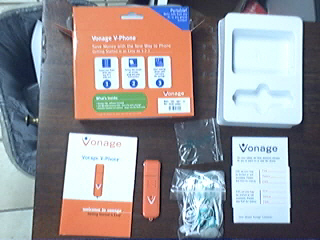
Vonage V-Phone contents
            Vonage V-Phone Box Contents

In any event, I installed the V-Phone on a 2nd PC (and later two laptops) and the installation went smoothly. The Vonage V-Phone client popped up in about 30s and I was able to immediately make and receive phone calls. The nice thing about the V-Phone software is that it doesn't install onto the hard drive, it simply runs the executable file directly from the Flash drive.

Here's a screenshot of an incoming call - notice how you can see the CallerID with Name and accept or reject the call.


The softphone client also features a History tab to show your call log as well as a Contacts page. The Contacts page lets you add contacts with phone numbers for speed-dial capabilities. You can also organize contacts into groups. During my test calls the voice quality was very good. I don't believe Vonage uses either GIPS's or Spirit DSP's voice engines for better voice quality, but I was still pleased with the voice quality.

Conclusion
Calling plans for the V-Phone are identical to their traditional service offerings. It costs $15 per month for 500 minutes, $25 for unlimited residential service and $35 for business use. The V-Phone isn't a replacement for a traditional Vonage phone line. In fact, if you are currently a Vonage customer with an existing Vonage number, you have to order a separate Vonage phone number for the V-Phone. Vonage doesn't offer the ability to have a single phone number married to both. This would actually be a nice feature - simply take the V-Phone when on the road and your home phone calls are automatically routed to your laptop/PC when you plug in the device.

Although, I had difficulty on one PC, the V-Phone performed flawlessly on 3 other computers. It does what it is advertised to do - namely give you the ability to carry your phone number with you for use on a Windows computer/laptop (no Mac or Linux client). Though arguably a cellphone can do the same exact thing (carry your phone number). You could argue that the V-Phone lets you make calls using inexpensive VoIP minutes instead of expensive cell minutes. However, many cellphone service providers offer a large bucket of minutes or even unlimited plans for a fixed price, which negates VoIP's advantage over cellphones. With this in mind, you have to wonder why a person would even need the Vonage V-Phone. I will say that the V-Phone could come in handy if you make a lot of international phone calls since cell phone calls to international destinations are still outrageously expensive. Then again, you can head over to Skype, download the Skype client for free and charge your SkypeOut account with $40 worth of phone minutes instead of paying $40 for the V-Phone.

Well, I guess for $40 you get a nice 256MB USB flash drive. Then again you can pick up a 256MB USB flash drive from Amazon for $13.99 or less. <sigh> Well, at least the V-Phone USB stick is a pretty orange.

| 21 Comments | 0 TrackBacks

Listed below are links to sites that reference Vonage V-Phone Review:

Vonage V-Phone Review TrackBack URL : http://blog.tmcnet.com/mt/mt-tb.cgi/26137

21 Comments

| Reply

Thank you! You answered pretty all the questions I had about the phone.

"With this in mind, you have to wonder why a person would even need the Vonage V-Phone."

Well, my cell phone does not work in my house, which is a major problem. VOIP is an option, especially a VOIP tech that does not require a special router and is portable.

I travel a fair amount away from home (internationally) and that's where the V-Phone really makes a difference: to be able to walk into most internet cafe's or friends houses and stick a key in their computer to talk to people at home for free is pretty amazing. This would be the perfect "going away" gift for anyone going backpacking in Europe!

The real + for the V-Phone is for international travel. In fact, I got it to use as my main phone in my vacation home in Mexico. The only hassle with it at the moment are compatibility issues with Vista. There is a workaround but it is annoying.

Where did you find that workaround for Vista RF?!

I'm a current Vonage customer & I'll be in Costa Rica on vacation soon & I'm planning on making & receiving calls for free using the V-Phone. Vonage customer support is telling me that the phone will ring in Costa Rica whenever anyone dials my regular California Vonage phone #. If it works the way they say it will, I'll be saving the $2.00 per minute everyone else pays to call the states from there. I think it's very cool!

Actually, you *can* use both the V-phone and another device. You have to buy the V-Phone separately in retail outlets, and then add the device to your account.

Then, when you're on the road you go to your vonage account profile and switch devices. it's pretty easy.

| Reply

I have not used this but as a expat living in the Philippines this could be a great way to call home and receive calls from home inexpensively. I am currently using skype and skype in and very happy with it. But hey, the women would find this very sexy when i'm on the road :}

hi.. i have this vonage phone and it's pretty cool knowing that you can call for free e where the v-phone is really choppy.. I hear anywhere as you bring it and plug unto pc but im having a problem.. There is a certain time when my mate's voice is really choppy! while my mate hears me clear and this occurs from 7:30pm to 2:30am.. Anyone help?

I got the V-Phone, which of course didn't work with our Macs. No problem, thought I, I can hook it up to our PC. Wrong. It didn't work. Going to the Vonage website, I found a tech note that Vista doesn't work with the V-Phone. But they have a workaround. A crappy workaround, which results in a whole lot of pop up security alert windows every time you use the phone.

Then I realized that the mic wasn't working.

I contacted Vonage, with the hopes of just exchanging this POS for the reliable Motorola device we used for our other 2 lines.

No dice. Vonage "does not upgrade/exchange any device. Vonage does not provide an additional device or replace an active device. I apologize for any inconvenience that may have been caused."

Inconvenience? I can't use my phone number! That's a bit of an inconvenience.

I signed up for Vonage on Nov. 30th, 2007, have not been able to start the services at all, yet, I am stuck with charges for:
1) VPhone Purchase ($39.99 + tax)
2) S/H charges for returning the original Motorola box ($9.95)
3) 2nd month charge $31.99 ($24.99 + Taxes)

All this could be avoided if the tech support personnel would simply ask important initial questions:

1) What is your primary usage for your Vonage Service?
2) What is the Operating System on the computer you'll connect your Vonage Service to?

They recommended VPhone to me, only to find out later, it won't work with Window Vista Home Premium. Go figure! I wasted $80+ and had absolutely not a lick of service!

Would you please acknowledge me Which IP use for for Vonage V-phone(i.e. SIP etc.).

| Reply

Reasons the V-phone is a good option out there.....

You live in the sticks, and broadband is more prevalent than cell phone reception.

You have a local wireless company that charges less for unlimited minutes in your region. The cost of the v-phone added on is still less than a cell phone with a major carrier. Now you have service when you travel out of your region, without ROAMING charges.

You travel out of the country, and voila, you have your US number at your disposal in the privacy of your hotel room.

You have a small business and would like to have the same number reach you at work as well as at home. Cell phone usage may be more expensive or undesirable.

Hey, it is true that this is not a phone option for everyone, but it IS an option, and a good one at that. I am traveling South America by foot for the next three months. For $15 a month, my friends and family have the piece of mind that I will be within reach at any time I am hooked up to the internet in my hostel. Brilliant. Try and get service with your cell phone in South America, and for less than $25 a month!

| Reply

I read your review, Mr. Keating, and held off bying a vPhone because I did not want to purchase another line subscription.

However, I finally inquired further and learned that it is not neccessary to purchase a new subscription.

I went to Best Buy and purchased the 39.99 v-phone and got a 30.00 rebate (=10 bucks).

I called customer service at vonage and for 29 bucks had it activated on my already existing account.

It now appears as a device in my account and I can move eaither of my two, already existing phone numbers to the (vphone) device at will through the web interface.

I am travelling to Europe this summer and will definitely bring a line on the vphone device and I wish I got it last year when I was in Mexico!

I bought the V-phone because I travel internationally, and with this device I can call home everyday and it doesn't cost me a penny more.
in addition, I also have a number where they can call me.
I used to use skype but I didn't have a number so it was only for outgoing calls and not incoming. I tried transferring a # I have been using forever but I wasn't able to, and with Vonage I was able to transfer my old # to the new device and now I have a phone anywhere I go.
it rings anywhere in the world, Same #.
right now I am in Beijing and my phone works flawlessly.
excellent device if you know how to use it.


FMD

I had some massive problems getting the V-Phone to work with Vista. I tried many of the official workarounds and they all failed.

In the end, here are a few highlights of my "fix":

- Don't plug the V-Phone into an external USB hub.
- Uninstall your ISO mounting software.
- Run the "usb-update-2007-01-22-000001.exe" file.
- Make sure the correct USB driver is loaded.
- Don't use the V-Phone microphone.

My blog post contains a few more details:

Goondocks Vonage V-Phone Vista Workarounds

Hopefully some of this might help someone else.

Pros: it is cheap and you get what you pay for

Cons: Customer service is terrible, phone service is on again off again. The customer service line is useless. They leave you on hold for 30 minutes plus each time and do not solve your problems. Even if they are wrong they will charge you.

Summary: This company does not provide the service they promise. They don't stand behind their product and when you try to cancel they will leave you on hold for an hour hang up on you and still charge you a disconnect fee of $39.99 that they do not disclose. Be sure to get written confirmation of your disconnection or they will not disconnect and will not refund your money.

Don't bother with this hunk of junk. Just download portableskype.zip and put on a usb drive. Then for when you are at a Internet Cafe, just pick up a USB sound adapter off ebay for $2. Plug your Headset into that (you will need an adapter cable to use a 2.5mm phone headset though). Works just as good with no nasty monthly fees.

It never works well with ANY flavor of Vista. I know. I have tried it all of them. Don't even think of trying to make it work on Vista Home.

Vonage Tech support acknowledges that the v-phone is problematic, at best. Their work around will work with Vista Ultimate (shortcut with winxp compatibility) but winxp compatibility setting does not stay.

Alternative? www.magicjack.com
$50 for the unit. $20 per year (yes, per year) unlimited US/Canada calls. Thats less than $2 per month.

I live in Calilfornia but will be moving to Toronto, Canada for 2 months. I would like to keep my existing number and those calling will get connected to me in Canada (or wherever I'm travelling after that).

Any comments on which would be best - v-Phone or V-Portal? I'm assuming sound quality would be better using the phone.

Have also looked at MagicJack but reviews aren't good.

I've used vonage for years and was an early customer for the v-phone. Idiotic stunts like the v-phone is how ineptly-managed companies trash their own brands.

Vista is old hat. It's Windows 7 now and Vonage should get with the program. The V-Phone is a spectacular idea and extremely useful (when it works). I take it to Europe with me on vacation so I can return business calls from Internet cafes and anyone who has caller ID thinks I'm back in my home state in the US. But when you have something that works so well people turn against you in a heartbeat when you muck it up with total idiocy... this absurdly stooopid inability of Vonage to get elementary software right makes you wonder if you want to trust them with anything important at all, like your other telephone services.

If they just got this right, the V-phone is a great way for them to get an extra $9.95 per account per month, as it is the sort of thing many people will buy and (like me) forget about until they need it, but will be paying that $10 per month. Gee, I guess vonage doesn't need money.

Leave a comment

Recent Activity

Today

  • Tom Keating tweeted, "Spending 4th of July with in-laws on their lake-side house. Coming soon - fireworks!"

Friday

  • Tom Keating queued Star Trek
  • Tom Keating queued Stardust
  • Tom Keating queued The Fountain

Thursday

More...

Recent Comments

  • http://openid.aol.com/drdaraban: Yes, I confirm antonioj's comment, both skype and the app read more
  • cmytroops: I was browsing the net and cam across a great read more
  • mike: Sorry if this is off topic but I’m thinking of read more
  • @NumberGarage: Our military service men and women should be driving new read more
  • https://www.google.com/accounts/o8/id?id=AItOawlacBYIyCFI8mz5HS_pdsnSDV1wLz6Vgc8: We have implemented over 50 VoIP systems in the last read more
  • Theo Barton: Its a good phone. I have had a lot of read more
  • https://me.yahoo.com/a/ea7WMvNu2Mlud7dBwQPAAus9JCfo9qE-#27391: I don't want to go through all the problems, I read more
  • Claudio G.: I contacted these folks via e-mail recently (June 2009)and they read more
  • Kinjudah De- Morgan: I am using a strong satelite receiver and a Gateway read more
  • dell gx620: I have just had my second Dell. Thinking by spending read more

Subscribe to Blog

    View my Microsoft MVP Profile:

Blogroll

Archives

Around TMCnet Blogs

  • Communications and Technology Blog - Tehrani.com:
    Problems at Joost
  • On Rad's Radar?:
    USF and Rural Reform
  • VoIP & Gadgets Blog:
    Worst Google News Headline Ever! - No public viewing
  • Communications and Technology Blog - Tehrani.com:
    Heading to Rhode Island
  • First Coffee:
    SugarCRM Studied, Broadband 'Crucial,' EGain, OOCOSPI, NetSuite's Zander
  • On Rad's Radar?:
    Bells Giving Up on Landlines?
  • The Readerboard:
    Tougher Actions To Save Telemarketing
  • VoIP & Gadgets Blog:
    eBuddy for iPhone Supports Push Notifications
  • Latest Whitepapers

    TMCnet Videos