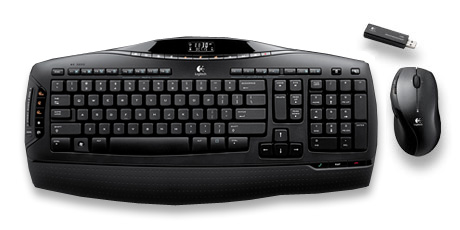
Logitech Cordless Desktop MX 3200 Laser: Now That's What I Call Wireless!

I'm talking across-the-room wireless connectivity, not just short range like other wireless keyboard/mouse combo kits.

With the Logitech Cordless Desktop MX 3200 Laser, you get leading-edge performance, comfort and style as well as things you never thought you could do from your keyboard.

Now, I can take advantage of my PC's great media and communication capabilities, even if I had Windows Vista. (I don't -- but this one is working with a Windows Media Center PC.)

Here's the skinny:

  • Integrated soft-touch palm rest provides extra support and can help reduce fatigue
  • Straight keyboard layout features Zero-Degree Tilt, which offers an extremely comfortable and natural typing experience
  • Full-travel keys maximize comfort, respond instantly and are extremely quiet
  • Sculpted design of the mouse fits comfortably in my hand
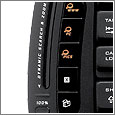
What's really cool is the dynamic search and zoom to find files faster. With the touch-sensitive slider, I can explore Windows Vista folders and images quickly and precisely.  Another cool feature is the one-touch Internet calling controls that give me access my favorite Internet calling application; I can start or end a call with a single touch.

And how about that mouse? Gently contoured sides and soft rubber grips offer enhanced support and comfort. The mouse also features an On/Off switch to extend battery life. (So much tech goes into these things.)

Another neat feature is something called AgION antimicrobial technology. Both the keyboard and mouse incorporate this to prevent the growth of a broad range of bacteria, mold and mildew. (Yuck.)

Go wireless, baby!

MSRP: $99.99 - Good price on Amazon - only $80.40


| 3 Comments | 0 TrackBacks

Listed below are links to sites that reference Logitech Cordless Desktop MX 3200 Laser: Now That's What I Call Wireless!:

0 TrackBacks

Logitech Cordless Desktop MX 3200 Laser: Now That's What I Call Wireless! TrackBack URL: http://blog.tmcnet.com/mt/mt-tb.cgi/31294

3 Comments

Nice writeup Tom! I too am enamored with the Logitech Cordless desktops, but I have to say that I was disappointed the company replaced the MX 3100 (which I bought about 6 months ago for my wife) with the MX 3200, and didn't include the MX 1000 Laser mouse -- which is superior to the MX 600 Laser mouse the company now bundles in. In order to get the MX 1000 mouse, you have to move up to the Cordless Desktop MX 5000. FYI, I've seen the MX 3200 on sale at Newegg.com for $73 and change, and the MX5000 for around $115.

Yes, it would have been nicer with the better mouse ...

I bought a MX3200 aka "Cordless Desktop MX3200 Laser", but it doesn't work out of the box with Debian. The mouse works perfectly out of the box, and the suspend key on the keyboard seems to work, but no other keys work at all.

When I hit the suspend key, I get a popup message thing from GNOME about 'suspend not supported'. I think this means that the scancode is sent, and is interpreted correctly by the PC, but the PC's ACPI config is b0rken.

No keys other than the suspend key seem to do anything at all. If I mash the keyboard, hitting every key except the suspend key, there is no visible result at the PC.

The kernel detects the USB receiver and its mouse and keyboard UDB endpoints apparently correctly. However at this stage there is a suspicious kernel message similar to 'fixing up Logitech endpoint descriptor'. I'm guessing this is a Linux kernel work-around for a hardware bug in the USB receiver. Maybe that's not working, or no longer necessary. Anyway, this is clearly indicative of hardware bugs known by the kernel devs.

I haven't tried 'xev', and I probably won't. If it doesn't work out of the box, I'll exchange it for one that does.

So, Linux users, beware the MX3200!

Leave comment to Logitech Cordless Desktop MX 3200 Laser: Now That's What I Call Wireless! article

Subscribe to Blog

    View my Microsoft MVP Profile:

Blogroll

Recent Assets

  • starbucks_escher.jpg
  • starbucks_cup.jpg
  • no-oil-zone.jpg
  • oil-platform.jpg

Around TMCnet Blogs

Latest Whitepapers