 A scratched DVD can certainly leave you frustrated, especially if it's one of your favorite movies, but at least the DVD can be replaced. Now imagine the scratched DVD is a home video of your most cherished family memories and you have no backup copy. This is pretty bad. Now imagine the scratched DVD is your wedding video, you then try the backup DVD and the backup DVD also fails with sector errors. Both of these wedding DVDs are the originals provided by the professional videographer. Oh for the love of humanity!
I did have my own 3rd backup copy of our wedding which worked, but this was the "beta" version and not the finalized version which had more footage. I discovered the sector errors on the wedding DVDs when I attempted to watch the video and the DVD player choked on the bad sectors. "If my wife finds out that our wedding DVDs are screwed up and I didn't keep a digital copy on my hard drive, I'm a dead man," I thought to myself. I actually had the wedding DVD on my hard drive, but it was taking up 4GB of space and I was running out of room. I figured I had 2 copies of the wedding DVD, so why take up valuable hard disk space? So the wedding ISO image was deleted. Word to the wise - megabytes cost pennies, so buy another hard disk rather than trust burned DVDs.
A DVD-ROM drive or DVD player utilizes a laser beam to read the metal layer. This laser beam crosses the plastic layer and reads the metal layer. If the plastic layer is scratched, the beam will be unable to pass through it, resulting in a read error. In other words, the data to be read are still on the DVD, the trouble lies in the layer of plastic refracting the laser beam. Since the DVD's contents are still there, a scratched DVD can be recovered by polishing its surface. But I wasn't about to start messing with the physical disc itself just yet, since once you do, there is no turning back.
Thus, I proceeded to try and rip the wedding DVDs to my hard disk to see if I could re-burn them. First I tried DVDFab Decrypter, a free ripping utility that can ignore sector errors while ripping. It also removes all DVD protections (CSS, RC, RCE, APS, UOPs and Sony ARccOS) while copying, though my wedding DVD wasn't copy-protected. After about 8 hours of ripping the DVD it finally finished (takes longer due to sector errors), I was finally able to at least rip whatever content was still available. I played the DVD image from my hard drive and I noticed that parts of the wedding video were messed up. Frustrated that I was missing portions of the wedding video, I thought perhaps if I tried my secondary (slave) DVD-ROM drive and another piece of software called ISOBuster, I might be able to read these bad sectors. I rarely use the secondary DVD drive since it isn't a burner, so its laser might be more "fresh" than the primary DVD drive.
After several hours, ISOBuster was able to rip the DVD, but it too had to skip some bad sectors. I was able to recover about 95% of the DVD, but when it comes to your wedding DVD, you want 100%. Who knows what that missing 5% contained? It could have been a priceless moment in our wedding. Undaunted, I tried to find a utility that can rip a DVD image to a hard drive, skipping bad sectors and marking the sectors it couldn't read so you can try and re-rip the DVD on another DVD drive to try and read these bad sectors. I also had 2 identical copies, so in theory, I could rip the 1st DVD to an image, then run this utility again to read the "missing gaps" from the 2nd DVD. The odds that both DVDs had bad sectors in the same location were pretty small. Now if only such a utility existed... :(
But wait!!! It does exist. After some creative Googling, I came across a German DVD utility called h2cdimage that purports to do exactly what I was looking for. It can rip a DVD, mark the bad sectors, remember which sectors were read with an accompanying "flag" file, then let you try to read the bad sectors from another DVD drive (or using another identical DVD disk). Woohoo! Excited, but still not sure this was going to work, I proceeded to download the software. In my case, I had two DVD drives to try on the same PC. However, if you have a network you can put the ISO image and flag files into a shared folder and then use multiple DVD drives on the network to try and recover the DVD disc. What's nice about the software is that you can interrupt it with Ctrl-C and then continue whenever you want. I should point out that Read errors are often a thermal problem or a problem with the drive itself. Often opening then closing the drive or putting the disk in the freezer could help rescue some sectors.
In any event, I ran the h2cdimage utility as follows:
c:\h2cdimage\\h2cdimage.exe 1:0:0 dvdiso -i
c:\h2cdimage\h2cdimage.exe 1:1:0 dvdiso
Note:
0:0:0 is primary master
0:1:0 is primary slave
1:0:0 is secondary master
1:1:0 is secondary slave
The first command above creates the dvdiso image filename due to the -i parameter and it uses the Primary Master. The second command reads from the Secondary Master and fills in any gaps it can by attempting to read just the bad sectors that the Primary Master could not read. Unfortunately, the software is written in German, so the results of each command returned the results in German, thus, I couldn't initially determine if a portion or all of the bad sectors were read. So I headed over to AltaVista Bablefish translation and copy/pasted the German text and converted it to English. The first time it ran it told me that 95% of the sectors were read. The second time it ran, it told me that 100% of my sectors were successfully read and I now had a 100% working wedding DVD. Great Scott! This software is the greatest thing since I got my first home video gaming system (Atari 2600). B)
Words can't express the relief I felt when I was able to successfully restore my scratched wedding DVD. I still can't believe my wedding DVDs failed in the first place. They are "burned" copies and not professionally "pressed" DVDs. Pressed DVDs are supposed to last decades. However, I have read that the die in burned DVDs can sometimes only last 2-3 years, especially for "cheap" DVD media. Apparently, this is the case with my wedding DVDs since they are only 3 years old. Wish I knew that 3 years ago or I would have had my wedding video professionally pressed
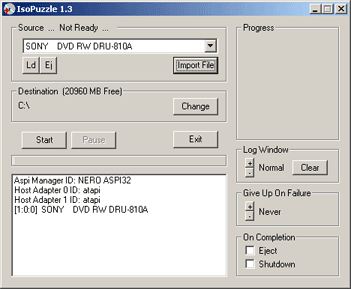
Soon after I recovered my DVD I decided to write about my experience and in my research I came across another DVD recovery software, called ISOPuzzle, that is based on the same concept as the German h2cdimage software. Only in this case, it is coded in English, and instead of a command-line it has a GUI. According to some forum posts I read, the author of ISOPuzzle is familiar with h2cdimage and he compared them by saying, "This one - I hope - is more user friendly because of it's GUI, it's 'GiveUp' and it's 'shutdown' function and it takes the filenames from the disk automatically (which could be a useful feature late at night). I also tried to find a faster an more efficient retry strategy with pausing or spinning up the drive after some read errors." I tried ISOPuzzle and it certainly seems like a more powerful version of the h2cdimage.exe utility, with some logging features, shutdown features, and more. I like how the log window shows how many reads and failures it makes on each pass.
Here's a screenshot of it running on my PC:
Here are some other suggestions I found on the Internet for fixing a scratched DVD you may find useful.
1) Use a yellow highlight marker and draw it over the scratched area. Careful, dry tips can scratch the disc.
2) Sprayable "silicone oil" - sold in Europe as "cockpit spray". I read it has a good affinity to the hydrophobic plastic material and a similar refractional index, which is the point!
Similarly, silicon spray will work. It should look like a mirror finish, but if you use too much the disc will be unreadable. Try spraying a tiny bit on and rubbing it over the surface with paper towel - you'll see it 'hide' the scratches as you rub. If you put too much on, it comes off pretty easily with eye glasses cleaner or other mild glass cleaning agent.
3) Toothpaste, with its abrasive particles can work their way into the scratches. Use a small pointer to rub it into the scratches to bring them closer to the surface and more even with the rest of the disc. Just make sure to clean off the disc when done. You don't want toothpaste flying around your DVD drive.
4) Try cooling the disc. If that doesn't work, try heating it. This trick will often help you get some more sectors read.
5) Some have had success with car wax or car polish. Worth a shot if all else fails.
I hope you find this info useful.