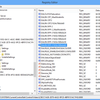
I recently bought a Sony DRU-840A DVD burner and when I tried to burn a home movie I noticed Nero didn't list the booktype setting under the 'Options' button. (Here's a screenshot of the book type setting in Nero on my Vista PC with a different DVD burner:)
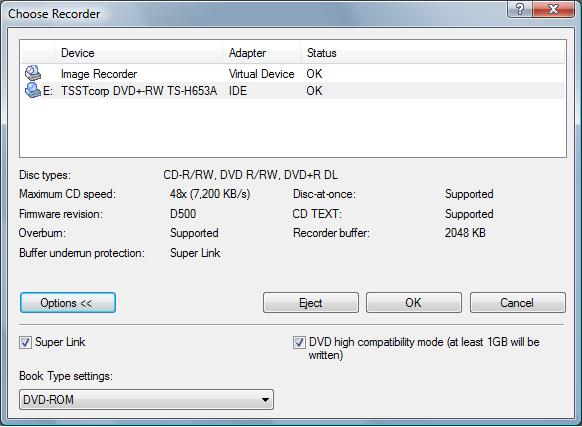
The Book Type setting, also knowns as "bitsetting" allows you to change DVD+R media's default book type of "DVD+R" & "DVD+RW" to "DVD-ROM" more more compatibility with home DVD players which are looking for this particular book type. The Book Type is four bits at the start of every DVD disc (in the physical format information section of the control data block), which indicates what the physical format of the disc is.Many DVD players will refuse to play burned DVDs without the proper book type. Changing the book type works on both single-layer (SL) and dual-layer (DL) DVD+R media but not on DVD-R or DVD-RW media. In other words, minus (-) is bad for compatibility and plus (+) is good.
So in any event, the reason I bought the Sony DRU-840a was because it was supposed to support bitsetting/book type. I had Nero 7 installed which should have recognized the drive as supporting this. So then I figured I may have had old firmware. I went to Sony's support page and couldn't find any new firmware for this drive. I knew there was "hacked" firmware out there and have gone to the RPC1.org website in the past to add "features" missing in my DVD burner. So I headed on over to codeguys.rpc1.org to see if I could find better firmware for my drive only to discover the site was down. I tried several days in a row and it was still down. The last Google cache is 5 days ago.
 Not good. Seems like a permanent outage to me. Wonder if they were shutdown for illegally distributing hacked firmware? Yeah well maybe if the original manufacturers didn't cripple the firmware users wouldn't resort to hacked firmware. Fortunately, after some creative Googling I found a RPC1 mirror here:
 http://codeworks.cdfreaks.com/cgmirror/
I thought perhaps my Sony drive was a LiteOn OEM, since LiteOn is perhaps the largest OEM manufacturer of DVD drives that do not carry the LiteOn label and past Sony DVD burners I used were LiteOn. Generally speaking you can use "real" LiteOn firmwares with these so-called rebadged drives. But when I attempted to try the firmware loaders from the mirrored website, the utilities wouldn't recognize my Sony DVD burner.
I then figured out it was actually an OEM of the Samsung SH-202J DVD drive. I then tried the OmniPatcher utility which is supposed to support Samsung/Sony DVD burners, but it couldn't detect my drive. Back to square one.

I then said the hell with Nero 7, I'll just use ImgBurn, a popular freeware DVD burning software utility that has a very powerful book type setting utility that works with virtually any DVD burner. It even features an Advanced tab for configuring settings manually. I selected the 'Samsung' tab, and it gave me a warning "Unknown (Drive doesn't report it!)". I read you can just ignore this message as long as you are selecting the correct OEM company. I changed the drop-down box to 'DVD+R DL Media' and then changed the book type to "DVD-ROM". I then clicked 'Ok', and received a "Success!" message, as seen below.
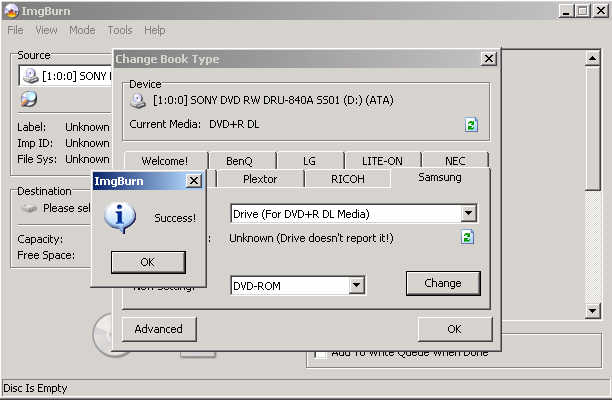
As long as you get this "Success!" message you are good to go. In my experience with multiple burners, I find that you can try each of the tabs with the various models and try to change the book type. At worst you'll get a "Failed!" message. In any case, I burned a DVD and then verified the booktype was correctly set to DVD-ROM by clicking Drive Info in Nero.
Curious if the book type setting I set in ImgBurn would work in Nero, I then burned a second DVD and Nero correctly set the book type. So the bitsetting change made by ImgBurn is global to all your DVD burning apps. Unfortunately, the setting isn't permanent. If you reboot your PC you have to go back into ImgBurn and change the book type setting again. Using "hacked" firmware would have saved me the trouble of doing this step.
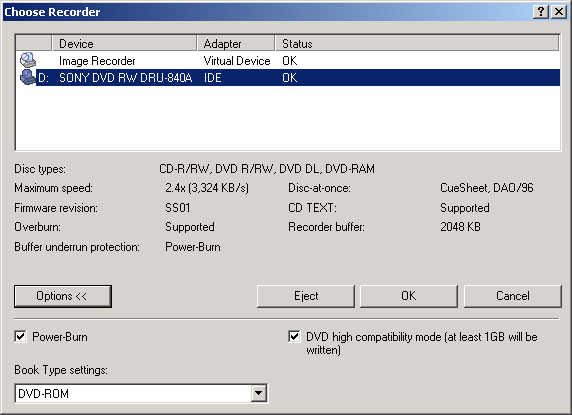
Just when I was going to give up on Nero 7, I decided to see if any updates were available. I downloaded and installed the latest version from Nero 7 from Nero's website. I went back to the Options section in Nero and voila' the Book Type setting was there!
Here's proof:
Conclusion:
So you are having problems with the book type settings in your DVD burner, try these steps:
- Re-install Nero or other DVD burning software with the latest updates.
- Use ImgBurn instead to set the booktype. Here's a good tutorial with screenshots explaining how to do it.
- Go to the RPC1.org mirror and try crossflashing your DVD burner or installing "hacked" firmware. Be aware this will void your warranty and could break your burner!
- If none of these work, it's possible your drive doesn't support setting the book type. Time to go buy a new burner! Try Googling your DVD model + "book type" and see if any discussions are out there mentioning if it supports it.