December 12, 2011
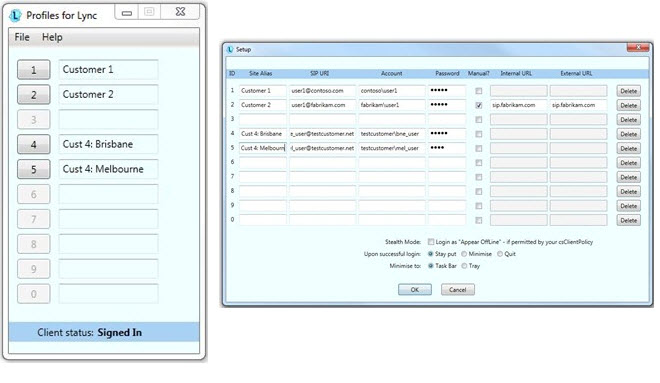
So you want to switch Lync profiles but are tired of having to logout and type in the other credentials (username + password), eh? Well, I came across a cool new utility for Microsoft Lync that saves your various usernames, passwords, and both the internal & external URLs. Called Profiles for Lync (or P4L for short), the developer explains, "This app fills what has been to date an annoying gap in the feature offer, especially for partners/integrators: with P4L it’s as easy as clicking a button to logout of Lync and log back in with another set of credentials – and even into another system!"
Who wouldn't like the ability to switch Lync profiles quickly without having to remember usernames and passwords? Although, unless you sport some secret identity like a superhero, you likely maintain a single, non-anonymous user identity for your corporate-based Lync client. So really this utility is only useful for IT/MIS personnel testing and troubleshooting Lync, as well as VARs and resellers that deploy Lync at customer locations.
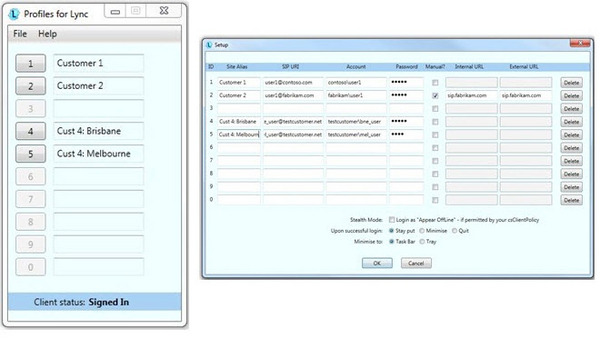
Screenshot of the Profiles for Lync switcher app (left) and the setup screen (right):
Go
download your copy today and then you too can have fast multiple Lync identities at your command!
|
Logitech H650e Headset Review
|
Logitech Sets Sights on Unified Communications
|
Logitech Wireless Headset H820e Review
|
Add-on Makes Microsoft Lync Feature-Complete to Compete with PBXs
|