

Recently in Computer Hardware Category

I thought notebook computers were supposed to be small (hence "notebook" in the first place).

Well, according to eWeek Magazine, Dell, Acer and Samsung are testing the waters for super-sized laptop computers that look more like briefcases than notebooks.

Driven as much by technology as demand, these new notebooks with 19- and 20-inch LCD monitors are looking for an audience -- high-end gamers, not mobile executives?

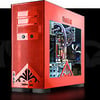
Acer was displaying its 20-inch mega-model this week in Taipei at Computex, the world's second largest computer show, while Dell was also targeting high-performance aficionados when it announced the release of its 20-inch laptop model last week (that's the one in the photo). Samsung's model comes with a detachable screen so that users can hook it up to their desktop monitors. Prices? Not cheap -- try $2,700 to more than $5,000

Plantronics 510 USBPlantronics sent me their Voyager 510 Bluetooth headset to review. Unlike any other Bluetooth headsets, the Plantronics Voyager 510 USB Bluetooth headset is the first to simultaneously support both VoIP softphones on your PC and your Bluetooth mobile phone simultaneously -- negating the need to deregister/re-register your Bluetooth connection with the other device. Plantronics is able to do this using their exclusive Multipoint Technology.

Measuring 4.0 x 2.5 x 0.8 inches and weighing 5.6 ounces, the Plantronic Voyager 510 headset is pretty lightweight - after awhile you don't even notice it is there. It is slightly heavier and bulkier than the Motorola HS850 , but I found the Voyager 510-USB much more comfortable on my ear. The Motorola HS850 would often dangle and not stay put.

Many PCs or even laptops don't have built-in Bluetooth, but fortunately, the Voyager 510 USB includes a plug and play Bluetooth USB adapter that works without the need for any software drivers. This enables mobile professionals to engage in one-step hands-free VoIP calling. If you want the ability to perform remote-end answer/hang-up integration with softphones you'll need to install the PerSonoCall application.

The system integrates with enterprise softphone software from leading companies — including Avaya, Cisco, Nortel, Skype, and others — to offer call notification and remote call answering through the headset. It also is compatible with most popular consumer VoIP services, like AOL, MSN, and Yahoo! although it doesn't feature remote call answer with these yet. I tested the ability to remotely answer incoming Skype calls from the 510-USB and it worked without a hitch. On an incoming Skype call from Greg Galitzine I simply pressed the call control button on the 510-USB and the Skype call was accepted. Beauty, eh?

Plantronics USB-510 profile
Profile of the Plantronics Voyager 510 USB Bluetooth Headset

The headset's "smart" technology knows which Bluetooth device you are using and allows you to take calls from any device simply by hitting the button. With the optional Plantronics Bluetooth Deskphone Adapter you can even switch between your office phone and your Bluetooth mobile phone. Thus, you won't need to use a dedicated "landline" phone headset.

The 510 headset features a noise-canceling microphone for clearer conversations and the mic boom swivels to position on either ear. The 510 supports adaptive frequency hopping (AFH) which helps avoid interference from WiFi networks. It supports a hefty 6 hours talk time using the built-in Lithium polymer rechargeable battery and up to 100 hours of standby time.

Plantronics USB-510 front
Front View of the Voyager 510 USB Bluetooth Headset

When you place the headset on the charging base, it automatically turns off the headset and charges it. Fortunately, when you remove the Voyager 510 from the charging base it remembers to turn it back on. Similarly, if you manually shut off the headset (depress power switch for 3s) and then place it on the charger, if you remove the headset from the base, the headset stays off. I wonder if the headset isn't truly "off" when you place the Voyager headset onto the charging base while it is still on? It's probably in a pseudo-sleep mode, but not totally powered off. The difference in charging the battery is probably negligible, so most users will probably keep the headset always turned on even when charging.

Plantronics USB-510 charging base and Bluetooth dongle
Plantronics USB 510 charging base connected to 1 USB port.
Bluetooth dongle connected to PC's 2nd USB port

Button functionality & testing
I had some minor difficulties with the power on/off switch which is very small and located just in front of the volume buttons, and it requires a very hard press. When the headset is on your ear, making a hard button press took a little getting used to. In any case, there are basically three buttons on the headset. The first button is simply a +/- volume button, which happens to be the largest of the three making it easy to adjust the volume.

The 2nd button on the 510 is the small black button I mentioned which toggles the power button (and mute with a quick depress). The power button requires you hold the button for 3s to toggle the power. Well, they advertise in the manual that it's 3 seconds, but I tested it and it's actually 3s to turn on and just 2-2.5s to turn off. The 3s is a tad long to turn on, but useful I suppose to prevent accidentally turning on or off the headset. Of course, like I said, you have to press the power button pretty hard, so I doubt it would be pressed by accident. It probably has more to do with the time it takes to negotiate a connection with the other Bluetooth devices.

The 3rd button on the Voyager is placed where the boom mic meats the ear piece and it is used to call answer or end the call, as well as toggle between your PC Bluetooth connection and your Bluetooth mobile phone. It is also used to activate voice dialing, redial, and other functions.

To activate last number redial you simply double click the call control button. You will hear a high tone for each key press. When you hear a further tone, the last number has been redialed. In addition, when receiving an incoming call you can press and hold the call control button to reject a call. You will hear a tone. When you hear a second tone, the call has been rejected and you can release the button.

Voice Dialing & Call Transfer to other BT device
You can easily perform voice dialing supported by your mobile phone by pressing and holding the call control button for 2 seconds until you hear a second tone. Then you can speak the name of the person you wish to reach. Switching a call from your mobile phone to the headset is pretty straightforward. You simply briefly press the call control button. Switching a call from the headset back to the phone requires a slighly longer button press until you hear a tone indicating the transfer has been complete. I was able to listen to streaming music on the 510-USB, hear beeps in the headset that an incoming call was coming in, and then press the call control to answer the call.

Features
  • Multipoint Technology allows you to seamlessly switch between two Bluetooth devices
  • Noise-canceling microphone for superior sound quality
  • Up to 6 hours talk time and up to 100 hours standby time
  • One-touch call answer/end, last number redial and voice activated dialing
  • Compatible with Bluetooth devices supporting the headset or hands-free profile
  • Noise-canceling microphone and wind-reduction technology for brilliant sound both indoors and out;
  • Lightweight, foldable design for all-day comfort and easy storage;
  • Boom swivels for use on either ear;
  • 33-foot roaming distance. feet away from voice-enabled Bluetooth devices
Pros
- Lightweight
- Flexible and foldable to stow in pocket
- Cool charging base
- Excellent Sound Quality
- Comes with 3 different sized ear pieces for the best fit
- Includes a small portable USB Bluetooth "dongle" to Bluetooth-enable any PC/laptop
- Range performance was good - better than other BT headsets I have tested

Cons
- Too dependent on the time a button is depressed for some functionality - another button to take the load of one of the features might be good
- Power switch is small and hard to depress
- USB Bluetooth dongle doesn't have a key ring to put in on your keychain
- Can switch from listening to PC audio (music or Skype call) to an incoming mobile phone call,  however if you switch from the mobile phone to your PC (music or Skype call), it ends the mobile phone call. I wish there was a way to switch to the PC (put caller on hold) without disconnecting the mobile phone call.

Conclusion
The Plantronics Voyager 510 USB is one of the best if not the best Bluetooth headset you can buy, period. Its ability to register with both your PC's audio software applications (including VoIP) and your Bluetooth-enabled phone is a key differentiating factor. The audio quality was very good and the headset itself is very flexible making it very comfortable to wear. I didn't have any issues with the headset losing the Bluetooth connection (cutting out) at all and the range is very good. I highly recommend the Voyager 510 USB.

The Voyager 510 USB Bluetooth headset is available on Amazon for just $43.99 if you just need the headset to have access to a Bluetooth mobile phone. If you need the optional USB Bluetooth dongle/transmitter for PC-connectivity (VoIP, iTunes, other sound apps) then you can also pick it up on Amazon for about $179 (originally $299). Some PC's come with Bluetooth adaptors, or you may already have a USB Bluetooth dongle - though I'm not sure how well Plantronic's multipoint technology works if you use a 3rd party Bluetooth dongle. Best bet is to pay the $179 for both the headset and the Plantronics USB Bluetooth adaptor.

Seems like Dell, which defined a new direct sales ("pay for it and we will build it for you") model is now moving away from that a bit with more retail presence.

Apparently, Dell is adding to their kiosk presence in various spots, but will not actually sell products from these larger retail spaces (don't want to copy the failed model of the Gateway stores, I'm sure).

Failing to meet Wall Street expectations is behind this latest move -- retail customers will still have to order online and buy a Dell (sure they want move away from all of those HP and other computers begging to be bought at Circuit City, Best Buy, etc.).

BTW, whatever happened to the Dell Dude? (Clue: Adweek blogs have a not-entirely up-to-date update.)

Much Ado About Dell

May 19, 2006 4:19 PM | 2 Comments

Seems like losing market leadership to another company is enough to make anyone crazy -- and Dell is no exception.

Fresh from less than stellar recent news, Dell is moving to chips from AMD rather than Intel, planning to hire more customer service reps to battle some very bad press in that area (and maybe they can be English speaking) and vowing to become more aggressive.

Now in computer market terms, aggressive can mean many things, but will be interested if Dell is getting more aggressive in its pricing -- the sales they run every week or so have some great deals (but it always pays to shop around ...).

A Dell Mac?

May 8, 2006 9:22 AM | 3 Comments

Anybody think there's much to the buzz last last week about Michael Dell putting the Mac OS into a Dell PC?

It would be nice to see how low the price would be, but what would be product be named?

You know from an earlier blog that I’m a big fan of American Power Conversion’s (APC) power availability and protection solutions.

Wanted to update you on its new Universal Notebook Battery 65 Wh (UPB60), which was introduced earlier this year along with its Universal Power Adapter and Power Port Accessory.

The Universal Notebook Battery is a thin, lightweight, portable notebook battery that provides up to six hours of runtime, depending on a computer’s size and configurations. And yes it really is lightweight, weighing only 1.64 lbs. or 0.75 kg – what a relief from other earlier models that often seemed to weigh more than the notebook itself!

Easy to set up, with a voltage selector switch and LEDs that indicate remaining power capacity, it is ideal for long business trips or charging the notebook’s battery when AC power is not available. It’s perfect for long coast-to-coast flights or for flights that take on epic proportions due to flight delays and missed connections, which are becoming all-too-common.

It comes with a wide selection of tips to fit notebooks from practically every leading brand, including Acer, Apple, Compaq, Dell, Fujitsu, Gateway, HP, HP Compaq, IBM, Mitac, Panasonic, Sony and Toshiba. My Dell Inspiron 600M needed a special tip, which is available free from the company. My takeaway: An essential tool for anyone going mobile with their notebook (and isn’t that what it was intended for?)

Estimated resale price: $149.99.

www.apc.com

Everybody may talk about how great their HP printers are, but there are some very good choices out there if you want to break away from the crowd. I’ve been testing the Konica Minolta Magicolor 2450 for some time now, and this one color laser printer that provides “workhouse” capabilities at 5 pages-per-minute (PPM) color and 20 PPM black & white.

A true desktop printer that fits easily into any environment, the Magicolor 2450 is designed for easy use. The pre-installed 4,500-page toner cartridges mean the machine is up and running in just a few minutes. Auto-run installation software automatically detects the printer on your network and guides you step-by-step through set-up. Comprehensive printer drivers simplify printing with options such as collation, fit-to-page scaling, separation pages, watermarks, tray selection, and secure printing, while the Desktop Status Monitor utilizes a pop-up window on your screen for notification of print job status and supply levels.

The PageScope suite of printer management utilities provides real-time consumables status, as well as remote printer management and configuration. Simple, full-front access makes it easy to reload supplies and clear paper jams (come on, every printer gets them once in a while), so there's no need to access the back of the machine. Now let’s get technical (and under the hood).

Output is brilliant, consistent color, with 9600 x 600 dpi-class Photo ART contone resolution generating more than 4,000 colors per dot to provide enhanced photographic detail and smooth color gradients. Enhanced Automatic Image Density Control (eAIDC) automatically calibrates the printer so you can count on consistent, accurate color from the first page to the last. Automatic ICC-based color matching provides single-button controls for automatic color correction of print files.

The Simitri Polymerized Toner produces sharp output, fine text and better halftones. It also reduces toner consumption by up to 30%, keeps the printer cleaner and is more environmentally friendly than other toner technologies.

PostScript 3 and PCL 6 printer emulations support popular software applications, allowing the seamless creation and processing of all your color documents. Window and Macintosh system compatibility offers support for mixed workgroups and networks.

The net net: Great color laser printer at a price that won’t break the bank.

http://printer.konicaminolta.com/products/

The SWISSMEMORY USB cirrusWHITE is a powerful, little, white high-speed USB (2.0) stick that offers a read and write performance class of up to 28MB/s and storage capacities ranging from 128MB to 2GB.

The optically integrated protective cap with a round eyelet allows the stick to be attached to key-rings and lanyards with only minimal weight – only eight grams.

As a bonus, the integrated software provides users with a wide range of additional features. Outlook Express settings, personal Internet favorites and data from My Documents can be synchronized with ease, while the "no trace surfing" function deletes all traces of Internet surfing. All data is compressed to save space and protected by a password. The only part not to be protected is the Lost&Found file, which provides information on the stick's owner in case of loss.

http://www.swissbit.com

Look how far technology advertising has come in 30 years! This is the first ad for the first Apple Computer, the Apple I, which was introduced 30 years ago this month.

Once again, thanks to the great Apple-History.com web site (so much to read on it!)

No, this isn't an April Fool's Day joke.

Apple Computer will celebrate its 30th anniversary tomorrow.  Really hard to believe that! But for all of you doubters, take a look at Apple-History.com, which offers an exhaustive look at all things Apple. (Yes, there is more to Apple than the iPod.)

Here's an excerpt from the very first entry, looking back 30 years, at the very first product (hard to call it that now), the Apple I:

CPU

  • CPU: MOS Technology 6502
  • CPU Speed: 1 MHz
  • FPU: none
  • Bus Speed: 1 MHz
  • Data Path: 8 bit
  • Onboard RAM: 8 kB
  • Maximum RAM: 32 kB

Video

  • VRAM: 1 kB
  • Max Resolution: 60.05 Hz, 40x24 char

Miscellaneous

  • Codename: ?
  • Power: 58 Watts
  • Introduced: April 1976
  • Terminated: 1977

The Apple I was Steven Wozniak's first contribution to the personal computer field. It was designed over a period of years, and was only built in printed circuit-board form when Steve Jobs insisted it could be sold. It debuted in April 1976 at the Homebrew Computer Club in Palo Alto, but few took it seriously. The Apple I was based on the MOStek 6502 chip, whereas most other "kit" computers were built from the Intel 8080. The Apple I was sold through several small retailers, and included only the circuit board. A tape-interface was sold separately, but you had to build the case. The Apple I's initial cost was $666.66

(Picture Credits: Barkley Anderson, Apple Computer, Inc.)

Lots of great material about all things Apple at www.apple-history.com.  Don't miss it!

Previous 1 2 3 4 5 6 7 8 9 10 11 Next

Subscribe to Blog

Archives






